
SQL Server Alert for Long Running Queries: Full Setup
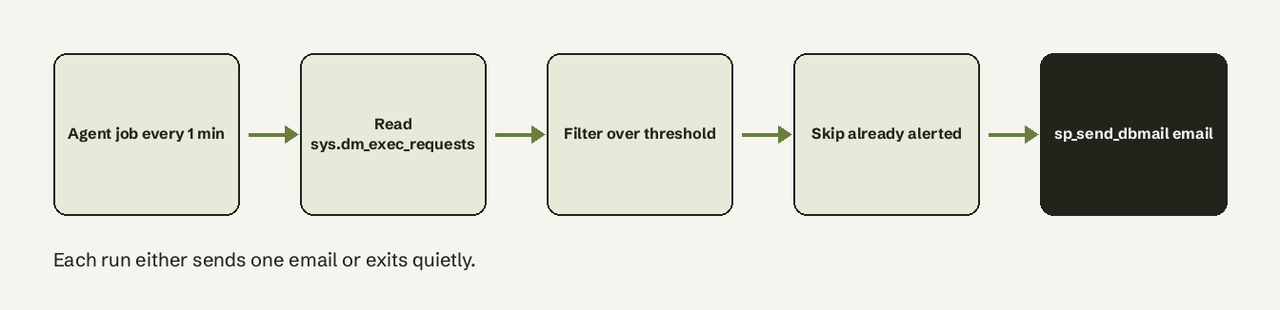
TL;DR: SQL Server has no built-in "query ran too long" alert, so you build one: a stored procedure reads sys.dm_exec_requests for user requests past a threshold, emails them with sp_send_dbmail, and logs what it sent so the same query never alerts twice. A SQL Server Agent job runs it every minute. The full script is below and takes about 15 minutes to set up.
To get a SQL Server alert for long running queries, schedule a check of the sys.dm_exec_requests DMV, whose total_elapsed_time column is the milliseconds since each request arrived, and email any user request over your threshold through Database Mail. SQL Server Agent's own alerts react to errors and performance counters, not to query duration, and the one counter that sounds right, Longest Transaction Running Time, only shows activity under read committed snapshot isolation. The forum answers that rank for this question each cover one piece (a job-history query, a mail snippet, an AWS Lambda build). This page puts the working pieces together: the DMV query, Database Mail, the Agent job, exclusions for backups and maintenance, and protection against repeat emails.
What you need
- SQL Server Standard, Enterprise or Web edition. SQL Server Agent is not included in Express, and Database Mail isn't supported on Express on Amazon RDS either. On Azure SQL Database there is no Agent at all; see the FAQ.
- sysadmin, or a login that can create Agent jobs and has
VIEW SERVER STATE. On SQL Server 2022 and later, readingsys.dm_exec_requestsneedsVIEW SERVER PERFORMANCE STATEinstead. Without it the DMV only shows your own session, and the alert silently finds nothing. - An SMTP account for outgoing mail: host, port (usually 587, or 465 for SSL) and credentials.
- A small utility database for the procedure and its log table. The examples use
DBAdmin.
Which DMV shows currently running queries and their duration?
sys.dm_exec_requests shows every request executing right now, one row per request, with start_time, status (running, runnable, suspended, sleeping, background or rollback), command, wait_type, blocking_session_id and total_elapsed_time in milliseconds. Join it to sys.dm_exec_sessions for the login, host and application, and to sys.dm_exec_sql_text(sql_handle) for the text. Run this first to see what the alert will see:
-- user requests running longer than 5 minutes, longest first
SELECT
    r.session_id,
    r.total_elapsed_time / 1000 AS elapsed_seconds,
    r.status,
    r.command,
    r.wait_type,
    r.blocking_session_id,
    DB_NAME(r.database_id) AS database_name,
    s.login_name,
    s.host_name,
    s.program_name,
    SUBSTRING(t.text, (r.statement_start_offset / 2) + 1,
        ((CASE r.statement_end_offset
            WHEN -1 THEN DATALENGTH(t.text)
            ELSE r.statement_end_offset END
          - r.statement_start_offset) / 2) + 1) AS running_statement
FROM sys.dm_exec_requests AS r
JOIN sys.dm_exec_sessions AS s ON s.session_id = r.session_id
OUTER APPLY sys.dm_exec_sql_text(r.sql_handle) AS t
WHERE s.is_user_process = 1
  AND r.session_id <> @@SPID
  AND r.total_elapsed_time >= 300000
ORDER BY r.total_elapsed_time DESC;
The offsets are in bytes, and the text is Unicode, so dividing by 2 cuts out the exact statement that is running rather than the whole batch or procedure. is_user_process = 1 drops system tasks such as ghost cleanup. If you want to check a query plan once you've found the culprit, the same reading habits apply as in our guide to reading a query plan with EXPLAIN.
How to set up the alert, step by step
- Enable Database Mail. Database Mail XPs is off by default. Turn it on (the Database Mail Configuration Wizard in SSMS does the same thing):
   EXEC sp_configure 'show advanced options', 1;
   RECONFIGURE;
   EXEC sp_configure 'Database Mail XPs', 1;
RECONFIGURE;- Create a mail account and profile, then send a test. Use your own SMTP host and an app password, not a personal mailbox password:
   EXEC msdb.dbo.sysmail_add_account_sp
       @account_name    = N'DBA Alerts SMTP',
       @email_address   = N'sql-alerts@example.com',
       @display_name    = N'SQL Server Alerts',
       @mailserver_name = N'smtp.example.com',
       @port            = 587,
       @enable_ssl      = 1,
       @username        = N'sql-alerts@example.com',
       @password        = N'replace-with-app-password';

   EXEC msdb.dbo.sysmail_add_profile_sp
       @profile_name = N'DBA Alerts';

   EXEC msdb.dbo.sysmail_add_profileaccount_sp
       @profile_name    = N'DBA Alerts',
       @account_name    = N'DBA Alerts SMTP',
       @sequence_number = 1;

   EXEC msdb.dbo.sp_send_dbmail
       @profile_name = N'DBA Alerts',
       @recipients   = 'dba-team@example.com',
       @subject      = N'Database Mail test',
       @body         = N'If you can read this, Database Mail works.';
sp_send_dbmail only queues the message. Confirm it left the server with SELECT TOP (5) mailitem_id, sent_status, sent_date FROM msdb.dbo.sysmail_allitems ORDER BY mailitem_id DESC; and look for sent, not failed or retrying.
- Create the log table that stops repeat alerts. A request is uniquely identified by its session and start time, so that pair is the key:
   USE DBAdmin;
   GO
   CREATE TABLE dbo.long_query_alert_log (
       session_id    smallint     NOT NULL,
       request_start datetime     NOT NULL,
       alerted_at    datetime2(0) NOT NULL DEFAULT SYSDATETIME(),
       CONSTRAINT PK_long_query_alert_log PRIMARY KEY (session_id, request_start)
   );
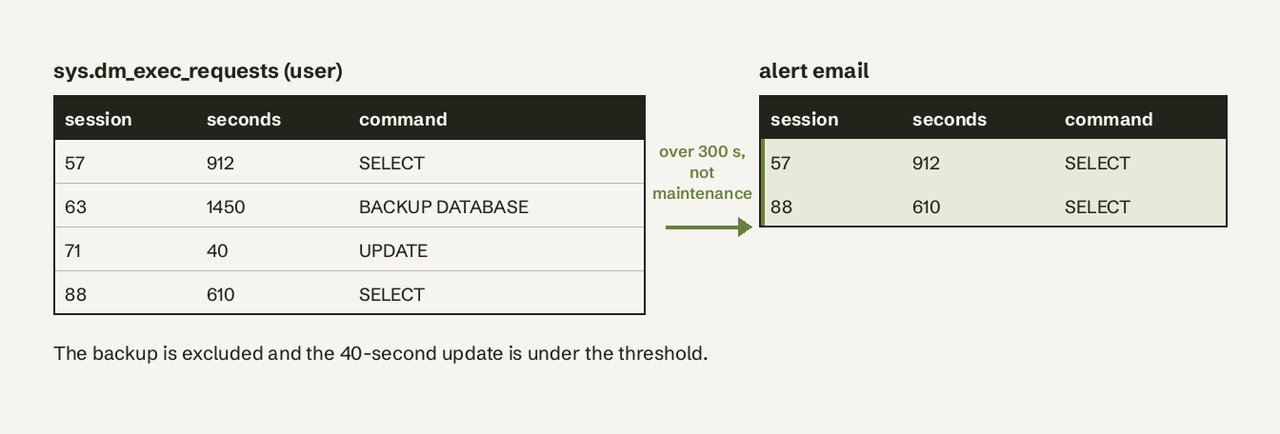
GO- Create the alert procedure. It collects requests over the threshold, drops maintenance work and anything already alerted, emails an HTML table, then records what it sent:
   CREATE OR ALTER PROCEDURE dbo.usp_alert_long_running_queries
       @threshold_seconds int          = 300,
       @recipients        varchar(max) = 'dba-team@example.com',
       @profile_name      sysname      = N'DBA Alerts'
   AS
   BEGIN
       SET NOCOUNT ON;

       SELECT
           r.session_id,
           r.start_time,
           r.total_elapsed_time / 1000 AS elapsed_seconds,
           r.status,
           r.wait_type,
           r.blocking_session_id,
           DB_NAME(r.database_id) AS database_name,
           s.login_name,
           s.host_name,
           LEFT(SUBSTRING(t.text, (r.statement_start_offset / 2) + 1,
               ((CASE r.statement_end_offset
                   WHEN -1 THEN DATALENGTH(t.text)
                   ELSE r.statement_end_offset END
                 - r.statement_start_offset) / 2) + 1), 500) AS statement_text
       INTO #long_running
       FROM sys.dm_exec_requests AS r
       JOIN sys.dm_exec_sessions AS s ON s.session_id = r.session_id
       OUTER APPLY sys.dm_exec_sql_text(r.sql_handle) AS t
       LEFT JOIN msdb.dbo.sysjobs AS j
           ON s.program_name LIKE 'SQLAgent - TSQL JobStep%'
          AND j.job_id = TRY_CONVERT(uniqueidentifier,
                TRY_CONVERT(binary(16), SUBSTRING(s.program_name, 30, 34), 1))
       WHERE s.is_user_process = 1
         AND r.session_id <> @@SPID
         AND r.total_elapsed_time >= @threshold_seconds * 1000
         -- maintenance that is allowed to run long
         AND r.command NOT LIKE 'BACKUP%'
         AND r.command NOT LIKE 'RESTORE%'
         AND r.command NOT LIKE 'DBCC%'
         -- Agent jobs that are allowed to run long (edit to your job names)
         AND ISNULL(j.name, N'') NOT LIKE N'IndexOptimize%'
         AND ISNULL(j.name, N'') NOT LIKE N'DatabaseIntegrityCheck%'
         -- one alert per request
         AND NOT EXISTS (
             SELECT 1 FROM dbo.long_query_alert_log AS l
             WHERE l.session_id = r.session_id
               AND l.request_start = r.start_time);

       IF NOT EXISTS (SELECT 1 FROM #long_running) RETURN;

       DECLARE @subject nvarchar(255) = N'[SQL alert] '
           + CAST((SELECT COUNT(*) FROM #long_running) AS nvarchar(10))
           + N' long running queries on ' + @@SERVERNAME;

       DECLARE @body nvarchar(max) =
           N'<p>Requests running longer than ' + CAST(@threshold_seconds AS nvarchar(10))
           + N' seconds on ' + @@SERVERNAME + N'</p>'
           + N'<table border="1" cellpadding="4"><tr><th>Session</th><th>Seconds</th>'
           + N'<th>Database</th><th>Login</th><th>Host</th><th>Status / wait</th>'
           + N'<th>Blocked by</th><th>Statement</th></tr>'
           + CAST((
               SELECT td = session_id, '',
                      td = elapsed_seconds, '',
                      td = ISNULL(database_name, ''), '',
                      td = login_name, '',
                      td = ISNULL(host_name, ''), '',
                      td = status + ISNULL(N' / ' + wait_type, N''), '',
                      td = blocking_session_id, '',
                      td = ISNULL(statement_text, '')
               FROM #long_running
               ORDER BY elapsed_seconds DESC
               FOR XML PATH('tr'), TYPE) AS nvarchar(max))
           + N'</table>';

       EXEC msdb.dbo.sp_send_dbmail
           @profile_name = @profile_name,
           @recipients   = @recipients,
           @subject      = @subject,
           @body         = @body,
           @body_format  = 'HTML';

       INSERT dbo.long_query_alert_log (session_id, request_start)
       SELECT DISTINCT session_id, start_time FROM #long_running;

       -- keep the log small
       DELETE dbo.long_query_alert_log
       WHERE alerted_at < DATEADD(DAY, -7, SYSDATETIME());
   END;
   GO
FOR XML PATH escapes < and > inside the statement text, so a query containing comparison operators can't break the email's HTML.
- Schedule it with a SQL Server Agent job that runs every minute. In
sp_add_schedule,@freq_type = 4means daily and@freq_subday_type = 4means the interval is in minutes:
   USE msdb;
   GO
   EXEC dbo.sp_add_job
       @job_name    = N'DBA - Alert long running queries',
       @description = N'Emails when a user request runs past the threshold';

   EXEC dbo.sp_add_jobstep
       @job_name      = N'DBA - Alert long running queries',
       @step_name     = N'Check DMVs and send mail',
       @subsystem     = N'TSQL',
       @database_name = N'DBAdmin',
       @command       = N'EXEC dbo.usp_alert_long_running_queries @threshold_seconds = 300;';

   EXEC dbo.sp_add_schedule
       @schedule_name        = N'Every 1 minute',
       @freq_type            = 4,  -- daily
       @freq_interval        = 1,
       @freq_subday_type     = 4,  -- minutes
       @freq_subday_interval = 1;

   EXEC dbo.sp_attach_schedule
       @job_name      = N'DBA - Alert long running queries',
       @schedule_name = N'Every 1 minute';

   EXEC dbo.sp_add_jobserver
       @job_name = N'DBA - Alert long running queries';
   GO
A one-minute schedule means a query is reported between 0 and 60 seconds after it crosses the threshold. That is fine for a 5-minute threshold. For a tighter threshold, the schedule can go down to 10 seconds (@freq_subday_type = 2), but each run costs a DMV scan.
How to check that it works
Open a new query window and start a request that will cross a short test threshold:
-- session A: simulate a slow query
WAITFOR DELAY '00:02:00';
Then, in another window, run the procedure with a 60-second threshold once the delay has passed one minute:
EXEC DBAdmin.dbo.usp_alert_long_running_queries @threshold_seconds = 60;
SELECT * FROM DBAdmin.dbo.long_query_alert_log;
You should get one email listing session A with the WAITFOR statement and a row in the log table. Run the procedure again while session A is still waiting: no second email, because the session and start time are already logged. Finally, check the Agent job history (right-click the job, View History) to confirm the scheduled runs succeed.
How do you exclude backups and maintenance jobs from the alert?
Exclude them by what the DMV tells you about the request. Backups, restores and DBCC checks show up in the command column (BACKUP DATABASE, BACKUP LOG, RESTORE DATABASE and the DBCC family), so the NOT LIKE filters in the procedure catch them whoever starts them. Agent jobs are different: their sessions report program_name as SQLAgent - TSQL JobStep (Job 0x... : Step n), with the job id as hex starting at character 30. The procedure converts that back to a job_id, joins msdb.dbo.sysjobs and filters by job name. Replace the two example names with your own index maintenance, ETL or reporting jobs. To exclude an application (a nightly export tool, for example), add AND s.program_name NOT LIKE N'YourApp%'.
Keep the exclusion list short and explicit. Every pattern you add is a query that can hang without anyone hearing about it.
How do you avoid repeat alerts for the same query?
Log every alerted request by session_id plus start_time and skip anything already in the log. A session can run many requests over its life, but each new request gets a new start_time, so the next slow query on the same connection still alerts while the one you already know about stays quiet. The procedure also deletes log rows older than seven days.
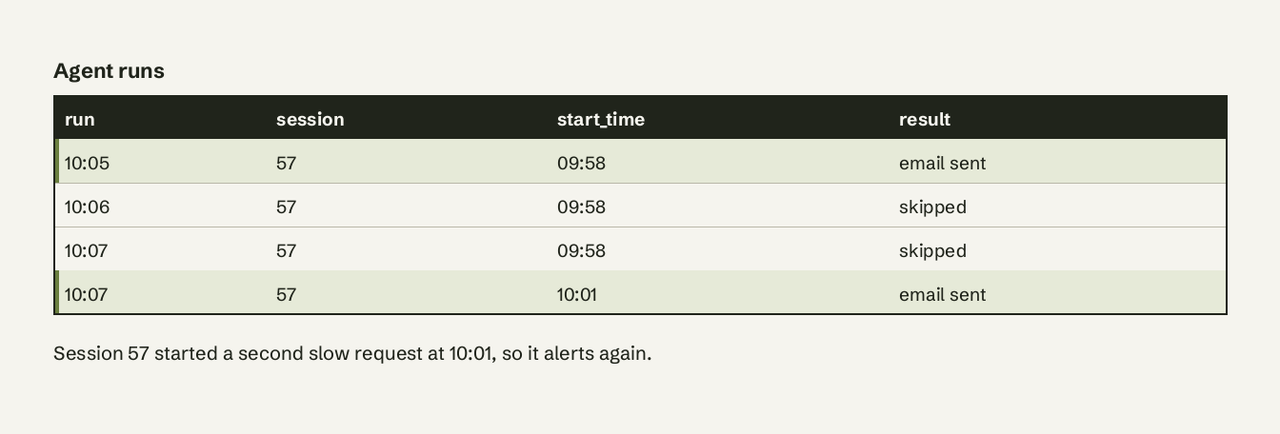
If you'd rather be reminded about a query that keeps running, add a reminder rule instead of removing the log: delete the log row once alerted_at is older than, say, 30 minutes, and the next run will email again.
Common errors and fixes
| Symptom or message | Cause | Fix |
|---|---|---|
| Msg 15281: SQL Server blocked access to procedure 'dbo.sp_send_dbmail' of component 'Database Mail XPs' because this component is turned off... | Database Mail XPs is 0 (the default) | Run step 1 |
| Msg 14607: profile name is not valid | The profile doesn't exist, or the caller can't use it | Check the name, make it public with sysmail_add_principalprofile_sp @principal_name = 'public', or add the user to DatabaseMailUserRole in msdb |
Email never arrives, sent_status is failed | SMTP host, port, TLS or credentials are wrong | Read msdb.dbo.sysmail_event_log for the SMTP error, fix the account with sysmail_update_account_sp |
| The job succeeds but never alerts | The job owner lacks VIEW SERVER STATE (or VIEW SERVER PERFORMANCE STATE on 2022+), so it only sees its own session | Make a sysadmin the job owner or grant the permission |
| Alerts for every backup at night | The exclusion filters were removed or your backup tool runs as a different command | Add its command or program_name to the filters |
Alternatives to an Agent job
The Agent job is the right default on a single SQL Server instance because it needs no extra software. Other options fit other setups:
- Amazon RDS for SQL Server. Agent and Database Mail both work on Web, Standard and Enterprise, so the script above runs there with a dedicated monitoring login. AWS also publishes a Lambda, CloudWatch and SES version that checks every 60 seconds with a 300-second example threshold and adds blocking-chain detection.
- Azure SQL Managed Instance. Agent is included, but Agent can only use one Database Mail profile, and it must be named
AzureManagedInstance_dbmail_profile. - Azure SQL Database. No Agent and no server-wide DMV access, so the script doesn't apply. Use elastic jobs for scheduling and Azure Monitor for alerting.
- Extended Events. A session on
sql_statement_completedwith a duration filter records slow queries, but only after they finish. It is good for finding patterns and useless for a query that is still holding locks. - Monitoring products. Tools such as Redgate SQL Monitor and SolarWinds SAM ship long running query alerts with dashboards and history. They cost money but save you from maintaining scripts across many instances.
- Job-duration checks. If what you really care about is an Agent job running longer than usual, compare
msdb.dbo.sysjobactivitywith the job's average from history. Be aware thatsysjobactivitycan still show a job as running after it failed or after Agent restarted.
For other scheduled checks, the pattern is the same as scheduling a query in Postgres with pg_cron: a stored query, a schedule and somewhere for the result to go.
Getting the alert somewhere other than email
Database Mail only sends email, and SMTP setup is the step that breaks most often. If your team lives in Slack, or you want to watch business conditions as well as server health (a stuck order queue, a payment table that stopped growing), AI for Database connects to SQL Server read-only, runs a check you describe in plain English on a schedule, and sends it to Slack, email or a webhook when a threshold is crossed. Try AI for Database free at aifordatabase.com.
Frequently Asked Questions
Which DMV shows currently running queries and their duration?
sys.dm_exec_requests. Its total_elapsed_time column is the time in milliseconds since the request arrived, and start_time is when it began. Join sys.dm_exec_sessions for the login and host and sys.dm_exec_sql_text(sql_handle) for the query text.
How do you email an alert from SQL Server Agent?
Enable Database Mail XPs, create a Database Mail account and profile, then call msdb.dbo.sp_send_dbmail with @profile_name, @recipients, @subject and @body from a T-SQL job step. Agent's built-in operator notifications only fire on job outcomes and Agent alerts, not on query duration.
Can SQL Server Agent alert on long running queries without a script?
Not reliably. Agent alerts fire on error numbers, severities, performance counter thresholds and WMI events. The counter that looks right, SQLServer:Transactions Longest Transaction Running Time, only reports activity for databases using read committed snapshot isolation, so it misses most workloads.
How often should the alert job run?
Every minute suits thresholds of a few minutes or more. The schedule can go as low as 10 seconds, but frequent DMV scans and emails add load and noise. Pick the threshold from your workload: a reporting server might use 15 minutes, an OLTP database 60 seconds.
Does this work on Azure SQL Database?
No. Azure SQL Database has no SQL Server Agent and VIEW SERVER STATE can't be granted there, so sys.dm_exec_requests only shows your own connection. Use elastic jobs or Azure Monitor alerts instead. Azure SQL Managed Instance does support the Agent approach.
Will the alert job show up in its own results?
No. The procedure filters out @@SPID, the session running the check itself.