
Default Port for SQL Server: 1433 and Every Other Port
TL;DR: The default port for SQL Server is TCP 1433, used by the default instance. Named instances (including SQL Server Express) pick a dynamic TCP port at startup, and clients find it by asking the SQL Server Browser service on UDP 1434. Azure SQL Database also listens on 1433, but connections from inside Azure get redirected to ports 11000-11999.
The default port for SQL Server is TCP 1433: a default instance of the Database Engine listens there whenever the TCP/IP protocol is enabled, on Windows, on Linux and in the official Docker image. Port 1434 is the other number to know: UDP 1434 belongs to the SQL Server Browser service, which tells clients which dynamic port a named instance is using, and TCP 1434 is the Dedicated Admin Connection for the default instance. Everything else (Service Broker, Availability Group endpoints, Analysis Services) uses its own port, listed below. If you only remember one rule: open TCP 1433 for a default instance, and give a named instance a fixed port before you put a firewall in front of it.
Port reference table: every component and its number
| Component | Port | Protocol | Default? | Notes |
|---|---|---|---|---|
| Database Engine, default instance | 1433 | TCP | Yes | The port almost every client connects to |
| Database Engine, named instance | Dynamic (often 49152-65535) | TCP | Yes, dynamic | Chosen at startup, can change on restart |
| SQL Server Browser | 1434 | UDP | Yes | Answers "which port is instance X on?" |
| Dedicated Admin Connection (DAC) | 1434 (default instance) | TCP | Yes | Remote DAC is off by default |
| Service Broker | 4022 | TCP | Convention | No true default; check sys.tcp_endpoints |
| Database mirroring / Availability Group endpoint | 5022 or 7022 | TCP | Convention | Admin-chosen; docs examples use these |
| Transact-SQL debugger | 135 | TCP | Yes | Also add ssms.exe or devenv.exe to firewall exceptions |
| HTTP / HTTPS endpoints | 80 / 443 | TCP | Yes | Only if you created an HTTP endpoint |
| Analysis Services, default instance | 2383 | TCP | Yes | SSAS, not the Database Engine |
| Analysis Services Browser (named SSAS) | 2382 | TCP | Yes | Redirects to the named SSAS instance |
| Reporting Services | 80 / 443 | TCP | Yes | Web portal and web service |
| Azure SQL Database gateway | 1433 | TCP | Yes | Outbound from the client |
| Azure SQL Database redirect | 11000-11999 | TCP | Inside Azure | Outbound, to the database node |
| Azure SQL Managed Instance public endpoint | 3342 | TCP | Yes | Only when the public endpoint is enabled |
Sources: Microsoft's Configure the Windows Firewall to allow SQL Server access, Azure SQL connectivity architecture and Managed Instance public endpoint.
What is the default port for SQL Server?
The default port for SQL Server is TCP 1433. Microsoft's documentation puts it plainly: "If enabled, the default instance of the SQL Server Database Engine listens on TCP port 1433." Port 1433 and the named pipe \sql\query are assigned to the default instance during installation.
Two details catch people out. First, "if enabled": SQL Server Express and Developer editions often ship with the TCP/IP protocol disabled, so nothing listens on 1433 until you enable TCP/IP in SQL Server Configuration Manager and restart the service. Second, a named instance that is the only instance on the machine will probably end up on 1433 too, so "it works on 1433" doesn't prove you have a default instance.
On Linux the default is the same 1433, stored in the network.tcpport setting of mssql-conf. In Docker you publish it with -p 1433:1433.
Which port does a named instance use?
A named instance uses a dynamic TCP port by default. Each time the Database Engine starts, it picks an available port, so the number can change after a restart or a patch. That is fine on a local network with no firewall, because clients don't need to know the number in advance: they ask the SQL Server Browser.
Here is the lookup when you connect to db01\SALES without a port:
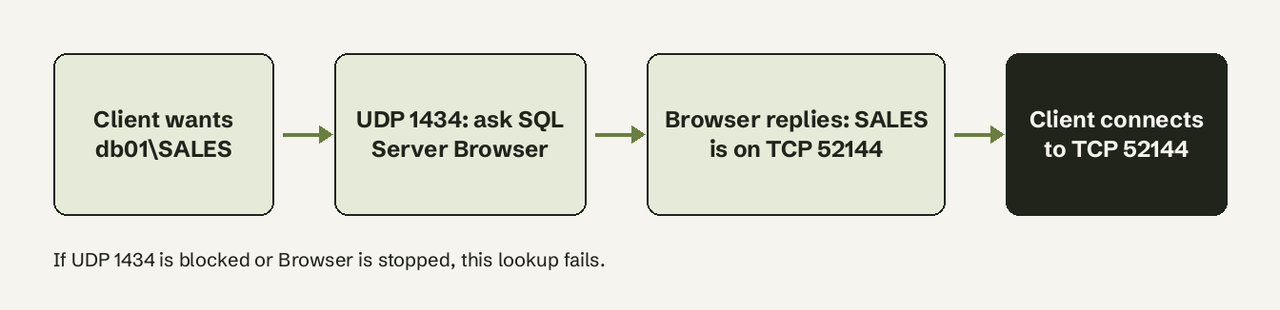
The Browser service claims UDP 1434 when it starts, reads the registry to find every instance on the server and its port, and answers each client's UDP request with the right TCP port. If the client already knows the port (db01,52144), it skips the Browser entirely.
That gives you two working options for a named instance behind a firewall:
- Open UDP 1434 and the instance's port, and keep the port fixed so the firewall rule stays correct.
- Set a fixed port, connect with
server,portin the connection string, and leave UDP 1434 closed.
Option 2 is the one Microsoft recommends for firewalled servers, and it means one less service exposed. Firewall rules that allow sqlservr.exe instead of a port also work, but they don't show a port in the rule list and can break when a cumulative update changes the executable path.
On a Windows client, the dynamic range starts at 49152 and ends at 65535 since Windows Vista and Server 2008 (it was 1025-5000 before), which is why named-instance ports often look like 49172 or 52144.
How do I check which port an instance is listening on?
Run this from any session connected over TCP:
-- port and address of your own connection
SELECT local_net_address, local_tcp_port
FROM sys.dm_exec_connections
WHERE session_id = @@SPID;
local_tcp_port is NULL if you are connected over shared memory (a local SSMS session often is). In that case, connect with tcp:localhost or read the error log, which records the listening port at every startup:
-- xp_readerrorlog is undocumented but widely used
EXEC xp_readerrorlog 0, 1, N'Server is listening on';
Without a query window, open SQL Server Configuration Manager, go to SQL Server Network Configuration > Protocols for <instance> > TCP/IP > IP Addresses, and scroll to IPAll. A value in TCP Dynamic Ports means the instance uses a dynamic port; a value in TCP Port is a fixed one.
To see the endpoint ports for Service Broker or Availability Groups:
-- endpoint ports (Service Broker, mirroring, AG)
SELECT name, type_desc, protocol_desc, port, state_desc
FROM sys.tcp_endpoints
WHERE type_desc IN ('SERVICE_BROKER', 'DATABASE_MIRRORING');
How do I change the listening port?
On Windows, change it in SQL Server Configuration Manager:
- Expand SQL Server Network Configuration and select Protocols for <instance name>.
- Double-click TCP/IP and make sure Enabled is Yes on the Protocol tab.
- On the IP Addresses tab, scroll to IPAll. If TCP Dynamic Ports shows
0or any number, delete it so the field is blank. - Type the new port in TCP Port (for example
1533) and select OK. - In SQL Server Services, right-click SQL Server (<instance name>) and select Restart.
- Update the firewall rule and every connection string, then test with
sqlcmd -S tcp:server,1533.
The Listen All setting decides which section counts. When it is Yes (the default), only the IPAll values are used and the individual IP1, IP2 sections are ignored. When it is No, IPAll is ignored and each IP section's own Enabled, TCP Port and TCP Dynamic Ports values apply.
Restart straight away. Microsoft notes that the Browser service reports the new port as soon as the registry changes, even though the engine keeps listening on the old one until restart, which produces confusing connection failures in between.
On Linux:
sudo /opt/mssql/bin/mssql-conf set network.tcpport 1533
sudo systemctl restart mssql-server
This short walkthrough shows the Configuration Manager steps on a SQL Server Express instance, including the restart and a failed connection on the old port:
Does changing the port make SQL Server safer? Only slightly. Microsoft's own note says that because a port scanner can find open ports, changing the number "isn't considered a robust security measure." Restricting who can reach the port does far more.
Which ports must be opened in the firewall?
For most setups, open the smallest set from this list:
| Setup | Inbound on the SQL Server host |
|---|---|
| Default instance only | TCP 1433 |
Named instance, fixed port, clients use server,port | TCP <that port> |
Named instance, clients use server\instance | TCP <fixed port> + UDP 1434 |
| Availability Group replicas | TCP 1433 (or instance port) + TCP 5022 between replicas |
| Remote DAC enabled | TCP 1434 |
Windows PowerShell, from Microsoft's firewall article:
New-NetFirewallRule -DisplayName "SQLServer default instance" -Direction Inbound -LocalPort 1433 -Protocol TCP -Action Allow
New-NetFirewallRule -DisplayName "SQLServer Browser service" -Direction Inbound -LocalPort 1434 -Protocol UDP -Action Allow
The same with netsh, limited to the local subnet and the domain profile:
netsh advfirewall firewall add rule name = SQLPort dir = in protocol = tcp action = allow localport = 1433 remoteip = localsubnet profile = DOMAINLinux with FirewallD (RHEL and its relatives):
sudo firewall-cmd --zone=public --add-port=1433/tcp --permanent
sudo firewall-cmd --reload
On cloud VMs the host firewall is only half the job: the security group or network security group must allow the same port, ideally from specific source IPs rather than 0.0.0.0/0.
What ports does Azure SQL Database use?
Azure SQL Database listens on TCP 1433 at the regional gateway, and what happens next depends on the server's connection policy:
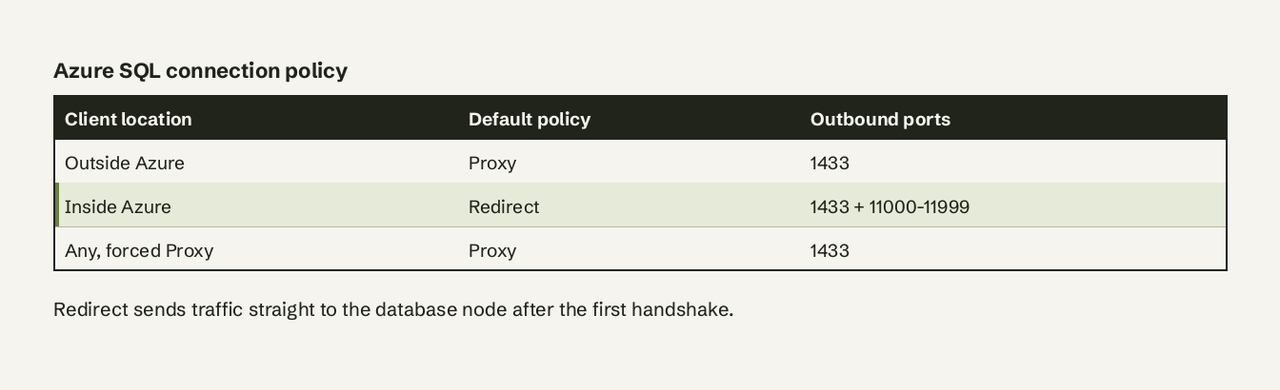
- Proxy: every packet goes through the gateway on 1433. Simple, slightly slower.
- Redirect: the client connects to the gateway on 1433, then talks directly to the node hosting the database on a port between 11000 and 11999. Microsoft recommends it for latency and throughput.
- Default: Redirect for connections from inside Azure (for example an Azure VM), Proxy for everything outside.
So a laptop connecting to Azure SQL Database needs outbound 1433 only, while an Azure VM or App Service using the default policy needs outbound 1433 plus 11000-11999 to the Azure SQL addresses for the region (the Sql.<region> service tag covers them). Azure SQL Managed Instance is different: its public endpoint, when enabled, listens on TCP 3342, not 1433. Amazon RDS for SQL Server uses 1433 by default.
How do you specify the port in a connection string?
SQL Server is unusual: most Microsoft tools put a comma between host and port, while JDBC and URL-style strings use a colon. Mixing them up is the most common "can't connect" mistake after a blocked firewall.
| Client | Syntax with port |
|---|---|
| sqlcmd | sqlcmd -S tcp:db01.example.com,1433 |
| ADO.NET / Microsoft.Data.SqlClient | Server=tcp:db01.example.com,1433;Database=app; |
| ODBC (pyodbc and others) | Server=db01.example.com,1433; |
| JDBC | jdbc:sqlserver://db01.example.com:1433;databaseName=app;encrypt=true; |
| SQLAlchemy | mssql+pyodbc://user:pass@db01.example.com:1433/app?driver=ODBC+Driver+18+for+SQL+Server |
| SSMS "Server name" box | db01.example.com,1433 |
For named instances, db01\SALES uses the Browser lookup and db01,52144 skips it. In JDBC, if you give both a port and an instance name, the port wins and the instance name is ignored, per the JDBC connection URL docs. The sqlcmd reference documents the -S [protocol:]server[\instance_name][,port] form. For the rest of a connection string (encryption, timeouts, pooling), see our database connection string glossary entry and connection pooling explained.
Once the port is open, the next job is usually letting the rest of the team use the data without handing out a login with write access. If that is where you are, AI for Database connects to SQL Server or Azure SQL over the same port with a read-only login, lets people ask questions in plain English, and shows the T-SQL behind every answer. Try AI for Database free at aifordatabase.com. Our guide on giving AI read-only database access covers how to scope that login, and alerting on long-running SQL Server queries covers what to watch once people start querying.
Frequently Asked Questions
Is SQL Server port 1433 TCP or UDP?
TCP. Port 1433 is the Database Engine's TCP port for the default instance. The UDP port is 1434, used by the SQL Server Browser service to answer port lookups for named instances.
What is port 1434 used for in SQL Server?
Two things. UDP 1434 is the SQL Server Browser service, which tells clients the TCP port of a named instance. TCP 1434 is the Dedicated Admin Connection for the default instance, used only when remote DAC is enabled.
Why can't I connect to SQL Server on port 1433?
The usual causes, in order: TCP/IP is disabled in Configuration Manager (common on Express and Developer installs), you are connecting to a named instance that listens on a dynamic port, the Windows Firewall or cloud security group blocks 1433, or the connection string uses a colon where the driver expects a comma. Check the listening port with sys.dm_exec_connections or the error log first.
What port does SSMS use?
SSMS has no port of its own. It connects to whatever port the instance listens on (1433 for a default instance). The only extra port is TCP 135 on the SSMS machine if you use the Transact-SQL debugger.
Does SQL Server Express use port 1433?
Not by default. SQL Server Express installs as a named instance (SQLEXPRESS) with dynamic ports, and TCP/IP is often disabled. Enable TCP/IP and set a fixed port, 1433 or another, in Configuration Manager.
Should I change the default SQL Server port?
Change it only if a policy requires it or another service needs 1433. It reduces noise from automated scans but doesn't stop a targeted port scan, so restricting source IPs, enforcing encryption and using least-privilege logins matter more.