
What Is a Parameterized Report? Definition and Examples
TL;DR: A parameterized report is a single saved report that asks for input values, such as a date range, region or customer, each time it runs, and uses them to filter or shape the results. One parameterized report replaces dozens of near-identical static copies. In SQL the values travel as bound parameters, which is also the main defense against SQL injection.
A parameterized report is a report definition with placeholders (parameters) whose values are supplied at run time by the viewer, a URL or a schedule, instead of being hard-coded in the query. In SQL Server Reporting Services (SSRS) a parameter is written as @Region, in Metabase as {{region}}, and in PostgreSQL prepared statements as $1. Microsoft describes report parameters as the way to "control report data, connect related reports together, and vary report presentation." The typical example: instead of maintaining separate "October West sales" and "October East sales" reports, you build one "Sales by region" report with a Region parameter and a date-range parameter.
Why do parameterized reports matter?
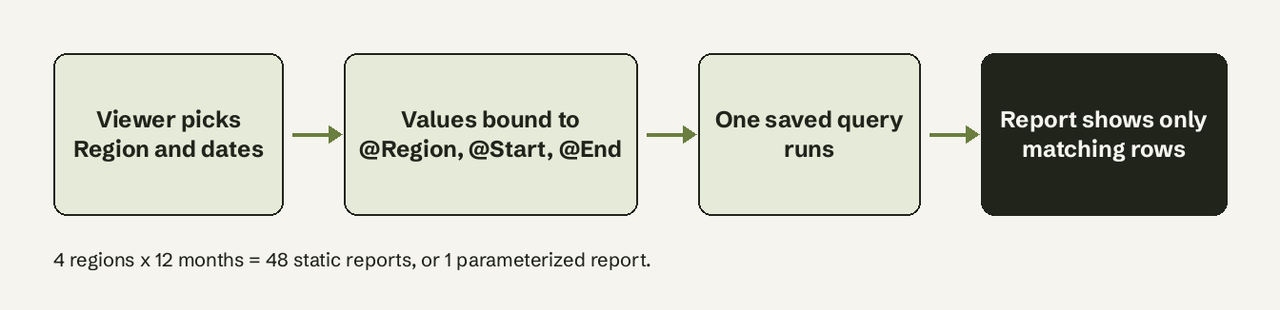
Parameterized reports matter because static reports multiply. Say a sales team wants monthly revenue for each of 4 regions. Without parameters that is 4 reports a month, 48 a year, each a copy of the same query with different literals, and a change to the revenue definition has to be made 48 times. With parameters it is one report with two inputs: region and month.
The same applies to customer-level reports (one report, a Customer ID parameter, thousands of possible runs) and to drill-through, where clicking a row in a summary report opens a detail report with that row's value passed in as a parameter.
What happens when the report runs?
Every run of a parameterized report follows three steps:
- Define the parameters with a name, data type, prompt and optional default and list of allowed values.
- Reference them in the query (
WHERE region = @Region) or in a report filter or expression. - Supply values at run time through the parameter pane, a URL, a dashboard filter, a subscription or a drill-through click.
Where the parameter is applied matters. In SSRS you can filter "at the data source by writing dataset queries that contain variables," so the database returns only matching rows, or add a dataset filter that references the parameter after the data is retrieved (Microsoft Learn). Filtering in the query is faster on large tables; report-side filters are the fallback when the query belongs to a shared dataset you can't edit. Our guide to filtering in SQL covers the WHERE side in more depth.
Worked example: the same report with and without parameters
Take a small orders table and the question "revenue for the West region in October 2026."
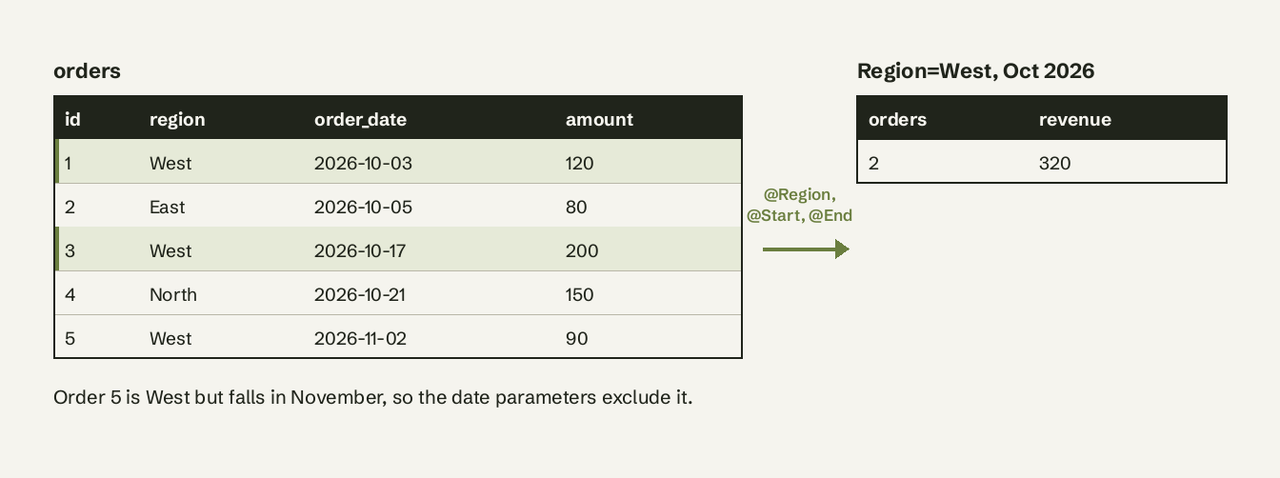
Without parameters, the values are literals. Every new region or month means a new copy of the query:
-- static: only ever answers one question
SELECT COUNT(*) AS orders, SUM(amount) AS revenue
FROM orders
WHERE region = 'West'
  AND order_date >= '2026-10-01'
  AND order_date <  '2026-11-01';
With parameters in SSRS, the dataset query uses variables, and Report Builder creates one report parameter for each automatically:
-- SSRS dataset query: @Region, @StartDate, @EndDate become report parameters
SELECT COUNT(*) AS orders, SUM(amount) AS revenue
FROM orders
WHERE region = @Region
  AND order_date >= @StartDate
  AND order_date <  @EndDate;
The report can then be opened with values in the URL, for example https://myrshost/ReportServer?/Sales/RegionRevenue&Region=West&StartDate=2026-10-01&EndDate=2026-11-01. Parameter names in the URL are case-sensitive (Microsoft Learn).
With parameters in Metabase, the SQL editor uses double braces, and square brackets make a clause optional so the report still runs when a value is left blank:
-- Metabase native question: blank region = all regions
SELECT COUNT(*) AS orders, SUM(amount) AS revenue
FROM orders
WHERE order_date >= {{start_date}}
  AND order_date <  {{end_date}}
  [[AND region = {{region}}]]
Metabase adds a filter widget for each variable, and values can be passed in the URL as ?region=West (Metabase docs).
In plain SQL, PostgreSQL prepared statements use positional parameters:
PREPARE region_revenue(text, date, date) AS
  SELECT COUNT(*) AS orders, SUM(amount) AS revenue
  FROM orders
  WHERE region = $1 AND order_date >= $2 AND order_date < $3;

EXECUTE region_revenue('West', '2026-10-01', '2026-11-01');
-- orders = 2, revenue = 320
A prepared statement lasts only for the current session and is removed with DEALLOCATE (PostgreSQL docs). In application code the same idea is a driver placeholder, such as cursor.execute("... WHERE region = %s", ("West",)) in Python's psycopg.
What are common parameter types?
The common parameter types are text, number, date, Boolean and list parameters, plus multi-value and cascading variants. SSRS limits report parameters to five data types:
| SSRS data type | Viewer sees | Typical use |
|---|---|---|
| Text | Text box, or dropdown with available values | Region, product category, customer name |
| Integer | Text box | Customer ID, top N rows |
| Float | Text box | Minimum order value, quota |
| DateTime | Calendar control | Start and end dates, report month |
| Boolean | True/False radio buttons | Show details, include cancelled orders |
On top of the data type, three options change behavior:
- Multi-value: the viewer picks several values (West and East), which the query uses with
IN (@Region). - Cascading: one parameter's choice narrows the next (pick a country, then only its cities appear), which Microsoft recommends for cutting thousands of values to a manageable list.
- Default values: if every parameter has a default, the report runs immediately on first view.
Metabase groups its variables differently: field filters (smart dropdowns and date pickers tied to a column), basic text, number and date variables, time grouping parameters (switch between day, week and month) and table variables.
How does a parameterized report differ from an ad hoc report?
A parameterized report is designed in advance with a fixed query and a fixed set of inputs; an ad hoc report is built on the spot to answer a question nobody planned for. Parameters let viewers change values (which region, which month) but not the question itself (revenue, not churn).
| Parameterized report | Ad hoc report | |
|---|---|---|
| Built by | A report author, once | The person asking, each time |
| What the viewer changes | Values of predefined inputs | Anything: columns, joins, grouping |
| Skill needed to run it | None | SQL or a query builder |
| Best for | Recurring, standard questions | One-off and exploratory questions |
| Risk | Rigid when the question changes | Inconsistent metric definitions |
Most teams need both: parameterized reports for the numbers everyone checks every week, ad hoc queries for everything else. A monthly KPI report template is a good candidate for parameters; "why did signups in Brazil drop last Tuesday" is not.
Parameterized report vs filter vs field parameter
These three terms get mixed up, especially in Power BI:
- Report parameter (SSRS, Power BI paginated reports): a value that goes into the query or report definition before it runs.
- Filter or slicer (Power BI interactive reports, dashboards): narrows data already loaded into the model. Power BI also accepts filters in the URL, written as
?filter=Table/Field eq 'value', with text in single quotes and numbers unquoted (Microsoft Learn). - Field parameter (Power BI): lets the reader switch which measure or dimension a visual shows, created under Modeling > New parameter > Fields (Microsoft Learn).
Are parameterized queries safer against SQL injection?
Yes, for values. OWASP lists parameterized queries as the primary defense against SQL injection: the database receives the query and the values separately, so input like West' OR '1'='1 is compared as a literal string instead of being executed as SQL (OWASP cheat sheet).
The protection stops at structure. Table names, column names and sort direction cannot be bound as parameters, so OWASP recommends mapping those choices to a strict allow-list of fixed values. Two common ways to lose the protection:
- A stored procedure behind a report that concatenates
@Regioninto a dynamic SQL string and runs it withEXEC. - A "sort by" parameter pasted straight into
ORDER BY.
Common pitfalls
- Filtering after retrieval: a report filter on a 10-million-row dataset still pulls 10 million rows. Put the parameter in the query's WHERE clause when you can.
- Optional clauses that break the query: in Metabase, wrap the whole clause,
[[AND region = {{region}}]], and start multiple optional clauses withWHERE TRUE. - Date ranges that drop the last day: use
order_date < @EndDatewith the day after the range, not<= '2026-10-31'on a timestamp column. - Unbounded parameters: a free-text Customer parameter invites typos; give it available values or a search box.
- Too many parameters: past four or five inputs, viewers stop knowing which combination answers their question. That is usually a sign the report should be split.
When parameters are not enough
Parameterized reports answer the questions someone anticipated. When a manager wants the same revenue number split by a dimension that is not a parameter, the request goes back to the report author. AI for Database takes the question in plain English ("revenue by region for October, West only"), writes and runs a read-only SQL query against PostgreSQL, MySQL, SQL Server and other databases, shows the SQL, and can pin the result to a dashboard that refreshes on a schedule or send it as an automated weekly report. Try AI for Database free at aifordatabase.com, or compare options in our list of free reporting tools.
Frequently Asked Questions
What is a parameterized report?
A parameterized report is a saved report that takes input values, such as dates, a region or a customer ID, each time it runs and uses them to filter or format its results. One parameterized report replaces many static copies that differ only in their filter values.
What are common parameter types?
Text, Integer, Float, DateTime and Boolean are the five SSRS parameter data types. Any of them can offer a dropdown of available values, allow multiple values or cascade from another parameter. Metabase adds field filters, time grouping and table variables.
How does a parameterized report differ from an ad hoc report?
A parameterized report has a fixed query built in advance, and viewers only change the input values. An ad hoc report is built on demand for a new question, so the person asking can change columns, joins and grouping, but usually needs SQL or a query builder.
Are parameterized queries safer against SQL injection?
Yes. Bound parameters send values separately from the SQL text, so user input is never executed as code; OWASP calls this the primary defense. Table names, column names and sort order can't be parameterized and need an allow-list instead.
How do I pass parameters to a report in a URL?
In SSRS native mode, append &Name=value after the report path, for example ?/Sales/RegionRevenue&Region=West; names are case-sensitive. In Metabase, add ?region=West to the question URL. Power BI interactive reports use ?filter=Table/Field eq 'West'.
Can Power BI do parameterized reports?
Yes, in two ways. Power BI paginated reports, built in Power BI Report Builder, use SSRS-style report parameters. Interactive Power BI reports use slicers, URL filters and field parameters, which filter or switch fields in data already loaded rather than changing the query.