
8 Best SQL Notebooks: Free Tiers and Databases Compared
TL;DR: For a free local SQL notebook on any database, use Jupyter with JupySQL or marimo. For SQL Server, the MSSQL extension for VS Code now has GA SQL notebooks (Azure Data Studio was retired on February 28, 2026). For a hosted team notebook with a usable free tier, Deepnote or Hex. If your data already sits in Databricks, BigQuery or Snowflake, use the notebook built into that platform.
A SQL notebook is a document made of cells where you write SQL, run it against a database, and see the result table directly under the query, with Markdown notes, charts and often Python in the same file. It differs from a SQL editor because the queries, their results and the reasoning around them are saved together, so the analysis can be rerun and shared top to bottom. The right SQL notebook depends on two things: which databases it can connect to, and what its free tier actually allows. This page compares eight tools on exactly that, with the command or click path to connect each one, using vendor docs and pricing pages checked on November 12, 2026.
How does a notebook built on SQL cells work?
A SQL notebook is an interactive file (usually .ipynb or a tool-specific format) that alternates SQL cells and text cells. Each SQL cell sends its query to a connected database and stores the result next to it. Most notebooks also turn that result into a dataframe, so the next cell can chart it in Python or feed it into another query.
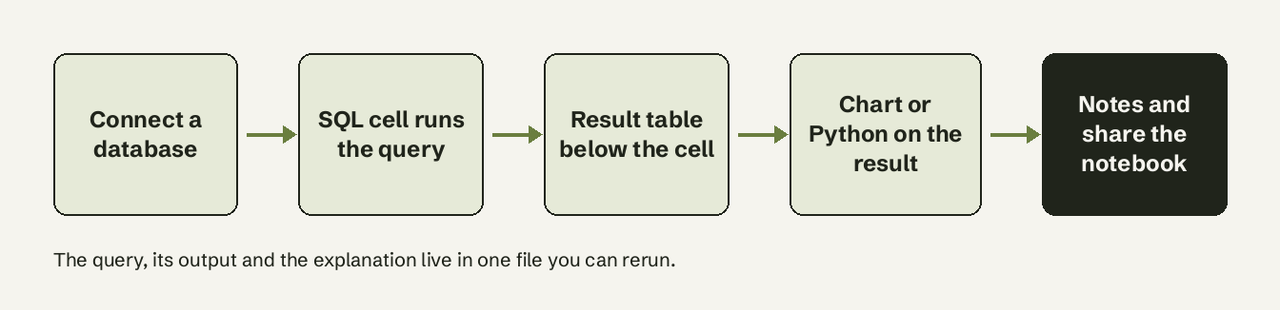
Typical uses:
- Exploratory analysis: checking a hypothesis in a few queries and keeping the trail.
- Runbooks: step-by-step troubleshooting queries a DBA reruns during an incident.
- Recurring reports: a notebook scheduled to rerun and send its output.
- Teaching and handover: a query someone else can read, rerun and modify.
How we judged them
Five criteria, weighted toward what decides whether a tool works for you at all:
- Databases it connects to: PostgreSQL, MySQL, SQL Server, Snowflake, BigQuery and others, and whether that needs a paid plan.
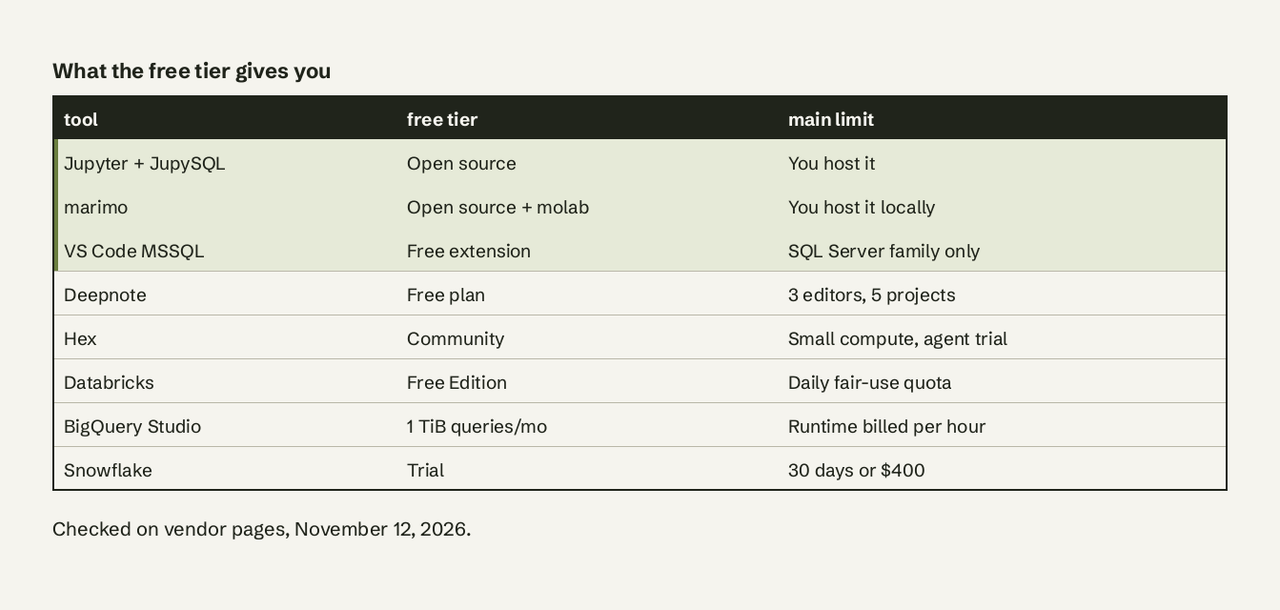
- Free tier: what is genuinely free (editors, projects, compute) and what is gated.
- Setup: the exact step to get from install to a first query.
- Collaboration and scheduling: sharing, comments, scheduled runs.
- Lock-in: whether the notebook is a standard
.ipynbor Python file you can take elsewhere.
We left out pure SQL editors (DBeaver, DataGrip, pgAdmin) because they keep query tabs, not notebooks. If you are choosing between those, see our DataGrip alternative comparison.
Summary table
| Tool | Best for | Databases | Free tier | Paid from |
|---|---|---|---|---|
| Jupyter + JupySQL | Free local notebook on any database | Anything with a SQLAlchemy driver | Fully free, open source | Free |
| marimo | Reproducible Python + SQL notebooks | DuckDB built in; Postgres, MySQL, SQLite, Snowflake, BigQuery via UI | Free, open source; free molab cloud | Free |
| VS Code MSSQL notebooks | SQL Server and Azure SQL users | SQL Server, Azure SQL, SQL database in Fabric | Free extension | Free |
| Deepnote | Hosted team notebooks on a budget | 13+ incl. Postgres, MySQL, Snowflake, BigQuery, Redshift, MongoDB | 3 editors, 5 projects | $39/editor/mo (yearly) |
| Hex | Notebooks that become data apps | Any data source on all plans | Community, small compute | $36/editor/mo |
| Databricks notebooks | Lakehouse data in Databricks | Unity Catalog tables, SQL warehouse | Free Edition, serverless only | Usage-based |
| BigQuery Studio notebooks | Data already in BigQuery | BigQuery | First 1 TiB of queries/month | $6.25/TiB + runtime |
| Snowflake Notebooks | Data already in Snowflake | Snowflake | 30-day trial, $400 credits | Credit usage |
1. Jupyter with JupySQL
JupySQL is an open-source Jupyter extension that adds %sql (one line) and %%sql (whole cell) magics, so any Jupyter notebook, JupyterLab or VS Code notebook becomes a SQL notebook. It started as a fork of the older ipython-sql package.
- Best for: anyone who already uses Python and wants SQL cells against any database for free.
- Databases: any database with a SQLAlchemy driver, including PostgreSQL, MySQL, SQL Server, Snowflake and DuckDB.
- Pricing: free and open source.
- Verified detail: queries take Python variables with
{{variable}},--savestores a query as a reusable CTE, and%sqlplotdraws histograms and box plots (JupySQL docs).
How do I run SQL in Jupyter? Install JupySQL and a driver, load the extension, connect with a URL, then write SQL in a %%sql cell:
%pip install jupysql pandas pyarrow psycopg2-binary --quiet
%load_ext sql
%sql postgresql://user:password@localhost:5432/shop
%%sql
-- customers with no order in the last 90 days
SELECT c.id, c.email, MAX(o.created_at) AS last_order
FROM customers c
LEFT JOIN orders o ON o.customer_id = c.id
GROUP BY c.id, c.email
HAVING MAX(o.created_at) < NOW() - INTERVAL '90 days'
OR MAX(o.created_at) IS NULL;%sqlcmd tables lists tables and %sqlcmd columns --table orders lists columns, which saves a trip to a separate client.
- Limits: no built-in sharing, scheduling or access control. Credentials in the connection string end up in the notebook unless you read them from environment variables.
The video below walks through the same magics on a DuckDB database, including parameterized queries and saved queries.
2. marimo
marimo is an open-source reactive notebook for Python where SQL cells are first-class: no magics, and the notebook file stays plain Python. When a cell changes, every cell that depends on it reruns, so results never go stale.
- Best for: analysts who want notebooks that are reproducible, diffable in Git and runnable as scripts or apps.
- Databases: an in-memory DuckDB by default (query dataframes, CSV and Parquet files directly); the "Add Database Connection" button connects PostgreSQL, MySQL, SQLite, DuckDB, Snowflake and BigQuery, and it auto-detects
PGHOST,PGUSERandPGDATABASEfrom your environment (marimo SQL guide). - Pricing: free and open source; molab is a free cloud-hosted version.
- Connect step:
# pip install "marimo[sql]"   then: marimo edit report.py
import marimo as mo
import sqlalchemy

engine = sqlalchemy.create_engine("postgresql://user:password@localhost:5432/shop")
orders = mo.sql(
    "SELECT status, COUNT(*) AS n FROM orders GROUP BY status",
    engine=engine,
)- Limits: the UI shows the first 10 rows of a result by default, and the reactive model takes adjustment if you are used to running Jupyter cells out of order.
3. VS Code MSSQL extension SQL notebooks
The MSSQL extension for Visual Studio Code now ships SQL notebooks as a generally available feature: native Jupyter notebooks with an MSSQL kernel, IntelliSense from your live connection and a sortable, filterable results grid. This is the replacement for Azure Data Studio notebooks, since Azure Data Studio was retired on February 28, 2026 and gets no more updates or security fixes (Microsoft Learn).
- Best for: DBAs and developers on SQL Server, Azure SQL or SQL database in Fabric, especially for runbooks.
- Databases: SQL Server family only. For PostgreSQL, Microsoft points to its separate PostgreSQL extension.
- Pricing: free.
- Connect step: install "SQL Server (mssql)" from the Extensions view, open the Command Palette (Ctrl+Shift+P or Cmd+Shift+P), run New Notebook (or right-click a database in Object Explorer and choose New Notebook), pick the MSSQL kernel and select a connection profile (SQL Notebooks docs).
-- runbook cell: the 5 longest-running active requests
SELECT TOP 5 session_id, status, total_elapsed_time / 1000 AS seconds, command
FROM sys.dm_exec_requests
WHERE session_id <> @@SPID
ORDER BY total_elapsed_time DESC;- Limits: one server per notebook kernel (you can switch databases on that server, not servers). Install the Jupyter extension to add Python cells.
4. Deepnote
Deepnote is a hosted, collaborative notebook with native SQL blocks whose results flow straight into Python, charts and interactive apps. It feels like Jupyter with Google Docs-style editing.
- Best for: small teams who want shared notebooks without running a server.
- Databases: PostgreSQL, MySQL, ClickHouse, MariaDB, BigQuery, Snowflake, Redshift, Amazon Athena, SQL Server and Azure SQL, MongoDB, Databricks, Trino and Dremio.
- Pricing: Free (up to 3 editors, 5 projects, Basic machines with 5 GB RAM and 2 vCPU, 7-day revision history, SQL blocks included); Team $39 per editor per month billed yearly, which adds scheduled notebooks, background execution and unlimited projects (Deepnote pricing).
- Connect step: in a project, open Integrations, choose the database, enter host, port, user and password, then add a SQL block and pick that integration as its source.
- Limits: free machines stop after 15 minutes of inactivity, and AI help on Free is capped at a handful of calls a month. If Deepnote is not quite right, we compared Deepnote alternatives separately.
5. Hex
Hex is a notebook-based analytics platform where SQL, Python and no-code cells chain together, and any notebook can be published as an interactive data app. SQL cells can query a database or earlier results ("dataframe SQL").
- Best for: data teams who turn analyses into apps for the rest of the company.
- Databases: "connect any data source" on every plan, including the free one; OAuth database connections are Enterprise-only.
- Pricing: Community free (all cell types, Small compute, Hex agent trial, 7-day version history); Professional $36 per editor per month; Team $75 per editor per month for scheduled runs and alerts and unlimited published apps (Hex pricing).
- Connect step: Data sources > Add a data connection, pick the warehouse or database, enter credentials, then add a SQL cell and choose the connection.
- Limits: scheduling sits on Team, and non-technical users still meet a blank notebook. Our Hex alternative guide covers that gap.
6. Databricks notebooks
Databricks notebooks mix Python and SQL cells (%sql switches a cell's language) against tables in Unity Catalog, running on serverless compute or a SQL warehouse.
- Best for: teams whose data already lives in a Databricks lakehouse.
- Databases: Databricks tables and anything federated into Unity Catalog.
- Pricing: Free Edition costs nothing but runs only on serverless compute, with one SQL warehouse capped at 2X-Small and a daily fair-use quota; if you exceed it, compute shuts down for the rest of the day (Databricks docs). Paid workspaces bill compute by usage.
- Connect step: none for data in the workspace: create a notebook, attach it to Serverless, and write
%sql SELECT .... - Limits: Free Edition has no support or SLA, and its outbound internet access is limited to a set of trusted domains, which can block connections to your own external database.
7. BigQuery Studio notebooks
BigQuery Studio includes Python notebooks that run on Colab Enterprise runtimes, with SQL cells that can reference Python variables and return dataframes (Google Cloud docs).
- Best for: analysts whose data is already in BigQuery.
- Databases: BigQuery (plus anything exposed to it through external tables).
- Pricing: no license fee. On-demand queries are free for the first 1 TiB per month, then $6.25 per TiB; the default notebook runtime costs about $0.16 per hour in us-central1 and is not charged after idle shutdown (BigQuery pricing).
- Connect step: in BigQuery Studio, create a new notebook from the console; your project's datasets are already available to its SQL cells.
- Limits: a notebook that scans large tables repeatedly burns through the free TiB fast. Select only the columns you need, because BigQuery bills by columns scanned.
8. Snowflake Notebooks
Snowflake Notebooks run Python, SQL and Markdown cells inside Snowsight against your Snowflake data. The current version is Notebooks in Workspaces, a Jupyter-compatible environment with Git integration and a native scheduler. The original experience was renamed Legacy Notebooks, and accounts created after April 2026 cannot create legacy notebooks at all (Snowflake docs).
- Best for: teams on Snowflake who want governed notebooks without moving data out.
- Databases: Snowflake.
- Pricing: consumes Snowflake credits; a new trial includes $400 of credits for 30 days (Snowflake trial).
- Connect step: open Workspaces in Snowsight, create a notebook, and query tables your role can access.
- Limits: tutorials written before 2026 often show the legacy UI, which new accounts will not see.
SQL notebook vs SQL editor: when should you use which?
Use a SQL editor when you are writing, tuning or debugging individual queries; use a SQL notebook when the result, the steps and the explanation need to stay together. Editors such as DBeaver, DataGrip and the plain MSSQL query window are faster for one query at a time and give you execution plans, schema browsing and autocomplete. Notebooks win when someone else must follow or rerun the work.
| SQL editor | SQL notebook | |
|---|---|---|
| Unit of work | One query tab | A sequence of cells |
| Results saved | Usually not | Yes, under each cell |
| Notes and charts | No | Markdown, charts, Python |
| Best for | Query tuning, admin, quick lookups | Analysis, runbooks, reports, handover |
| Sharing | Share the .sql file | Share the rerunnable notebook |
For query tuning inside either, our EXPLAIN guide for PostgreSQL shows how to read a plan.
How to choose a SQL notebook
- You want free and local, any database: Jupyter + JupySQL, or marimo if you care about reproducibility and Git diffs.
- You live in SQL Server: the VS Code MSSQL extension. Move off Azure Data Studio now; it is unsupported.
- A small team needs shared notebooks: Deepnote's free plan for up to 3 editors, Hex if you will publish apps.
- Your data is in one platform: use that platform's notebook (Databricks, BigQuery Studio, Snowflake) to avoid moving data and credentials.
- You need a notebook to rerun on a schedule: Deepnote Team, Hex Team, Snowflake Notebooks or Databricks jobs, or schedule the query in the database itself, as in our guide to scheduling Postgres queries.
When a notebook is the wrong tool
Notebooks assume the person asking the question can write SQL. When the questions come from ops, sales or founders who cannot, every answer still routes through whoever owns the notebook. That is the gap AI for Database fills: people ask in plain English, it writes and runs a read-only query on PostgreSQL, MySQL, SQL Server, BigQuery and other sources, shows the SQL, and can pin the answer to a self-refreshing dashboard or an alert. Keep the notebook for deep analysis; try AI for Database free at aifordatabase.com for the everyday questions.
Frequently Asked Questions
What is a SQL notebook?
A SQL notebook is an interactive document of cells where you write SQL, run it against a connected database and see the result directly below each query, alongside Markdown notes and charts. Jupyter with JupySQL, marimo, Deepnote, Hex and the VS Code MSSQL extension are common examples.
Which SQL notebook tools are free?
Jupyter with JupySQL, marimo and the VS Code MSSQL extension are fully free. Deepnote's Free plan allows 3 editors and 5 projects, Hex Community is free with small compute, Databricks Free Edition is free with a daily quota, and BigQuery includes 1 TiB of free queries per month.
How do I run SQL in Jupyter?
Install JupySQL and a database driver (%pip install jupysql psycopg2-binary), run %load_ext sql, connect with %sql postgresql://user:password@host/db, then put %%sql at the top of a cell and write your query. The result appears as a table below the cell.
What replaced Azure Data Studio notebooks?
Azure Data Studio was retired on February 28, 2026. Microsoft's replacement is the MSSQL extension for Visual Studio Code, whose SQL notebooks feature is generally available and uses standard .ipynb files, so existing notebooks open there.
Can a SQL notebook query PostgreSQL and MySQL?
Yes. JupySQL connects to both through SQLAlchemy drivers, marimo's connection UI supports both, and Deepnote lists both on its Free plan. The VS Code MSSQL notebooks do not; they support only the SQL Server family.
Are SQL notebooks good for dashboards?
They can produce one, but they are built for analysis. Hex and Deepnote can publish a notebook as an app, and Deepnote Team or Hex Team can rerun it on a schedule. For a dashboard non-technical people check daily, a BI tool or a self-refreshing dashboard is usually simpler to keep current.