
How to Schedule a Query in Postgres with pg_cron
TL;DR: To schedule a query in Postgres, install the pg_cron extension, load it through shared_preload_libraries, run CREATE EXTENSION pg_cron, then call cron.schedule('job-name', '0 3 * * *', 'your SQL'). Check every run in cron.job_run_details. Setup differs by host: RDS needs a parameter group change, Supabase is one click, Neon only runs jobs while the compute is awake.
PostgreSQL has no built-in job scheduler, so a postgres schedule query almost always means pg_cron, the Citus extension that runs cron jobs inside the database (PostgreSQL 10 or newer). It reads standard five-field cron syntax, adds $ for "last day of the month" and a '30 seconds' interval form, stores jobs in the cron.job table and logs each run in cron.job_run_details. The alternatives are pgAgent (an external agent managed from pgAdmin), pg_timetable (an external Go scheduler) or plain OS cron calling psql. For most teams pg_cron is the right default because the schedule lives next to the data and works on almost every managed host except Heroku.
This guide covers the full setup on self-hosted Postgres, Amazon RDS, Supabase and Neon side by side, the exact cron syntax, how to tell whether a job failed, and the managed-provider gotchas the official docs scatter across four sites.
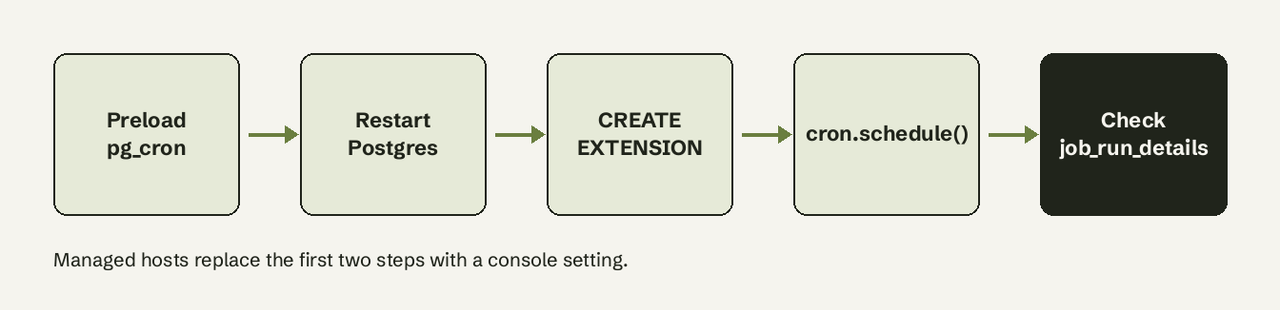
What you need
- PostgreSQL 10 or newer (packages exist up to PostgreSQL 18, for example
postgresql-18-cronon Debian and Ubuntu). - Superuser, or
rds_superuseron Amazon RDS, to create the extension. Regular users can schedule jobs once grantedUSAGEon thecronschema. - Permission to edit
postgresql.confor your provider's parameter settings, and to restart the server once. - The SQL you want to run, tested by hand first.
How do I schedule a query in PostgreSQL?
Use pg_cron in five steps. Steps 1 and 2 are only for self-hosted servers; managed providers have their own switch (next section).
- Install the package. On Debian or Ubuntu with the PGDG repository:
sudo apt-get -y install postgresql-18-cronOn Red Hat, Fedora or Amazon Linux: sudo yum install -y pg_cron_18.
- Preload the background worker and restart. Add to
postgresql.conf:
   shared_preload_libraries = 'pg_cron'
   cron.database_name = 'postgres'   # the one database that holds the job tables
   cron.timezone = 'UTC'             # default is GMT
Then restart Postgres. These settings have postmaster context, so pg_reload_conf() is not enough.
- Create the extension in the database named by
cron.database_name:
   CREATE EXTENSION pg_cron;
   -- optional: let a non-superuser schedule their own jobs
GRANT USAGE ON SCHEMA cron TO reporting_user;- Schedule the query. Give every job a name so you can change it later:
   -- refresh a reporting rollup every day at 03:00 UTC
   SELECT cron.schedule(
     'nightly-revenue-rollup',
     '0 3 * * *',
     $$REFRESH MATERIALIZED VIEW CONCURRENTLY daily_revenue$$
   );
cron.schedule returns the job id. Calling it again with the same name updates the existing job instead of creating a duplicate.
- Verify it ran. After the first scheduled time:
   SELECT jobid, status, return_message, start_time, end_time
   FROM cron.job_run_details
   ORDER BY start_time DESC
   LIMIT 5;
A succeeded row with a return message such as REFRESH MATERIALIZED VIEW means the job works.
To run a query in a different database on the same server, use cron.schedule_in_database('job-name', '0 3 * * *', 'VACUUM ANALYZE orders', 'shop'). pg_cron can only be installed in one database per cluster, so this is how you reach the others.
pg_cron cron syntax
pg_cron parses schedules with code taken from Paul Vixie's cron, so anything crontab.guru accepts works here, plus two additions.
| Schedule | Meaning |
|---|---|
'30 seconds' | Every 30 seconds (1-59 seconds; cannot be combined with other fields) |
* * * * * | Every minute |
*/5 * * * * | Every 5 minutes |
0 * * * * | Every hour, on the hour |
0 3 * * * | Every day at 03:00 |
0 8 * * 1-5 | Weekdays at 08:00 |
0 1 * * 0 | Sundays at 01:00 |
0 12 $ * * | 12:00 on the last day of every month |
The fields are minute (0-59), hour (0-23), day of month (1-31 or $), month (1-12) and day of week (0-6, Sunday is 0 or 7). Times are interpreted in cron.timezone, which defaults to GMT. If your team thinks in local time, either set cron.timezone (restart required) or write schedules in UTC and say so in the job name.
To run a query every day in Postgres, 0 3 * * * is the usual choice: overnight in most of Europe and the Americas, before anyone opens a dashboard.
Is pg_cron available on RDS, Supabase and Neon?
Yes on all three, and on Google Cloud SQL, Azure, Crunchy Bridge, DigitalOcean and Aiven. The pg_cron README lists Heroku Postgres as not supported. The setup is what differs.
| Host | How to enable | Restart needed | Main gotcha |
|---|---|---|---|
| Self-hosted | shared_preload_libraries, then CREATE EXTENSION | Yes | Default libpq connection needs pg_hba.conf access from localhost |
| Amazon RDS / Aurora | Add pg_cron to shared_preload_libraries in a custom parameter group, reboot, CREATE EXTENSION as rds_superuser | Yes (reboot) | Needs RDS for PostgreSQL 12.5+; jobs live in the postgres database |
| Supabase | Dashboard: Integrations > Cron, enable | No | Supabase recommends at most 8 concurrent jobs, each under 10 minutes |
| Neon | Set cron.database_name via the Update compute endpoint API, restart compute, CREATE EXTENSION | Yes (compute) | Jobs only run while the compute is active; schedules are UTC |
| Heroku Postgres | Not supported | n/a | Use Heroku Scheduler or an external runner |
Amazon RDS
AWS documents four moves: edit the custom parameter group to add pg_cron to shared_preload_libraries (and to rds.allowed_extensions if you use that list), reboot the instance, connect to the postgres database as a rds_superuser member and run CREATE EXTENSION pg_cron;. The default parameter group cannot be edited, so create a custom one first if the instance still uses the default.
The trap is permissions. GRANT USAGE ON SCHEMA cron TO app_user lets a user schedule jobs, but the job runs with that user's rights. If the user cannot read the table, the job fails and the Postgres log shows ERROR: permission denied for table ... followed by background worker "pg_cron" ... exited with exit code 1.
Supabase
Supabase Cron is pg_cron with a dashboard. Enable it under Integrations > Cron, then create jobs either in the UI or with the same cron.schedule SQL. A job can run a SQL snippet, a database function, or an HTTP request (for example to an Edge Function) once the pg_net extension is enabled. Supabase's own guidance is no more than 8 jobs running at once and no job longer than 10 minutes.
Neon
Neon's pg_cron page asks you to set cron.database_name through the Update compute endpoint API, restart the compute and then run CREATE EXTENSION IF NOT EXISTS pg_cron;. The bigger catch: pg_cron runs only while the compute is active. If your compute scales to zero at night, a 0 3 * * * job simply does not fire. Neon now points scheduled work toward its Function Triggers and keeps pg_cron for maintenance on an always-on compute.
How do I see if a pg_cron job failed?
Query cron.job_run_details. Every run gets a row with status (starting, running, succeeded or failed), the return_message, and start and end times.
-- failed runs in the last 24 hours, with the job name
SELECT j.jobname, d.status, d.return_message, d.start_time
FROM cron.job_run_details d
JOIN cron.job j USING (jobid)
WHERE d.status = 'failed'
  AND d.start_time > now() - interval '24 hours'
ORDER BY d.start_time DESC;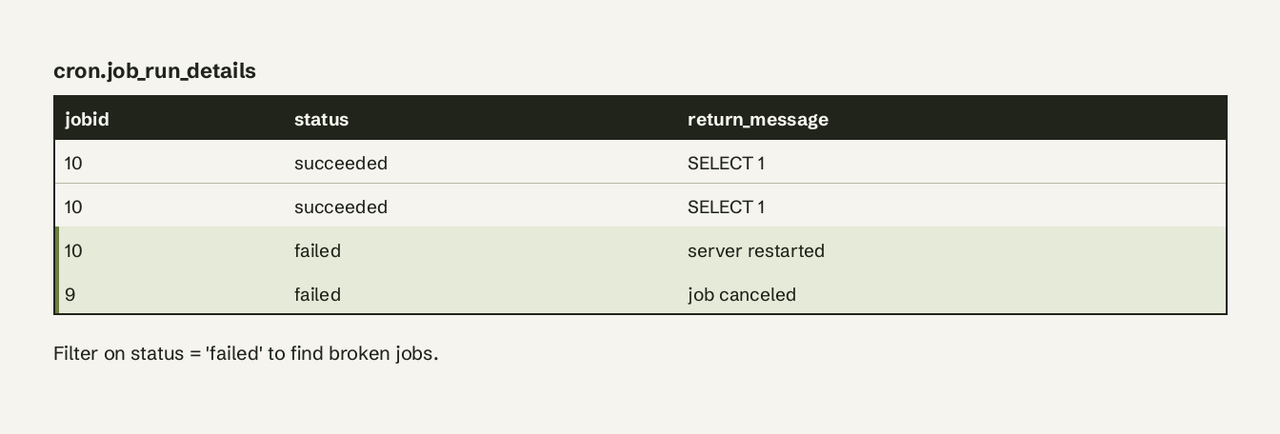
Messages you will meet: server restarted (the job was running when Postgres went down), job canceled, and the real SQL error text, such as permission denied for table orders. A job that never shows up at all usually means the scheduler is not running: check SHOW shared_preload_libraries;, confirm you are in the database named by cron.database_name, and remember pg_cron does not run jobs on a hot standby.
Two housekeeping rules:
cron.job_run_detailsis never cleaned automatically. Schedule its own cleanup:SELECT cron.schedule('purge-cron-history', '0 12 * * *', $$DELETE FROM cron.job_run_details WHERE end_time < now() - interval '7 days'$$);- A query nobody reads is a silent failure. Pair the failed-runs query above with an alert, for example posting to Slack, so a broken job is noticed the same day.
Manage jobs: list, change, pause, delete
SELECT jobid, jobname, schedule, command, active FROM cron.job;   -- list
SELECT cron.alter_job(42, schedule := '0 4 * * *');              -- change time
SELECT cron.alter_job(42, active := false);                      -- pause
SELECT cron.unschedule('nightly-revenue-rollup');                -- delete
Row-level security on cron.job means each user sees only their own jobs unless they are a superuser. Setting cron.launch_active_jobs = off and reloading pauses every job at once without a restart, useful during a migration.
Common errors and fixes
| Error or symptom | Cause | Fix |
|---|---|---|
pg_cron can only be loaded via shared_preload_libraries | pg_cron not in shared_preload_libraries | Add it to postgresql.conf and restart the server |
can only create extension in database postgres | You ran CREATE EXTENSION in another database | Connect to the cron.database_name database, or change that setting |
Run shows connection failed | pg_cron's libpq connection to localhost is rejected by pg_hba.conf | Allow local connections for the job user, add a .pgpass, or set cron.use_background_workers = on |
| Jobs fire at the wrong hour | Schedule read as GMT | Set cron.timezone and restart, or convert the schedule to UTC |
Old rows pile up and cron.job_run_details keeps growing | Second-level jobs log every run | Purge history daily or set cron.log_run = off |
| Long job never overlaps but runs late | pg_cron runs one instance of a job at a time and queues the next | Shorten the job or widen the interval |
pg_cron vs pgAgent vs OS cron
| pg_cron | pgAgent | OS cron + psql | |
|---|---|---|---|
| Runs where | Inside Postgres (background worker) | Separate daemon, managed in pgAdmin | The server's crontab |
| Managed hosts | Most (not Heroku) | Rarely, needs its own host | Needs a host you control |
| Job types | One SQL command per job | Multi-step jobs, SQL and shell steps | Anything a shell can run |
| Run history | cron.job_run_details | pgAgent log tables, pgAdmin UI | Whatever you log yourself |
| Best for | SQL maintenance and rollups | Multi-step batch jobs on self-hosted servers | Jobs that also touch files or other systems |
Pick pg_cron when the job is SQL and you are on a managed host. Pick pgAgent when you need multi-step jobs with shell steps and you control the server. Pick OS cron when the job leaves the database.
When the schedule is really a report
Many scheduled queries exist to answer one business question every morning: yesterday's signups, failed payments, accounts that went quiet. pg_cron can compute that, but it cannot send it to anyone without extra plumbing (pg_net, an Edge Function, a mail relay). If what you actually need is a scheduled query whose result lands in Slack or email, AI for Database connects to your PostgreSQL database, lets you ask the question in plain English, and runs it on a schedule with alerts and monitoring when a number crosses a threshold. Try it free at aifordatabase.com. Keep pg_cron for the maintenance work: vacuums, rollups and cleanup.
For the Slack side specifically, see PostgreSQL to Slack alerts and our guide to automating weekly database reports.
Frequently Asked Questions
Does PostgreSQL have a built-in job scheduler?
No. Core PostgreSQL has no scheduler. pg_cron is the common extension; pgAgent and pg_timetable run outside the database. Some forks ship their own, such as Postgres Pro's pgpro_scheduler.
How do I run a query every day in Postgres?
With pg_cron: SELECT cron.schedule('daily-job', '0 3 ', 'your SQL'); runs it every day at 03:00 in cron.timezone (GMT by default).
Can pg_cron run a job every few seconds?
Yes. Use the interval form, for example '10 seconds', from 1 to 59 seconds. It cannot be mixed with the normal cron fields.
Can a pg_cron job call a stored procedure or function?
Yes. The command can be CALL process_updates() or SELECT my_function(). Each job is one command, so wrap multi-statement logic in a procedure.
Is pg_cron available on RDS and Supabase?
Yes. RDS for PostgreSQL supports it from 12.5 through a custom parameter group; Supabase enables it from Integrations > Cron. Heroku Postgres does not support it.
pg_cron vs pgAgent: which should I use?
pg_cron for SQL jobs and managed databases, since it runs inside Postgres and needs no extra server. pgAgent for multi-step jobs that include shell commands on a server you run yourself.
How do I see if a pg_cron job failed?
Select from cron.job_run_details where status = 'failed'; the return_message column holds the error. Join to cron.job for the job name.