
Postgres List All Databases: psql, SQL and GUI Methods
TL;DR: In psql, type \l (or \l+ for sizes). From any SQL client, run SELECT datname FROM pg_database WHERE NOT datistemplate;. Use \c dbname to switch, then \dt to list tables.
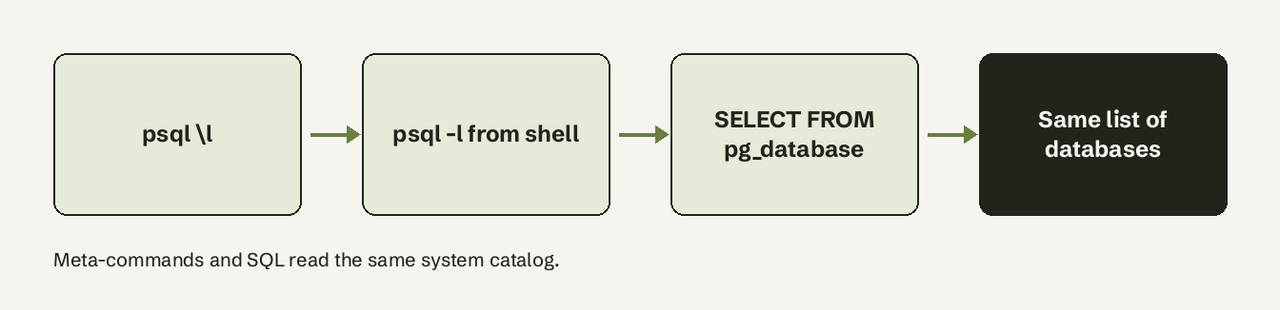
To list all databases in Postgres, connect with psql and run the \l meta-command, or run psql -l from your shell to print the list and exit. If you are in a GUI, a BI tool, or application code where meta-commands do not work, query the pg_database system catalog instead: SELECT datname FROM pg_database WHERE datistemplate = false;. Both methods read the same catalog, so they return the same databases. The rest of this guide covers sizes, filtering out template databases, listing tables inside each database, and what changes on managed hosts like Amazon RDS and Supabase.
What you need
- A PostgreSQL server (any supported version; the examples are checked against the PostgreSQL 18 docs).
- psql, or any SQL client such as pgAdmin, DBeaver or DataGrip.
- A role that can connect to at least one database. Listing databases needs no special privilege: every role can read
pg_database.
How do I list databases in PostgreSQL?
Follow these steps in psql. Each one is a single command.
- Connect to any database. psql needs a database to connect to, even just to list others.
postgresexists on almost every server:
psql -h localhost -U postgres -d postgres- Run `\l`. This prints name, owner, encoding, collation and access privileges:
\l- Add sizes with `\l+`. The plus variant adds size, tablespace and description columns:
\l+- Filter by name with a pattern.
\laccepts a pattern, so this lists only databases starting withapp:
\l app*- Or skip the interactive session.
psql -l(long form--list) lists all available databases and exits, which is handy in scripts:
psql -h localhost -U postgres -l\list is the long name of \l; they are identical. Coming from MySQL, where the command is SHOW DATABASES? Our Postgres vs MySQL comparison covers other differences.
How do I list all databases with a SQL query?
Use a SQL query when you are not in psql. Meta-commands like \l are processed by the psql client, not the server, so they fail in pgAdmin's query tool, in application code and in most BI tools. The server-side equivalent is the pg_database catalog:
SELECT datname
FROM pg_database
WHERE datistemplate = false
ORDER BY datname;
The useful columns of pg_database, per the official catalog docs:
| Column | Type | What it tells you |
|---|---|---|
datname | name | Database name |
datdba | oid | Owner (join to pg_roles.oid) |
datistemplate | bool | True for templates that can be cloned with CREATE DATABASE ... TEMPLATE |
datallowconn | bool | False means nobody can connect (as with template0) |
datconnlimit | int4 | Max concurrent connections, -1 for no limit |
datcollate | text | Collation for the database |
A fuller query with owner and connection status:
SELECT d.datname        AS database,
       r.rolname        AS owner,
       d.datallowconn   AS allows_connections,
       d.datconnlimit   AS connection_limit
FROM pg_database d
JOIN pg_roles r ON r.oid = d.datdba
WHERE NOT d.datistemplate
ORDER BY d.datname;
Why do I see template0 and template1?
template0 and template1 are system templates, not your data. CREATE DATABASE works by copying template1 by default, and template0 is a pristine copy that should never be changed after the cluster is initialized, per the template database docs. Filter them out with WHERE NOT datistemplate. The postgres database is a normal default database created by initdb; it is safe to keep in the list.
How do I see database sizes?
Use pg_database_size() with pg_size_pretty(). pg_database_size takes a name or OID and returns bytes as a bigint; pg_size_pretty turns that into kB, MB or GB (admin functions docs).
SELECT datname,
       pg_size_pretty(pg_database_size(datname)) AS size
FROM pg_database
WHERE NOT datistemplate
ORDER BY pg_database_size(datname) DESC;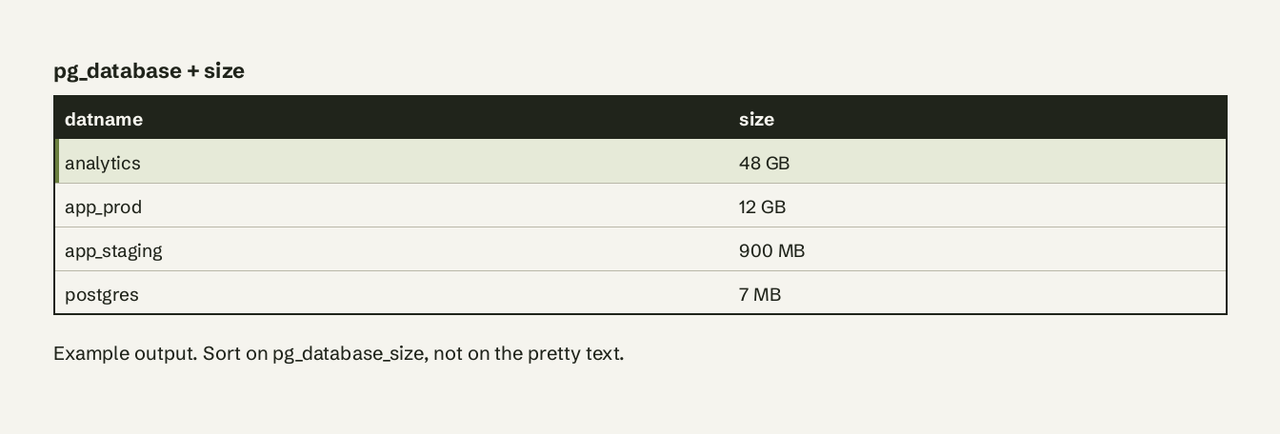
Sort on the raw pg_database_size value, not on the pretty string: text sorting would put "900 MB" above "48 GB". In psql, \l+ shows the same size column without writing SQL. If you lack CONNECT privilege on a database, \l+ shows "No Access" for its size and the function raises a permission error.
How do I list tables?
Tables live inside a single database, so switch first, then list. A PostgreSQL connection is bound to one database; you cannot list tables of another database without connecting to it.
- Switch database with
\c(or\connect):
\c app_prod- List tables with
\dt. By default it shows only user-created tables; add a pattern or theSmodifier to include system tables:
   \dt
   \dt+          -- adds size on disk and persistence
\dt sales.* -- only tables in the sales schema- Or use SQL from any client:
   SELECT table_schema, table_name
   FROM information_schema.tables
   WHERE table_type = 'BASE TABLE'
     AND table_schema NOT IN ('pg_catalog', 'information_schema')
   ORDER BY table_schema, table_name;
Run \conninfo at any point to confirm which database and host you are connected to. For more lookup syntax, see our SQL cheat sheet.
How do I list databases in a GUI?
Every major client reads pg_database behind the scenes:
- pgAdmin: expand Servers, then your server, then Databases.
- DBeaver: the connection's tree shows one database by default; enable "Show all databases" in the connection's PostgreSQL settings to see the rest.
- DataGrip: open the data source's Schemas tab and select the databases to introspect.
If a database is missing in a GUI but appears in \l, the client is usually set to show only the database in the connection string.
What changes on Amazon RDS and Supabase?
Managed hosts add their own databases and restrict privileges, so the list looks different from a laptop install.
- Amazon RDS / Aurora: you will see an
rdsadmindatabase used by AWS for management; you cannot connect to it. Your master user is a member ofrds_superuser, not a true superuser (AWS docs), which is why some admin queries behave differently. Exclude it withWHERE datname <> 'rdsadmin'. - Supabase: your project's data lives in the
postgresdatabase; most projects never create another. When connecting from a GUI or BI tool, Supabase recommends the shared pooler in session mode, which is reachable over IPv4 (Supabase connection docs). If you are handling Supabase keys for scripts, read our note on the Supabase service role key.
How to verify it worked
Cross-check the two methods. The count from SQL should match the non-template rows from \l:
SELECT count(*) FROM pg_database WHERE NOT datistemplate;If a database you expect is missing, you are probably connected to a different server or port. Check with \conninfo or SELECT inet_server_addr(), inet_server_port();.
Common errors and fixes
- `psql: error: connection to server ... failed: FATAL: database "yourname" does not exist`: psql defaults the database name to your OS username. Pass
-d postgres. - `ERROR: syntax error at or near "\"`: you ran
\lin a client that is not psql. Use thepg_databasequery. - `FATAL: database "template0" is not currently accepting connections`: expected;
template0hasdatallowconn = false. - `ERROR: permission denied for database ...` from `pg_database_size`: grant
CONNECTon that database, or check sizes as an admin role.
When listing is not the real question
Most people list databases because they are about to answer something: which tables hold customers, how big an analytics database has grown, what changed this week. If the next step is asking questions of that data, AI for Database connects to PostgreSQL read-only and lets you ask in plain English, then turns answers into dashboards that refresh themselves. It is useful when the people asking are not the people who write SQL.
Frequently Asked Questions
What is the command to list all databases in PostgreSQL?
In psql, \l or \list. From the shell, psql -l. In SQL, SELECT datname FROM pg_database;.
How do I list all databases and tables in psql?
Run \l for databases, then \c dbname to connect to one and \dt to list its tables. Repeat \c and \dt for each database, since a connection only sees one database at a time.
Why does SHOW DATABASES not work in Postgres?
SHOW DATABASES is MySQL syntax. PostgreSQL's SHOW displays configuration parameters only. Use \l or pg_database.
How do I list databases without entering psql?
psql -U postgres -l prints the list and exits. For scripts, psql -U postgres -At -c "SELECT datname FROM pg_database WHERE NOT datistemplate" gives one bare name per line.
Can I list databases on another server from the current connection?
No. A connection sees only its own server's catalog. Connect to the other host, or use an extension such as dblink or postgres_fdw to query it remotely.