
Supabase Service Role Key: Where to Find It, Use It Safely
TL;DR: The Supabase service role key lives in your project's Dashboard under Settings > API Keys. It bypasses Row Level Security, so it belongs only in servers, cron jobs and Edge Functions, never in a browser. Supabase is replacing it with the new secret key (sb_secret_...), and the legacy service_role key is deprecated by the end of 2026.
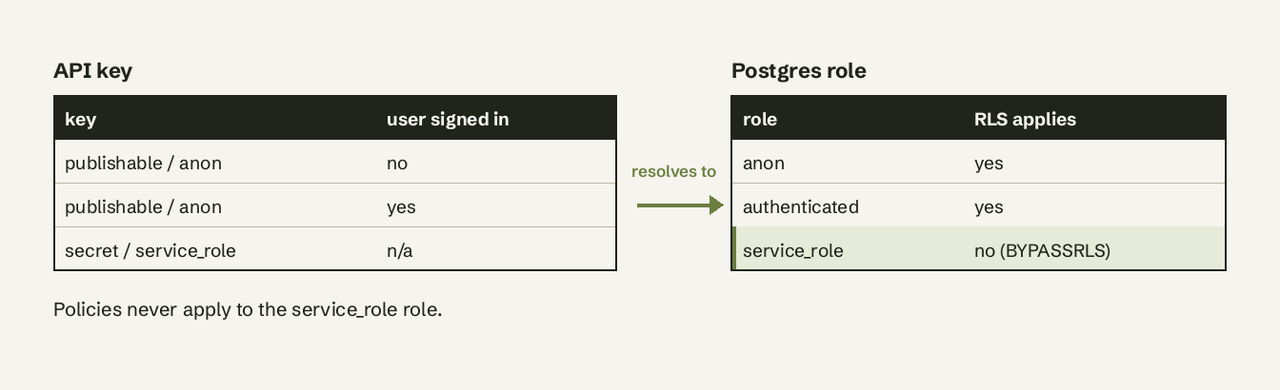
To find the Supabase service role key, open your project in the Supabase Dashboard and go to Settings > API Keys. The legacy service_role key (a long JWT starting with eyJ) and the newer secret keys (sb_secret_...) both live on that page; there is no separate "Settings > API" page any more. Both map to the service_role Postgres role, which has the BYPASSRLS attribute, so any request made with the service key reads and writes every row regardless of your policies. Copy it into a server-only environment variable, use it with createClient in backend code, and if it ever leaks, create a new secret key, swap it in everywhere, then retire the old one.
Prerequisites
- A Supabase project and a Dashboard login with access to project settings.
- For code examples:
@supabase/supabase-jsv2 on a server (Node, Next.js route handler, worker) or a Supabase Edge Function. - A place to store secrets that never ships to users: your host's secret manager or a server-only
.envfile kept out of git.
Which Supabase API key does what?
The service role key is the elevated API key that authenticates a trusted backend component to your Supabase project. Supabase now has four key types (Supabase docs):
| Key | Format | Privileges | Where it goes | Postgres role |
|---|---|---|---|---|
| Publishable key | sb_publishable_... | Low | Browser, mobile app, CLI | anon or authenticated |
| Secret key | sb_secret_... | Elevated, bypasses RLS | Servers, Edge Functions, cron | service_role |
| anon (legacy) | Long-lived JWT | Low | Browser, mobile app | anon or authenticated |
| service_role (legacy) | Long-lived JWT | Elevated, bypasses RLS | Servers only | service_role |
"Service role key", "service key" and "secret key" all describe the same privilege level. The difference is format: the legacy key is a JWT, the new secret key is a short opaque string. If a tutorial tells you to copy a long key starting with eyJ, it was written for the legacy system.
How to find the Supabase service role key, step by step
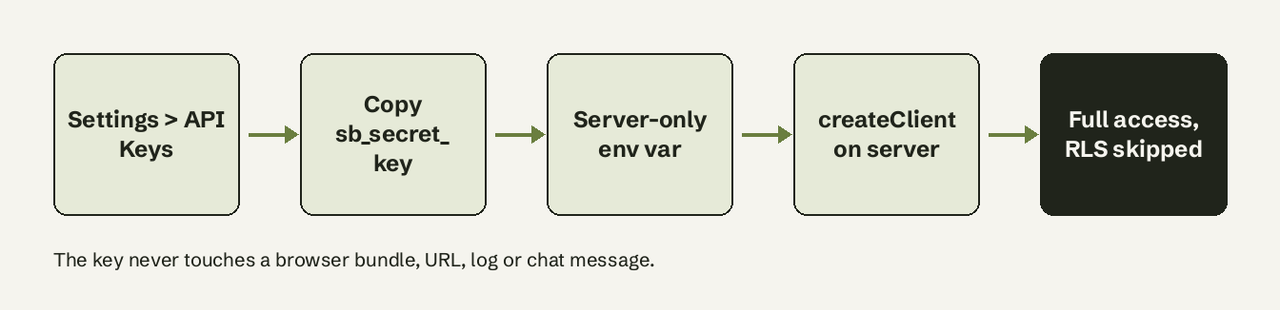
- Open the API Keys page. In the Supabase Dashboard, select your project, then go to Settings > API Keys. Every key lives here, legacy or not. The project's Connect dialog only shows the URL and publishable key, so don't look for the service key there.
- Pick the key type. If your project already has a secret key (
sb_secret_...), use it. If not, create one on the same page. Creating a secret key does not revoke your legacyservice_rolekey; both keep working until you disable the legacy keys yourself. For new code, prefer the secret key, because the legacy keys are deprecated by the end of 2026. - Store it in a server-only environment variable. Never give it your framework's public prefix (
NEXT_PUBLIC_,VITE_,EXPO_PUBLIC_), or the bundler ships it to every visitor:
   # Safe to expose to the browser
   NEXT_PUBLIC_SUPABASE_URL=https://your-project.supabase.co
   NEXT_PUBLIC_SUPABASE_PUBLISHABLE_KEY=sb_publishable_...

   # Server-only. No public prefix.
   SUPABASE_URL=https://your-project.supabase.co
SUPABASE_SECRET_KEY=sb_secret_...- Create an admin client in backend code only. Use it in a route handler, worker or script that never runs on a user's device:
   import { createClient } from '@supabase/supabase-js'

   export const supabaseAdmin = createClient(
     process.env.SUPABASE_URL!,
     process.env.SUPABASE_SECRET_KEY!
)- In Edge Functions, don't read the key yourself. Supabase recommends the
@supabase/serverSDK, which verifies the caller's secret key and hands you a privileged client:
   import { withSupabase } from 'npm:@supabase/server@1'

   export default {
     fetch: withSupabase({ auth: 'secret' }, async (_req, ctx) => {
       const { data } = await ctx.supabaseAdmin.from('profiles').select('email')
       return Response.json({ data })
     }),
   }
Set verify_jwt = false in supabase/config.toml for a function called with a secret key. If you build the client by hand, read SUPABASE_SECRET_KEYS, which the runtime injects as a JSON dictionary keyed by key name. SUPABASE_SERVICE_ROLE_KEY still exists in the runtime but carries the legacy JWT.
- For local development, use the keys the CLI prints.
supabase startprints a publishable key and a secret key for your local stack; the local secret key replaces the old localservice_rolekey.
How do I verify it worked?
Run a query that RLS would normally block. If a table has RLS enabled and no policy for anon, a publishable-key client gets an empty array, while the admin client returns rows:
const { data, error } = await supabaseAdmin.from('profiles').select('id').limit(1)
console.log(error ?? `rows: ${data.length}`)
If you get a permission denied error instead of rows, the problem is a table grant, not RLS. Postgres checks grants before Row Level Security, and a missing grant fails even for service_role. Check the grant before you debug a policy.
Does it bypass Row Level Security?
Yes. Requests made with the legacy service_role key or a new secret key run as the service_role Postgres role, which has the BYPASSRLS attribute. Your policies are skipped entirely, so the key can read, insert, update and delete any row in any table it has grants on. Write your policies for anon and authenticated; they never apply to the service key. For more on how policies work, see our guide to row level security.
Is it safe in the browser?
No. A leaked service key exposes all of your project's data, and anything you ship to a browser or app can be read from the bundle or the network inspector. Supabase now actively blocks the new secret keys in browsers: it checks the User-Agent header and returns HTTP 401 Unauthorized. That block is a safety net, not protection, because an attacker can still use a leaked key from curl or a script.
Supabase's own rules for secret keys (API keys security reference):
- Never in a web page, public doc, source code or a bundled mobile, desktop or CLI package, and never in a browser, even on localhost.
- Never in a URL or query parameter, and never over chat, email or SMS.
- Never logged. If you must record which key was used, log at most 6 characters after the prefix, or a SHA256 hash.
- One secret key per backend component, so a leak only forces one rotation.
If your frontend needs privileged data, add a server endpoint that checks the user's identity, then uses the admin client on their behalf.
How do I rotate a leaked key?
Rotate by adding a new key first and deleting the old one last:
- Find and fix the cause of the leak (a committed
.env, a public prefix, a log line). - Create a new secret key in Settings > API Keys.
- Replace the compromised key everywhere it is used: servers, cron jobs, CI secrets, Edge Functions. If the leaked key was the legacy JWT
service_rolekey, replace it with the new secret key. - Confirm every component works on the new key.
- Retire the old key. Deleting a secret key cannot be undone. Legacy
anonandservice_rolekeys are deactivated instead, which is reversible if you find a client you missed.
Separate secret keys also let you rotate one backend component without touching the rest, which is a good reason to migrate before the deprecation deadline.
Common errors and fixes
| Symptom | Cause | Fix |
|---|---|---|
401 Unauthorized from a browser | Secret key used client-side; Supabase blocks it by User-Agent | Move the call to a server route |
permission denied for table ... | Missing table grant; grants are checked before RLS | Grant the privilege to the role |
| Empty array with the publishable key | RLS policy matches no rows | Fix the policy, or query from the server |
| JWT verification fails on a new key | sb_secret_ keys are not JWTs | Send it on the apikey header, not Authorization: Bearer |
| Self-hosted keys rejected | Legacy keys must be signed with your JWT secret | Regenerate them from the same JWT secret your stack uses (issue #23639) |
Should a BI or AI tool get admin access?
Usually not, and you should push back when one asks for it. A reporting or BI tool only needs to read, and the service key grants write and delete on every table. The safer pattern is a dedicated read-only Postgres user with SELECT grants on the schemas you want to analyze, connected through your project's connection string. We walk through that setup in how to give AI read-only database access.
That is how AI for Database connects to Supabase: read-only, with the SQL shown for every answer, so your team can ask "how many signups did we get this week?" and get a chart without anyone handling an admin key. Try AI for Database free at aifordatabase.com, sample data included. For more on querying Supabase this way, see querying Supabase without SQL and our database security best practices.
Frequently Asked Questions
Where do I find the Supabase service role key?
In the Supabase Dashboard, open your project and go to Settings > API Keys. The legacy service_role JWT and any new sb_secret_... keys are listed there. The Connect dialog only shows the publishable key.
What is the difference between the anon key and the service role key?
The anon (or publishable) key is safe to expose and is limited by your RLS policies. The service role (or secret) key runs as the service_role Postgres role, bypasses RLS and must stay on the server.
Is the service role key the same as the secret key?
They grant the same access through the same Postgres role. The secret key (sb_secret_...) is the newer, non-JWT replacement, and Supabase is deprecating the legacy service_role key by the end of 2026.
Does creating a secret key break my existing service role key?
No. Both systems work side by side. The legacy key stays valid until you deactivate it in Settings > API Keys.
Can I use the service role key in Next.js?
Yes, in server-only code: route handlers, server actions and server components. Keep it in a variable without the NEXT_PUBLIC_ prefix so it is never bundled for the browser.
What should I do if I committed the service role key to GitHub?
Treat it as leaked even after deleting the commit, because it stays in git history. Create a new secret key, replace the old one everywhere, then deactivate or delete the leaked key.