
Cumulative Sum in SQL: Running Totals With SUM() OVER
TL;DR: A cumulative sum in SQL is SUM(amount) OVER (ORDER BY order_date ROWS BETWEEN UNBOUNDED PRECEDING AND CURRENT ROW). Add PARTITION BY to restart the total per group. Always write the ROWS frame explicitly, because the default RANGE frame adds tied rows together.
To calculate a cumulative sum in SQL (also called a running total), use SUM() as a window function: SUM(amount) OVER (ORDER BY order_date, id ROWS BETWEEN UNBOUNDED PRECEDING AND CURRENT ROW). For each row, the database adds the current value to every earlier value in the ORDER BY order, and every row stays in the output. No self-join or subquery is needed. This works in PostgreSQL, MySQL 8.0+, SQL Server 2012+, SQLite 3.25+, Oracle, BigQuery, Snowflake and Redshift. Older engines such as MySQL 5.7 have no window functions, so they need a correlated subquery instead (shown in Step 6).
What you need
- A database with window functions: PostgreSQL (any supported version), MySQL 8.0 or later, SQL Server 2012 or later for
ROWS/RANGEframes, SQLite 3.25.0 or later. - A column that defines the order (a date or timestamp) and a numeric column to add up.
- A unique tiebreaker column such as
id, so the order is deterministic.
All examples use this orders table:
CREATE TABLE orders (
  id          INT PRIMARY KEY,
  customer_id INT,
  order_date  DATE,
  amount      NUMERIC(10,2)
);

INSERT INTO orders VALUES
  (1, 101, '2026-01-01', 100),
  (2, 102, '2026-01-02',  50),
  (3, 101, '2026-01-02',  30),
  (4, 102, '2026-01-04',  70),
  (5, 101, '2026-01-05',  20);
How do I calculate a running total in SQL?
Follow these steps in order. Each one builds on the previous query.
- Pick the order. Decide which column defines "before". For revenue it is the order date; break ties with the primary key:
ORDER BY order_date, id. - Wrap the value in SUM() OVER. Add the window function next to the normal columns:
SELECT
  id,
  order_date,
  amount,
  SUM(amount) OVER (
    ORDER BY order_date, id
    ROWS BETWEEN UNBOUNDED PRECEDING AND CURRENT ROW
  ) AS running_total
FROM orders
ORDER BY order_date, id;- Write the frame explicitly.
ROWS BETWEEN UNBOUNDED PRECEDING AND CURRENT ROWmeans "from the first row of the partition up to this exact row". Step 4 explains why the default is not safe. - Check the ordering of the output. The
ORDER BYinsideOVER()controls the calculation; theORDER BYat the end controls how rows are displayed. Keep them the same so the total reads top to bottom. - Add PARTITION BY to reset per group (next section).
- Use a fallback on engines without window functions (MySQL 5.7 section).
The result:
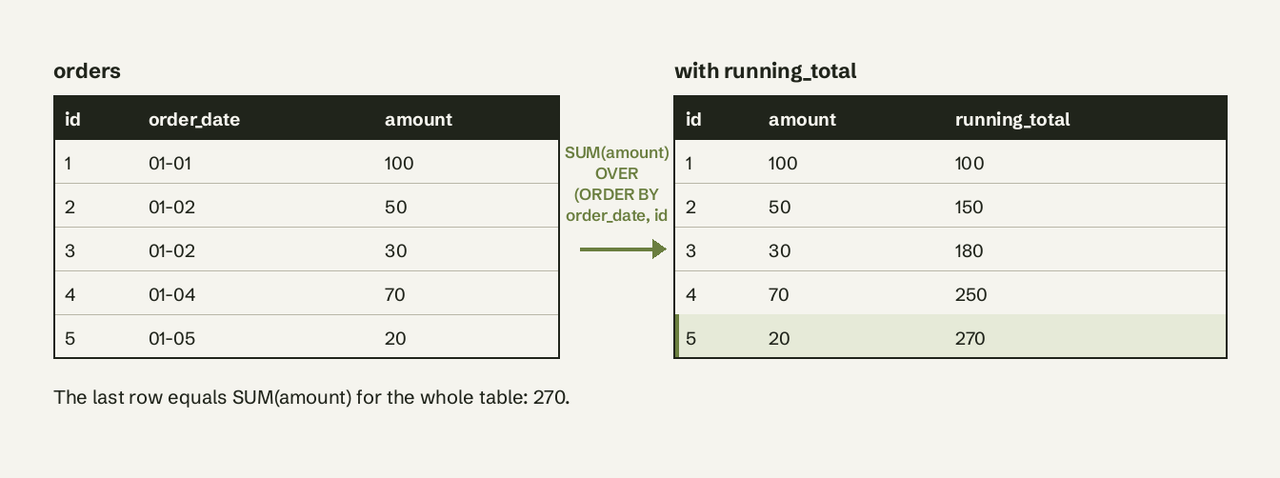
The last running total (270) equals the plain SUM(amount) of the table. That is your first check that the query is right.
How do I reset a cumulative sum per group?
Use PARTITION BY to restart the running total for each group, such as each customer, account or month. Rows are split into partitions, and the sum starts again at zero in each one:
SELECT
  customer_id,
  order_date,
  amount,
  SUM(amount) OVER (
    PARTITION BY customer_id
    ORDER BY order_date, id
    ROWS BETWEEN UNBOUNDED PRECEDING AND CURRENT ROW
  ) AS customer_running_total
FROM orders
ORDER BY customer_id, order_date, id;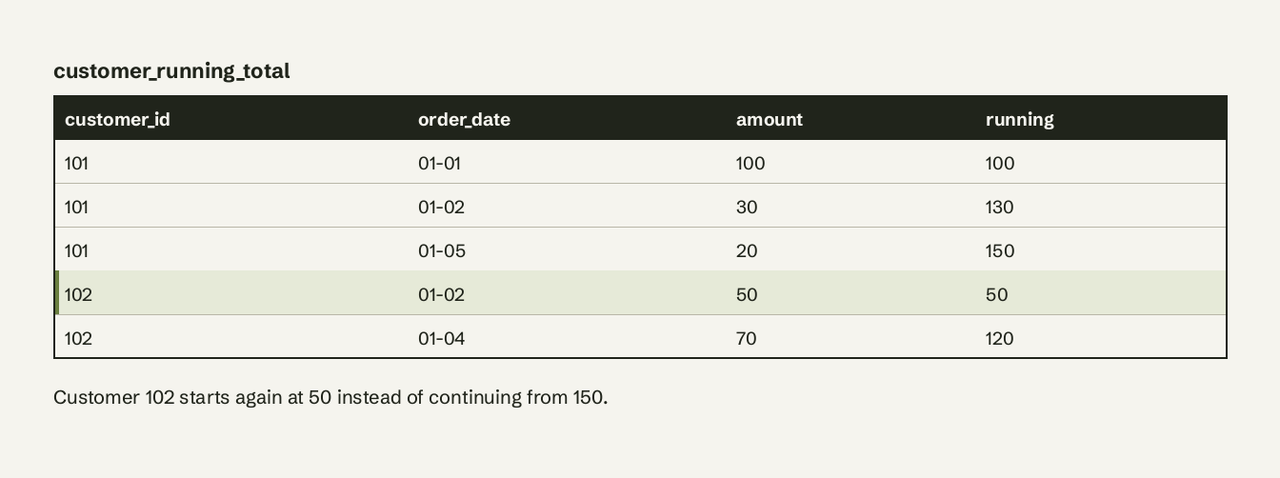
The same pattern gives a month-to-date total: partition by the month.
-- PostgreSQL: month-to-date revenue that resets on the 1st
SELECT
  order_date,
  amount,
  SUM(amount) OVER (
    PARTITION BY date_trunc('month', order_date)
    ORDER BY order_date, id
    ROWS BETWEEN UNBOUNDED PRECEDING AND CURRENT ROW
  ) AS mtd_revenue
FROM orders;
In MySQL use PARTITION BY DATE_FORMAT(order_date, '%Y-%m'); in SQL Server use PARTITION BY YEAR(order_date), MONTH(order_date). For more on partitions, see our guide to SQL PARTITION BY.
ROWS vs RANGE: why do ties double count?
The default frame is RANGE, and RANGE treats rows with the same ORDER BY value as one block. When you write ORDER BY inside OVER() and no frame, PostgreSQL and SQL Server both use RANGE BETWEEN UNBOUNDED PRECEDING AND CURRENT ROW. In RANGE mode, CURRENT ROW ends at the current row's last peer: every row with the same ordering value. So two orders on the same day get the same running total, already including each other.
-- Default frame (RANGE), ordered by date only
SELECT id, order_date, amount,
       SUM(amount) OVER (ORDER BY order_date) AS running_total
FROM orders;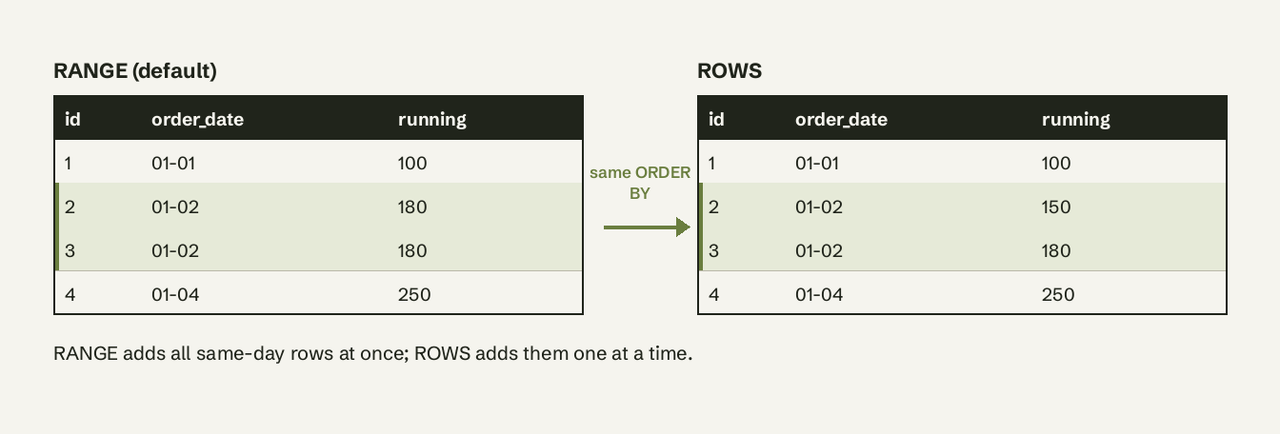
Neither is "wrong"; they answer different questions:
| Frame | Ties (same order value) | Use it when |
|---|---|---|
ROWS BETWEEN UNBOUNDED PRECEDING AND CURRENT ROW | Added one row at a time | You want a row-by-row running balance |
RANGE BETWEEN UNBOUNDED PRECEDING AND CURRENT ROW (default) | Added together as one block | You want "total as of the end of this day" on every row of that day |
GROUPS BETWEEN UNBOUNDED PRECEDING AND CURRENT ROW (PostgreSQL, SQLite) | Counts peer groups instead of rows | You want offsets like "the last 3 distinct dates" |
Two practical rules:
- If you want one running total per day, aggregate first, then take the running sum. That is cleaner than relying on
RANGE:
SELECT
  order_date,
  SUM(amount) AS daily_revenue,
  SUM(SUM(amount)) OVER (ORDER BY order_date) AS cumulative_revenue
FROM orders
GROUP BY order_date
ORDER BY order_date;
After GROUP BY there is one row per date, so there are no ties and RANGE and ROWS give the same answer. The nested SUM(SUM(amount)) is valid: the inner sum is the GROUP BY aggregate, the outer one is the window.
- If you want a row-level total, write
ROWSand add a unique tiebreaker toORDER BY. Without the tiebreaker, rows that tie can come back in a different order between runs and the running total shifts.
How do I do it in MySQL 5.7?
MySQL 5.7 has no window functions (they arrived in MySQL 8.0), so SUM() OVER fails with a syntax error such as ERROR 1064 (42000): You have an error in your SQL syntax ... near '(ORDER BY'. Use a correlated subquery that sums every earlier row:
-- MySQL 5.7: running total with a correlated subquery
SELECT
  o.id,
  o.order_date,
  o.amount,
  (SELECT SUM(o2.amount)
     FROM orders o2
    WHERE o2.order_date < o.order_date
       OR (o2.order_date = o.order_date AND o2.id <= o.id)) AS running_total
FROM orders o
ORDER BY o.order_date, o.id;
The WHERE clause reproduces ORDER BY order_date, id with ROWS semantics. Add AND o2.customer_id = o.customer_id to reset per customer. Cost grows with the square of the row count, so index (order_date, id) and keep it for small tables.
You will also see the user-variable trick:
-- MySQL 5.7 only; deprecated in 8.0
SELECT id, order_date, amount,
       (@total := @total + amount) AS running_total
FROM orders, (SELECT @total := 0) init
ORDER BY order_date, id;
It is fast, but MySQL does not guarantee the order in which expressions with user variables are evaluated, and setting user variables inside expressions is deprecated in MySQL 8.0. Treat it as a last resort, and move to SUM() OVER when you upgrade.
How to verify the running total is correct
- The last row of each partition must equal
SUM(amount)for that partition:SELECT customer_id, SUM(amount) FROM orders GROUP BY customer_id; - The running total must never decrease if all amounts are non-negative. If it drops, rows are ordered differently inside and outside
OVER(). - Rows with the same date should show different totals if you used
ROWS. If they show the same value, you are getting the defaultRANGEframe.
Common errors and fixes
- `ERROR 1064` near `OVER` (MySQL): you are on MySQL 5.7 or MariaDB older than 10.2. Run
SELECT VERSION();and use the subquery fallback. - `column "x" must appear in the GROUP BY clause` (PostgreSQL): you mixed a window over a raw column with
GROUP BY. Window over the aggregate instead:SUM(SUM(amount)) OVER (...). - `Windowed functions can only appear in the SELECT or ORDER BY clauses` (SQL Server): you filtered on the running total in
WHERE. Compute it in a CTE, then filter the outer query. See our CTE glossary entry. - Running total is NULL or skips rows:
SUMignores NULL inputs, so a NULL amount adds nothing; the total is NULL only when every row so far is NULL. UseCOALESCE(amount, 0)if you want explicit zeros. - Same total on several rows: the RANGE tie behavior above. Add
ROWSand a tiebreaker.
Where a running total gets used
Running totals are the base of most growth metrics: cumulative signups, revenue to date, account balances and inventory on hand. A cumulative MRR chart, for example, is a running sum of net new MRR per month; our guide on calculating MRR and ARR from your database walks through the inputs. If you need this kind of number every week and nobody on the team wants to maintain the SQL, AI for Database lets you ask "cumulative revenue by month this year" in plain English, shows the window-function SQL it ran, and pins the result to a dashboard that refreshes itself. Try AI for Database free at aifordatabase.com.
Frequently Asked Questions
What is the difference between a cumulative sum and a running total?
They are the same thing. "Cumulative sum", "running total" and "running sum" all mean the sum of the current value and every earlier value in a defined order.
Can I calculate a cumulative sum without a window function?
Yes. Use a correlated subquery (SELECT SUM(...) FROM t t2 WHERE t2.key <= t.key) or a self-join with GROUP BY. Both work on any SQL engine but slow down sharply on large tables because each row rescans the earlier rows.
How do I calculate a rolling sum of the last 7 rows instead of all rows?
Change the frame start: SUM(amount) OVER (ORDER BY order_date, id ROWS BETWEEN 6 PRECEDING AND CURRENT ROW). For a calendar window of 7 days in PostgreSQL, use RANGE BETWEEN INTERVAL '6 days' PRECEDING AND CURRENT ROW ordered by the date alone.
How do I calculate a cumulative percentage of the total?
Divide the running total by the grand total, which is the same window with no ORDER BY: SUM(amount) OVER (ORDER BY order_date, id ROWS BETWEEN UNBOUNDED PRECEDING AND CURRENT ROW) 100.0 / SUM(amount) OVER ().
Does a cumulative sum in SQL work in BigQuery and Snowflake?
Yes. Both support SUM() OVER (PARTITION BY ... ORDER BY ... ROWS BETWEEN UNBOUNDED PRECEDING AND CURRENT ROW) with the same syntax shown above. Read more on how the clause works in our [window function glossary entry](https://www.aifordatabase.com/glossary/window-function/). Sources: [PostgreSQL window function syntax](https://www.postgresql.org/docs/current/sql-expressions.htmlSYNTAX-WINDOW-FUNCTIONS), [SQL Server OVER clause](https://learn.microsoft.com/en-us/sql/t-sql/queries/select-over-clause-transact-sql), [MySQL 8.0 window functions](https://dev.mysql.com/doc/refman/8.0/en/window-functions.html), [SQLite window functions](https://www.sqlite.org/windowfunctions.html).