
JSON Extract in MySQL: JSON_EXTRACT, -> and ->> Reference
TL;DR: To extract a value from JSON in MySQL, use JSON_EXTRACT(col, '$.key') or its shorthand col->'$.key'. Both return JSON, so strings keep their quotes; use col->>'$.key' to get plain unquoted text, and index the field through a generated column.
JSON_EXTRACT(json_doc, path[, path] ...) returns the part of a JSON document that a path selects, available since the JSON type arrived in MySQL 5.7.8. The path starts at $ (the document root), uses .key for object members and [n] for zero-based array positions. -> is shorthand for JSON_EXTRACT (MySQL 5.7.9) and ->> is shorthand for JSON_UNQUOTE(JSON_EXTRACT(...)) (MySQL 5.7.13). If no path matches, the result is NULL (MySQL JSON search functions).
Syntax Table: Functions, Operators and Paths
You want | Syntax | Returns for {"name": "Ana"}
| A value as JSON | JSON_EXTRACT(doc, '$.name') | "Ana" (quoted) |
|---|---|---|
| Same, shorthand | doc->'$.name' | "Ana" |
| Plain text | doc->>'$.name' | Ana |
| Plain text, long form | JSON_UNQUOTE(JSON_EXTRACT(doc, '$.name')) | Ana |
| A typed value (8.0.21+) | JSON_VALUE(doc, '$.age' RETURNING UNSIGNED) | 34 as an integer |
| Several paths at once | JSON_EXTRACT(doc, '$.a', '$.b') | [1, 2] (wrapped in an array) |
| Array elements as rows (8.0.4+) | JSON_TABLE(doc, '$[*]' COLUMNS (...)) | One row per element |
JSON path syntax
| Path | Selects | Example result |
|---|---|---|
$ | Whole document | the full JSON |
$.plan | Member plan | "pro" |
$.address.city | Nested member | "Pune" |
$."first name" | Key with a space (quote it) | "Ana" |
$.tags[0] | First array element (zero-based) | "vip" |
$.tags[last] | Last element (8.0.2+) | "beta" |
$.tags[0 to 1] | Range (8.0.2+) | ["vip", "trial"] |
$.tags[*] | All elements | ["vip", "trial", "beta"] |
$.* | All member values | array of values |
$**.id | Every id at any depth | array of ids |
Wildcard paths (*, **) and ranges always return an array (MySQL JSON path syntax).
How Do I Extract a Value From JSON in MySQL?
Use JSON_EXTRACT or ->> with a path. Given a customers table with a JSON profile column:
CREATE TABLE customers (
  id INT PRIMARY KEY,
  email VARCHAR(255),
  profile JSON
);

INSERT INTO customers VALUES
 (1, 'ana@example.com', '{"plan": "pro", "seats": 5, "address": {"city": "Pune"}, "tags": ["vip", "trial"]}'),
 (2, 'ben@example.com', '{"plan": "free", "seats": 1, "address": {"city": "Austin"}, "tags": []}');

SELECT id,
       JSON_EXTRACT(profile, '$.plan')      AS plan_json,
       profile->>'$.plan'                   AS plan,
       profile->>'$.address.city'           AS city,
       profile->>'$.tags[0]'                AS first_tag
FROM customers;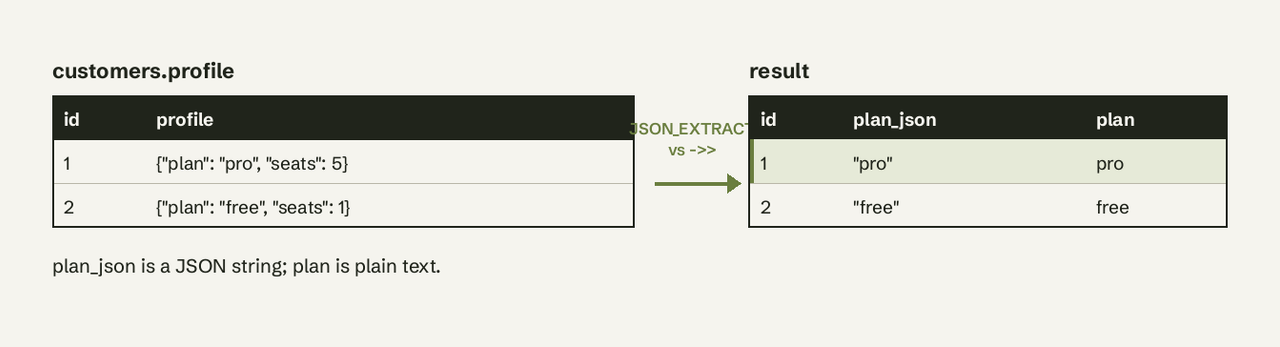
Filter on a JSON value the same way:
SELECT email
FROM customers
WHERE profile->>'$.plan' = 'pro'
  AND JSON_EXTRACT(profile, '$.seats') >= 5;
Numbers compare correctly as JSON values, but compare strings through ->>: profile->'$.plan' = 'pro' compares a JSON string against SQL text and is a common source of empty results.
What Is the Difference Between -> and ->>?
-> returns JSON and ->> returns unquoted text. col->'$.k' equals JSON_EXTRACT(col, '$.k'); col->>'$.k' equals JSON_UNQUOTE(JSON_EXTRACT(col, '$.k')).
| Operator | Equivalent | Output type | Use for |
|---|---|---|---|
-> | JSON_EXTRACT(col, path) | JSON | Nested objects, arrays, passing to other JSON functions |
->> | JSON_UNQUOTE(JSON_EXTRACT(col, path)) | Text (utf8mb4) | Display, WHERE on strings, joins, GROUP BY |
Both operators need a column on the left; for an expression or a string literal, use the function form.
JSON_VALUE: Cast a Scalar to a SQL Type
JSON_VALUE(doc, path RETURNING type), added in MySQL 8.0.21, extracts a scalar and casts it in one step. It is the cleanest choice for sums and date math:
SELECT SUM(JSON_VALUE(profile, '$.seats' RETURNING UNSIGNED)) AS total_seats
FROM customers;
You can add DEFAULT ... ON EMPTY and DEFAULT ... ON ERROR to control missing or bad values.
JSON_TABLE: Turn a JSON Array Into Rows
JSON_TABLE (MySQL 8.0.4+) expands an array into a relational result, which beats extracting $[0], $[1] one at a time:
SELECT c.id, t.tag
FROM customers c,
     JSON_TABLE(c.profile, '$.tags[*]' COLUMNS (tag VARCHAR(50) PATH '$')) AS t;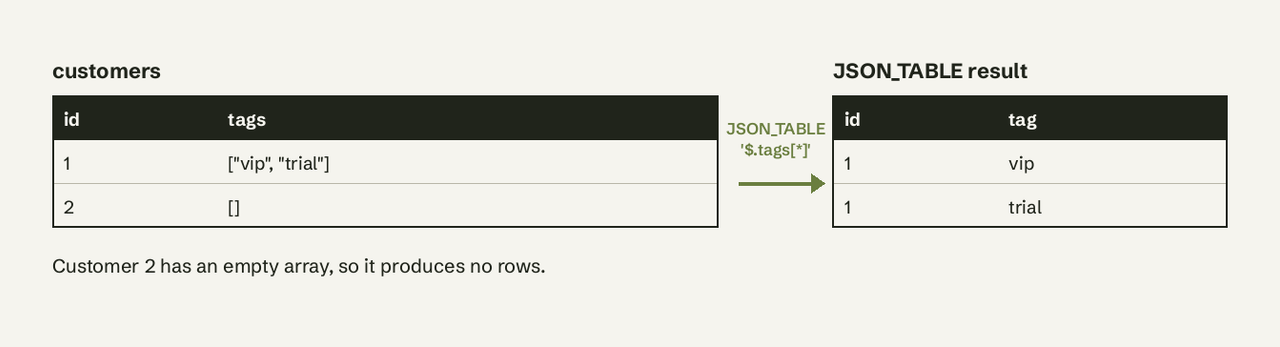
How Do I Index a JSON Field in MySQL?
You can't index a JSON column directly; index a generated column or a functional key part that extracts the field (MySQL secondary indexes and generated columns).
Generated column (MySQL 5.7+):
ALTER TABLE customers
  ADD COLUMN plan VARCHAR(20) AS (profile->>'$.plan') VIRTUAL,
  ADD INDEX idx_plan (plan);

-- The optimizer uses idx_plan for this query
SELECT id FROM customers WHERE profile->>'$.plan' = 'pro';
Functional index (MySQL 8.0.13+):
CREATE INDEX idx_city
  ON customers ((CAST(profile->>'$.address.city' AS CHAR(50)) COLLATE utf8mb4_bin));
The CAST ... COLLATE utf8mb4_bin matters: ->> returns utf8mb4_bin text, and the query must match the indexed expression for MySQL to use it.
Multi-valued index for arrays (MySQL 8.0.17+):
CREATE TABLE orders (
  id INT PRIMARY KEY,
  data JSON,
  INDEX idx_skus ((CAST(data->'$.sku_ids' AS UNSIGNED ARRAY)))
);

SELECT id FROM orders WHERE 1042 MEMBER OF (data->'$.sku_ids');
Multi-valued indexes serve MEMBER OF, JSON_CONTAINS and JSON_OVERLAPS (CREATE INDEX, multi-valued). Check with EXPLAIN that the index appears under key.
Common JSON_EXTRACT Errors
- `ERROR 3141 (22032): Invalid JSON text in argument 1 to function json_extract`: the column holds text that isn't valid JSON. Find bad rows with
WHERE JSON_VALID(col) = 0. - `ERROR 3143 (42000): Invalid JSON path expression`: usually a key with a space or a dash that isn't quoted. Write
'$."order-id"'. - Result is `NULL`: the path doesn't exist, or keys are case-sensitive (
$.Planis not$.plan). - Result has quotes: you used
JSON_EXTRACTor->; switch to->>.
Version Notes: MySQL vs MariaDB
| Feature | MySQL | MariaDB |
|---|---|---|
| Native JSON type | 5.7.8+, binary storage | Alias for LONGTEXT with a JSON_VALID check |
JSON_EXTRACT | 5.7.8+ | Yes |
-> / ->> | 5.7.9 / 5.7.13 | Documented as JSON arrow operators |
JSON_VALUE | 8.0.21+ | Yes (with JSON_QUERY for objects) |
[last], ranges | 8.0.2+ | See MariaDB JSONPath docs |
MariaDB's function reference is at MariaDB JSON_EXTRACT. On Amazon RDS, Aurora MySQL, PlanetScale and Google Cloud SQL, the behaviour follows the MySQL version underneath.
If your team keeps product events or Stripe metadata in JSON columns and the people asking questions don't know path syntax, AI for Database lets them ask in plain English ("customers on the pro plan in Pune") and shows the ->> SQL it ran against your MySQL database. Try AI for Database free.
Related: the SQL cheat sheet, finding duplicates with SQL, COUNTIF in SQL, Postgres vs MySQL and our MySQL integration.
Frequently Asked Questions
How do I extract a value from JSON in MySQL?
Use JSON_EXTRACT(column, '$.key') or column->>'$.key'. The second returns plain text without quotes, which is what you want for display and string comparisons.
What is the difference between -> and ->> in MySQL?
-> returns a JSON value (strings keep their double quotes), equal to JSON_EXTRACT. ->> also unquotes the result, equal to JSON_UNQUOTE(JSON_EXTRACT(...)).
How do I index a JSON field in MySQL?
Add a generated column that extracts the field and index it, or on MySQL 8.0.13+ create a functional index on CAST(col->>'$.key' AS CHAR(n)) COLLATE utf8mb4_bin. For arrays, use a multi-valued index on CAST(... AS UNSIGNED ARRAY).
Why does JSON_EXTRACT return NULL?
The path doesn't match: the key is missing, is spelled with a different case, or contains special characters that need double quotes in the path.
How do I extract a value from a JSON array in MySQL?
Use a zero-based index such as '$.tags[0]', '$.tags[last]' for the last element, or JSON_TABLE to turn every element into its own row.
Does JSON_EXTRACT work in MySQL 5.7?
Yes. JSON_EXTRACT and -> work from 5.7.8 and 5.7.9, and ->> from 5.7.13. JSON_TABLE, JSON_VALUE, [last] and multi-valued indexes need MySQL 8.0.