
Analytics Stack for Small Teams: 14 Tools and Free Tiers
TL;DR: An analytics stack has five layers: sources, ingestion, storage, transformation and the layer people actually look at (BI, product analytics, alerts). A team under about 20 people rarely needs all five on day one. Start with your production database plus one product analytics tool, add a warehouse when you have three or more data sources to join.
An analytics stack is the set of tools that collects data from your apps, stores it in one queryable place, models it into metrics, and puts those metrics in front of people as dashboards, reports and alerts. The modern data stack diagrams you see from vendors show a dozen boxes; most startups get far with three: the production database (often PostgreSQL), an event-tracking tool such as PostHog or Mixpanel, and something that turns SQL into charts. This page lists the tools for each layer with their free tiers as of November 2026, then gives a start-here path by team size.
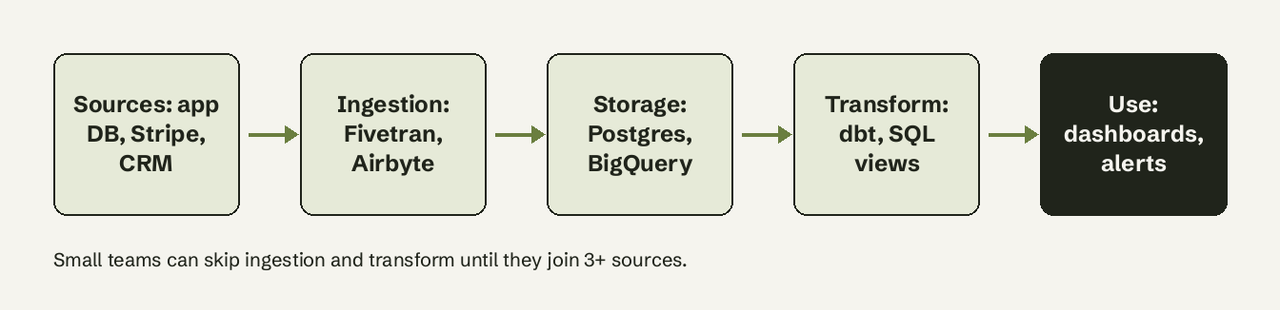
What tools make up an analytics stack?
An analytics stack is made of one or more tools per layer:
| Layer | Job | Small-team default | When to upgrade |
|---|---|---|---|
| Sources | Where data is born | Your app database, Stripe, CRM | n/a |
| Ingestion | Copy data into one place | Skip; query the source directly | 3+ sources to join |
| Storage | Hold data for analysis | PostgreSQL read replica | Queries slow the app, or data > a few hundred GB |
| Transformation | Clean and define metrics | SQL views | 20+ metrics, more than one analyst |
| Use | Dashboards, product analytics, alerts | One BI tool + one event tool | People wait on engineers for numbers |
Which analytics stack tools have free tiers?
Product analytics (event tracking)
- PostHog: open source product analytics with session replay and feature flags. Free tier is 1M analytics events and 1M feature flag requests a month, renewing monthly, no card; PostHog says 97% of its companies stay free. Best first pick if engineers own analytics.
- Mixpanel: funnels, retention and cohorts with the friendliest UI for PMs. Free plan covers up to 1M events and 10K session replays a month. Pick it when non-engineers will build their own reports.
- Google Analytics 4: free web analytics for marketing traffic. Good for acquisition, weak for in-product behavior.
Ingestion (ELT)
- Fivetran: managed connectors, near zero maintenance. The Free plan covers 500,000 monthly active rows and 5,000 model runs a month, enough for a few SaaS sources at small scale.
- Airbyte: open source connectors. Airbyte Core is free to self-host under the Elastic License 2.0; Airbyte Cloud starts with a 14-day trial of 400 credits (about 100 GB of syncs). Choose it when you have someone happy to run Docker.
Storage (database or warehouse)
- PostgreSQL: free and open source. A read replica of your production Postgres is a perfectly good analytics store until queries take minutes.
- Supabase: hosted Postgres. Free plan is $0 with 2 active projects that pause after one week of inactivity; Pro is $25 a month. Fine for a side analytics database, not for production analytics on the free plan.
- BigQuery: serverless warehouse billed by data scanned. The first 1 TiB of query processing each month is free, then $6.25 per TiB on demand. The cheapest warehouse to start with if your queries stay small.
- DuckDB: free, MIT-licensed, in-process analytical database. Query CSV and Parquet files on a laptop at warehouse speed with no server.
- MotherDuck: hosted DuckDB. Free tier includes 10 GB of storage and 10 hours of compute a month.
Transformation
- dbt Core: open source, free; SQL models with tests and docs, versioned in git. The standard once you have more than a handful of metric definitions.
- SQL views in your database: zero new tools. Start here; move to dbt when two people start defining "active user" differently.
BI, dashboards and alerts
- Metabase: open source BI, free with unlimited users when self-hosted; Metabase Cloud Starter is $100 a month (or $90 billed yearly) plus $6 per extra user. Strong question builder for simple charts.
- Looker Studio: free Google dashboarding, best when data already sits in BigQuery or Google Sheets.
- Apache Superset: free, open source, powerful SQL-first dashboards; heavier to host than Metabase.
Learning resources worth the time
- dbt Learn: free courses on analytics engineering and modeling; the best way to understand the transformation layer even if you never adopt dbt.
- PostgreSQL documentation: window functions and aggregates chapters cover most metric SQL a startup needs.
- r/dataanalysis: practitioners comparing real stacks and tools; useful for honest gripes vendors leave out.
- BigQuery public datasets: free datasets to practise warehouse SQL before you move your own data.
What is the minimum analytics stack for a startup?
The minimum analytics stack for a startup is three pieces: the production database with a read-only user, one product analytics tool for events, and one way to turn SQL into charts that non-engineers can open. That covers signups, activation, revenue and churn for most seed-stage SaaS companies. Everything else is added when a specific pain shows up.
The read-only role is the step most teams skip. In PostgreSQL it takes four statements:
CREATE ROLE analytics_ro WITH LOGIN PASSWORD 'change-me';
GRANT CONNECT ON DATABASE app TO analytics_ro;
GRANT USAGE ON SCHEMA public TO analytics_ro;
GRANT SELECT ON ALL TABLES IN SCHEMA public TO analytics_ro;
Add ALTER DEFAULT PRIVILEGES IN SCHEMA public GRANT SELECT ON TABLES TO analytics_ro; so new tables are readable too, and set statement_timeout = '30s' on the role so a heavy report cannot stall the app.
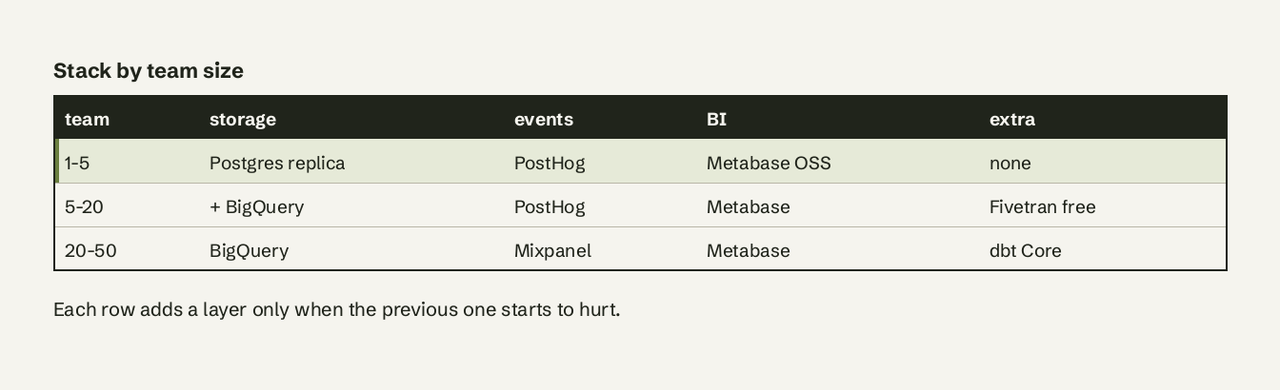
A start-here path by team size:
- 1-5 people: Postgres read replica (or the main DB with a read-only role), PostHog or Mixpanel free plan, Metabase open source or Looker Studio. Cost: $0.
- 5-20 people: add a warehouse (BigQuery free tier is the cheapest start) and Fivetran's free plan or Airbyte to pull in Stripe and your CRM. Define metrics as SQL views.
- 20-50 people: move metric logic into dbt, add data tests, and give one person ownership of the stack.
- 50+ people or a first data hire: now the full modern data stack starts to pay for itself.
Do small teams need a data warehouse?
Small teams usually do not need a data warehouse until they must join data from three or more systems, or until analytics queries start slowing the production database. A read replica of PostgreSQL handles millions of rows of reporting comfortably. The warehouse becomes worth it when you want Stripe revenue, CRM deals and product events in one query, which is exactly the point where an ingestion tool also earns its place.
The layer small teams most often get wrong is the last one: they set up dashboards, then every new question still lands on an engineer. AI for Database connects to the Postgres, MySQL or BigQuery you already have, answers plain-English questions with the SQL shown, keeps dashboards refreshed and sends alerts when a metric moves, so the 1-5 person stack above does not need a BI specialist. Try AI for Database free at aifordatabase.com.
Related reading: text-to-SQL explained, our PostgreSQL connection guide, PostgreSQL to Slack alerts and scheduling a Postgres query.
Frequently Asked Questions
What is the difference between an analytics stack and a modern data stack?
An analytics stack is any set of tools you use to get from raw data to decisions. The modern data stack is a specific pattern of that: cloud warehouse, managed ELT, dbt transformations and BI on top. Every modern data stack is an analytics stack; a two-tool startup setup is an analytics stack too.
Is Google Analytics enough for a SaaS analytics stack?
No. Google Analytics 4 measures website traffic and acquisition well, but it does not see what happens inside your product or your billing data. Pair it with an event tool such as PostHog or Mixpanel and SQL access to your database.
How much does an analytics stack cost for a startup?
It can be $0. PostHog (1M events), Mixpanel (1M events), BigQuery (1 TiB of queries), Fivetran (500,000 monthly active rows) and self-hosted Metabase all have free tiers that cover a typical seed-stage company.
Should I use PostHog or Mixpanel?
Use PostHog when engineers own analytics and you also want session replay and feature flags in one tool. Use Mixpanel when product managers and marketers will build most reports themselves. Both free plans cover 1M events a month.
When should I add dbt?
Add dbt when metric definitions start to drift between people or dashboards, usually around 20 or more metrics or a second person writing analytics SQL. Before that, plain SQL views in your database do the same job with less setup.