
pandas read_sql: Run SQL Queries Into a DataFrame
TL;DR: pd.read_sql(query, con) runs a SQL query (or reads a whole table) and returns a pandas DataFrame. Pass a SQLAlchemy engine or connection as con, put user values in params instead of f-strings, and use chunksize with a server-side cursor for big tables. If you want the answer without writing Python at all, AI for Database lets you ask the same question in plain English and shows the SQL it ran.
To read SQL into pandas, install pandas and SQLAlchemy plus your database driver, create an engine with create_engine("postgresql+psycopg://user:pass@host/db"), then call df = pd.read_sql(text("SELECT ... WHERE id = :id"), engine, params={"id": 42}). read_sql is a convenience wrapper: a query string goes to read_sql_query, a bare table name goes to read_sql_table. Everything below is checked against the pandas 3.1.1 docs.
Try AI for Database free at aifordatabase.com (https://app.aifordatabase.com/signup, sample data included).
When is pandas the wrong tool, and what does AI for Database do instead?
pandas is the right tool when the result feeds Python: a model, a notebook, a data-cleaning script. It is the wrong tool when someone on the team just needs a number or a recurring report. That is the job AI for Database does:
- Ask in plain English. Connect PostgreSQL, MySQL, SQL Server, SQLite, BigQuery, Supabase and more, type "revenue by country last 30 days", and get a table or chart. Every answer shows its SQL, so you can paste it into
read_sqllater. - Read-only answers. Queries run read-only, so nobody can drop a table by accident.
- Dashboards that refresh themselves. Pin an answer and it re-runs on a schedule, instead of a cron job calling a pandas script.
- Workflows on data changes. "When daily signups drop below 50, send a Slack alert" replaces a polling script.
- Price. Start free with sample data; Pro is $10 per user per month (aifordatabase.com/pricing, as of 2026-10-23).
If you are writing Python anyway, keep reading.
What do you need before running read_sql?
- Python 3.10+ and pandas 2.2 or newer (the docs used here are pandas 3.1.1).
- SQLAlchemy 2.x for any database other than SQLite.
- A driver:
psycopg(PostgreSQL),pymysql(MySQL),pyodbc(SQL Server), or the standard librarysqlite3.
How to read SQL into pandas, step by step
- Install the packages.
pip install "pandas>=2.2" "sqlalchemy>=2.0" "psycopg[binary]"- Create an engine. The URL picks the dialect and driver.
import pandas as pd
from sqlalchemy import create_engine, text

engine = create_engine("postgresql+psycopg://analyst:secret@localhost:5432/shop")- Run a query into a DataFrame.
df = pd.read_sql(text("SELECT id, email, created_at FROM customers LIMIT 100"), engine)
print(df.shape)- Pass parameters safely. Use
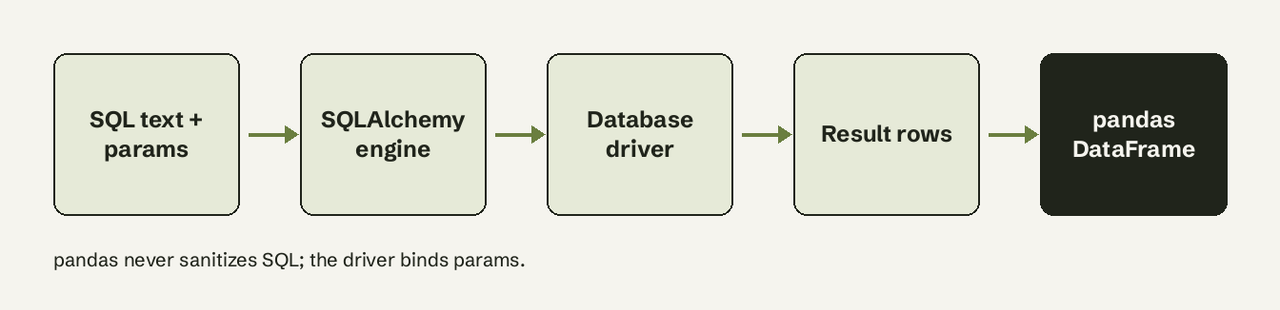
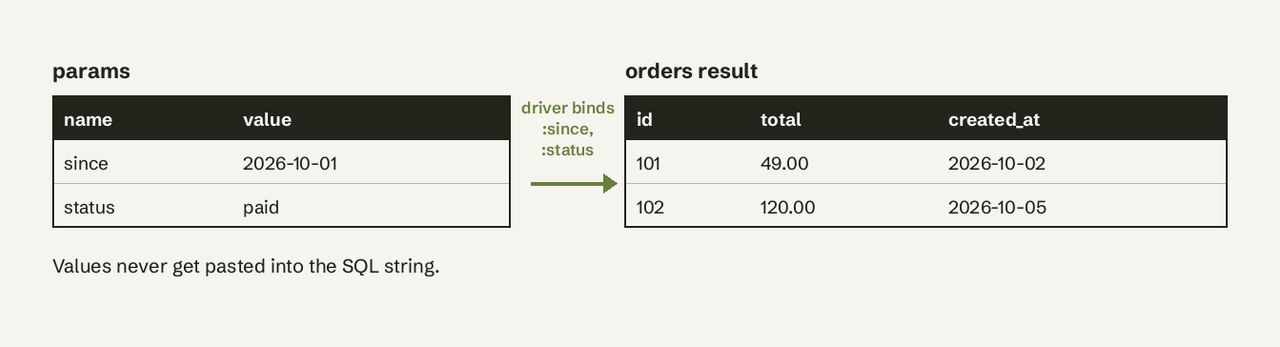
paramswith SQLAlchemytext()and:nameplaceholders. pandas forwards SQL to the driver without sanitizing it, so an f-string with user input is an injection risk.
sql = text("""
    SELECT id, total, created_at
    FROM orders
    WHERE created_at >= :since AND status = :status
""")
df = pd.read_sql(sql, engine, params={"since": "2026-10-01", "status": "paid"})- Parse dates and set an index.
df = pd.read_sql(
    sql, engine,
    params={"since": "2026-10-01", "status": "paid"},
    parse_dates=["created_at"],
    index_col="id",
)- Choose dtypes.
dtype_backend="pyarrow"(added in 2.0) gives nullable Arrow types, so an integer column with NULLs stays integer instead of becoming float.
df = pd.read_sql(sql, engine, params={"since": "2026-10-01", "status": "paid"},
dtype_backend="pyarrow")- Close what you open. pandas closes connections it built from a string URI, but you own SQLAlchemy engines and connections. Call
engine.dispose()when a script ends.
What is the difference between read_sql, read_sql_query and read_sql_table?
| Function | Takes | Notes |
|---|---|---|
read_sql | query or table name | Wrapper, kept for backward compatibility; routes to one of the two below |
read_sql_query | a SELECT query | Tz-aware datetimes from parse_dates are converted to UTC |
read_sql_table | a table name | Needs SQLAlchemy; supports columns=[...] and schema |
With a plain sqlite3 connection only queries work: pd.read_sql("orders", sqlite_conn) fails because the table route needs SQLAlchemy. Use read_sql_query when you always pass SQL; the intent is clearer to the next reader.
How do you read a large table in chunks?
chunksize=N returns an iterator of DataFrames with N rows each. The pandas docs warn that this alone usually does not lower peak memory, because most drivers buffer the whole result set. Pair it with a server-side cursor via SQLAlchemy stream_results:
with engine.connect().execution_options(stream_results=True) as conn:
    for chunk in pd.read_sql(text("SELECT * FROM events"), conn, chunksize=50_000):
        chunk.to_parquet(f"events_{chunk.index[0]}.parquet")
Better still: push the aggregation into SQL (GROUP BY in the database) so pandas only receives the summary rows.
How do you write a DataFrame back with to_sql?
rows = df.to_sql("orders_clean", engine, if_exists="append", index=False,
chunksize=1_000, method="multi")if_exists:fail(default, raises ValueError),replace(drops the table),append, ordelete_rows(empties it, keeps the schema).index=Trueis the default and writes the DataFrame index as a column. Setindex=Falseunless you want it.method="multi"sends many rows per INSERT. Oracle does not support it.- The return value is the number of rows affected as reported by the driver.
Common errors and fixes
Why does pandas warn about a DBAPI2 connection?
UserWarning: pandas only supports SQLAlchemy connectable (engine/connection) or database string URI or sqlite3 DBAPI2 connection. Other DBAPI2 objects are not tested. You passed a raw psycopg2 or pymysql connection. It often works, but it is untested. Fix: wrap it in a SQLAlchemy engine, or pass an ADBC connection (supported since pandas 2.2).
AttributeError: 'OptionEngine' object has no attribute 'execute'
Old pandas (1.x) with SQLAlchemy 2.0. Upgrade pandas to 2.2+, which supports SQLAlchemy 2.
ObjectNotExecutableError or "Not an executable object"
You passed a plain string to a raw SQLAlchemy conn.execute(). Wrap it: text("SELECT ...").
Big IDs come back slightly wrong
coerce_float=True turns Decimal values into float64, and integers above 2**53 lose precision. Pass coerce_float=False or cast the column to text in SQL.
ValueError: Table 'orders_clean' already exists
to_sql defaults to if_exists="fail". Choose append, replace or delete_rows.
How do you verify it worked?
Check df.shape against SELECT COUNT(*) with the same filters, inspect df.dtypes (dates should be datetime64, not object), and for to_sql compare the returned row count to len(df).
Related guides
- SQL cheat sheet
- SQL notebook options
- How to schedule a query in Postgres
- Find duplicates with a SQL query
Sources: pandas.read_sql docs, pandas.read_sql_query docs, DataFrame.to_sql docs, SQLAlchemy server-side cursors.
Try AI for Database free at aifordatabase.com: ask your database in plain English and see the SQL behind every answer. Start free.
Frequently Asked Questions
Is pandas read_sql safe from SQL injection?
Only if you use params. pandas does not sanitize SQL; the driver binds parameters. Never build the query with f-strings from user input.
What parameter syntax should I use?
With SQLAlchemy text(), use :name. With a raw driver, follow its PEP 249 paramstyle: psycopg2 uses %(name)s, sqlite3 uses ?.
Can read_sql run INSERT or UPDATE?
It is built for queries that return rows. Run writes through conn.execute(text(...)) inside engine.begin(), or use to_sql.
Does read_sql work with MySQL, SQL Server and Snowflake?
Yes, through any SQLAlchemy dialect: mysql+pymysql://, mssql+pyodbc://, or the snowflake-sqlalchemy package.
Can I get the same answers without Python?
Yes. Connect the database to AI for Database, ask the question in plain English, and copy the SQL it shows into read_sql when you need it in a notebook.