
MetricFlow Resources: 18 Docs, Repos and Tools Worth Using
TL;DR: MetricFlow is the open source engine behind the dbt Semantic Layer: you define metrics once in YAML and it writes the SQL. It has been Apache 2.0 licensed since version 0.209.0 (October 2025). Start with the dbt "About MetricFlow" docs, clone the jaffle-sl-template repo, and run mf tutorial; everything else below is for when you go deeper.
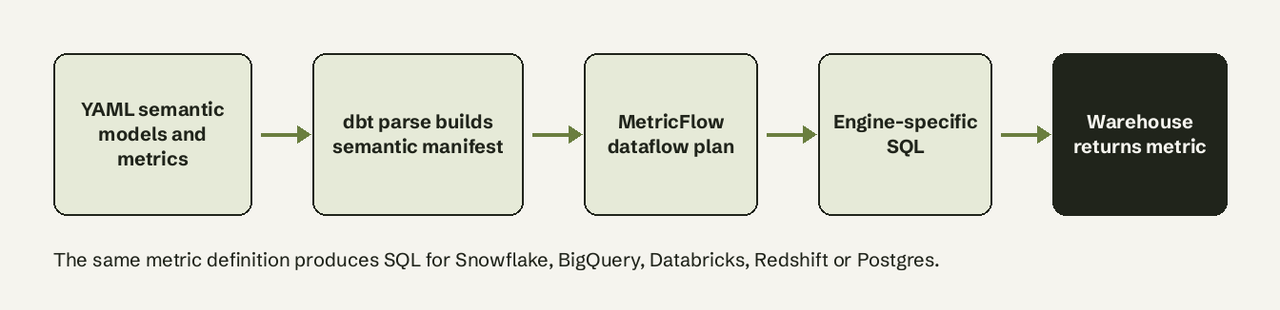
MetricFlow is a Python library from dbt Labs that turns metric definitions written in YAML (semantic models, entities, dimensions, measures and metrics) into SQL for your warehouse. Its README describes how: "metric requests are compiled into a dataflow-based query plan, which is then optimized and translated into engine-specific SQL." It handles multi-hop joins, ratio, cumulative and derived metrics, and rolling metrics up to different time grains. You can run it free with self-hosted dbt using the mf CLI, or through dbt's paid platform, where it powers the Semantic Layer APIs that Tableau, Power BI, Google Sheets, Hex and others query. The resources below are grouped by what you are trying to do, each with who it suits, what it costs and why it is worth the time. All links and versions were checked on November 6, 2026.
What is MetricFlow, and is it free and open source?
MetricFlow is free and open source under the Apache 2.0 license from version 0.209.0, published to PyPI on October 14, 2025. The license history is spelled out in the repo: versions up to 0.140.0 were AGPL, 0.150.0 to 0.208.2 were under the Business Source License, and 0.209.0 onward is Apache 2.0. That change is why older forum threads say you cannot embed MetricFlow commercially; that advice is now out of date.
What is not free is the hosted dbt Semantic Layer. According to dbt's pricing page, the free Developer plan is one seat and does not include the Semantic Layer; Starter is $100 per user per month with 5,000 queried metrics a month, and Enterprise tiers include 20,000 queried metrics a month. The MetricFlow commands docs confirm you need a Starter, Enterprise or Enterprise+ account to query metrics from downstream tools.
| Use | Where it runs | Cost | Command prefix |
|---|---|---|---|
| Define and test metrics locally | Self-hosted dbt + dbt-metricflow | Free (Apache 2.0) | mf |
| Query metrics in dbt Studio IDE or dbt CLI | dbt platform | Paid plan | dbt sl |
| Serve metrics to BI tools via GraphQL/JDBC | dbt platform Semantic Layer | Starter and up | APIs |
MetricFlow vs the dbt Semantic Layer
MetricFlow is the engine; the dbt Semantic Layer is the hosted service built on it. MetricFlow defines the spec for semantic models and metrics and generates the SQL. The Semantic Layer adds what a business needs to consume those metrics: GraphQL and JDBC APIs, caching through the dbt job scheduler, saved query exports and native integrations. If you only need consistent metric SQL inside your dbt project and CI, MetricFlow alone is enough. If you need Tableau or Google Sheets users pulling governed metrics, you need the Semantic Layer. Our semantic layer vs metrics layer guide covers the broader category.
Official docs: start here
These are the pages to read first. All are free.
- About MetricFlow: the concept primer (semantic graph, semantic models, entities, metric types). Read it before writing YAML; it also lists supported warehouses: Snowflake, BigQuery, Databricks, Redshift, and Postgres on dbt v1 only.
- Semantic models: the reference for entities, dimensions and measures. You will keep this open while modeling.
- Creating metrics: every metric type (simple, ratio, cumulative, derived, conversion) with YAML examples.
- MetricFlow time spine: required reading, because time-based metrics fail without a time spine model. Since dbt 1.9 it is configured with the
time_spineYAML property, and the oldmetricflow_time_spine.sqlmodel can be deleted afterwards. - MetricFlow commands: the
mfanddbt slcommand matrix, install steps and the gotchas (see below). - Saved queries: reusable metric queries and exports, useful when you want MetricFlow output materialized as tables.
Learning paths and guides
- How we build our metrics: dbt Labs' own best-practices series, the best explanation of how to structure semantic models in a real project. Free, for analytics engineers past the basics.
- Semantic Layer quickstart (Snowflake): an end-to-end guide from an empty account to querying a metric in a BI tool. Free to read; following it needs a dbt platform trial.
- dbt Semantic Layer overview: what the hosted layer adds on top of MetricFlow. Read it before choosing between self-hosted and paid.
Code, repos and example projects
- dbt-labs/metricflow on GitHub: the source, issues and roadmap discussion. About 1,860 stars and actively committed to (last push November 2, 2026). Read
TENETS.mdto understand the design choices. - MetricFlow CHANGELOG: check this before upgrading; behaviour changes land here first.
- jaffle-sl-template: dbt Labs' example project with semantic models and metrics already defined. The fastest way to see working YAML. Free.
- dbt-metricflow on PyPI: the install bundle. Version 0.15.0 (September 2026) supports Python 3.10 to 3.14.
- dbt-mcp: dbt Labs' official MCP server, which gives AI agents access to your dbt project, including Semantic Layer tools.
- mcp-metricflow: a community MCP server that wraps the MetricFlow CLI (
query,list_metricsand more) over STDIO or SSE, for teams running MetricFlow self-hosted. More on the pattern in our MCP server for databases glossary entry.
How do I get started with MetricFlow?
Install it into the same environment as your dbt project, then run the built-in tutorial:
# pick the extra for your warehouse adapter
python -m pip install "dbt-metricflow[dbt-snowflake]"

# from your dbt project root
mf tutorial
Then define a semantic model and a metric next to the dbt model it describes:
semantic_models:
  - name: orders
    model: ref('orders')
    defaults:
      agg_time_dimension: ordered_at
    entities:
      - name: order_id
        type: primary
      - name: customer
        type: foreign
        expr: customer_id
    dimensions:
      - name: ordered_at
        type: time
        type_params:
          time_granularity: day
    measures:
      - name: order_total
        agg: sum

metrics:
  - name: revenue
    label: Revenue
    type: simple
    type_params:
      measure: order_total
Parse, validate and query it:
dbt parse                     # refreshes semantic_manifest.json
mf validate-configs           # checks semantic models and metrics
mf list metrics
mf query --metrics revenue --group-by metric_time__month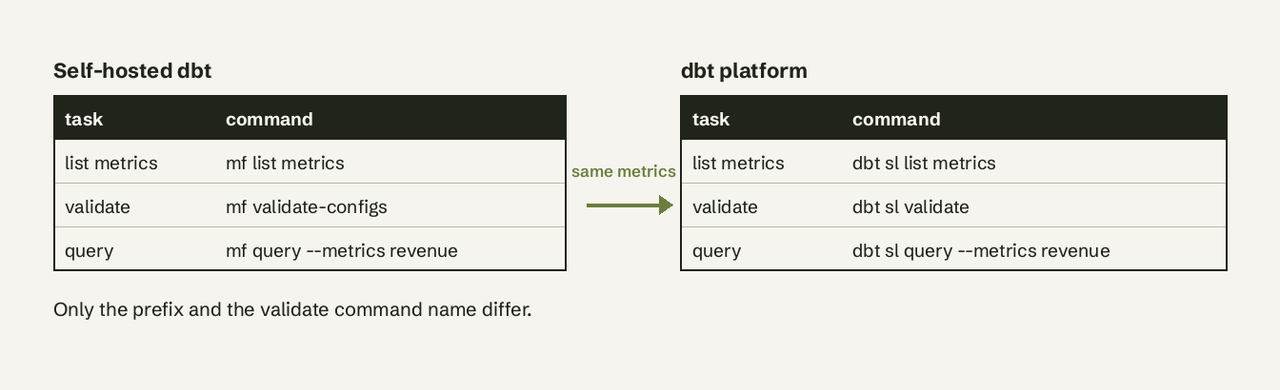
Three gotchas from the docs that cost people an afternoon:
- The time spine. Any metric with a time dimension needs a time spine model configured, or queries fail.
- Metafont. The docs warn that
mfcommands return an error if the Metafont LaTeX package is installed, because both use themfname. Uninstall it. - Re-parse after edits. MetricFlow reads
semantic_manifest.json, so rundbt parseafter changing metrics.
Also note that MetricFlow does not yet support dbt builtin functions or packages inside semantic definitions, per the About MetricFlow page.
Integrations and APIs
- Available Semantic Layer integrations: the official list, including Power BI, Tableau, Google Sheets, Microsoft Excel, Omni, Hex, Klipfolio PowerMetrics and Mode. Check here before assuming your BI tool can read dbt metrics.
- Semantic Layer APIs overview and the JDBC API: for building your own app or AI agent on top of governed metrics. Paid plan required.
Standards and news: what changed recently
- Open Semantic Interchange announcement: on September 23, 2025, Snowflake announced the OSI initiative with dbt Labs, Salesforce, ThoughtSpot, Hex, Cube, Omni, Sigma and others, to standardize semantic metadata in a YAML format. MetricFlow's README now says it is developed as part of OSI.
- Ossie support: the dbt docs say MetricFlow works with the Apache Ossie format, and from dbt v1.12 you can define semantic models with Ossie documents instead of dbt's native YAML. If you are starting a new project in late 2026, check which format your other tools read.
Most top-ranking pages on MetricFlow still describe the BSL era or predate OSI. When a guide tells you MetricFlow is source-available only, check its date.
Community
- dbt Community Slack: the community the MetricFlow README points to for questions. Free, and the place to ask about edge cases the docs skip.
- MetricFlow GitHub issues: search before you file. Many "why does my query join like that" questions are already answered there.
Start-here path for beginners
- Read About MetricFlow (30 minutes) and our glossary entries on semantic layers and metric definitions.
- Clone jaffle-sl-template, install
dbt-metricflowwith your adapter and runmf tutorial. - Model one real table: one semantic model, one simple metric, one time dimension, plus a time spine.
- Add
mf validate-configsto CI so broken metric YAML fails the pull request. - Only then decide whether you need the paid Semantic Layer for BI tools, or whether local MetricFlow plus your existing dashboards is enough.
When MetricFlow is more than you need
MetricFlow pays off when you already run dbt and have several people defining the same metrics differently. It assumes a dbt project, an adapter, YAML modeling and someone to maintain it. Many small SaaS teams have none of that: their data is in one Postgres or MySQL database and they want answers, not a modeling layer. For that case, AI for Database connects straight to the database, answers questions in plain English with the SQL shown, and keeps the results on self-refreshing dashboards with alerts. Try AI for Database free at aifordatabase.com. If you do adopt MetricFlow, the dimension vs metric guide is a useful primer for the modeling vocabulary.
Frequently Asked Questions
What is MetricFlow?
MetricFlow is dbt Labs' open source metric engine. You describe semantic models and metrics in YAML, and it generates the SQL, including joins and time-grain rollups, for Snowflake, BigQuery, Databricks, Redshift or Postgres.
Is MetricFlow free and open source?
Yes. Version 0.209.0 and later are Apache 2.0 licensed. Earlier versions were AGPL and then BSL. The hosted dbt Semantic Layer that serves metrics to BI tools is a paid dbt platform feature.
How do I get started with MetricFlow?
Run pip install "dbt-metricflow[<your adapter>]" in your dbt environment, then mf tutorial from the project root. Clone jaffle-sl-template for working example YAML.
What is the difference between MetricFlow and the dbt Semantic Layer?
MetricFlow is the engine that defines metrics and compiles SQL. The dbt Semantic Layer is dbt's hosted service on top of it, adding GraphQL and JDBC APIs, caching, exports and BI integrations.
Does MetricFlow work without dbt Cloud?
Yes. Self-hosted dbt users install dbt-metricflow and use mf commands locally, including in CI. You lose the hosted APIs and integrations.
Which databases does MetricFlow support?
The dbt docs list Snowflake, BigQuery, Databricks, Redshift and Postgres, with Postgres supported on dbt v1 only.