
Database Documentation: Tools, a Template and Examples
TL;DR: Good database documentation is a data dictionary (what every table and column means), an ER diagram (how tables connect) and a few lines of business rules, generated from the live schema so it never goes stale. Store descriptions as native comments in the database, then let a free generator such as tbls, SchemaSpy or dbdocs turn them into a browsable site on every merge.
Database documentation is the written description of a database's structure and meaning: each table's purpose, each column's type, unit and allowed values, the keys that link tables, and who owns the data. The fastest way to build it in 2026 is to write descriptions where the schema lives (PostgreSQL COMMENT ON, MySQL COMMENT, SQL Server extended properties) and generate the rest. Free generators read those comments plus the catalog and output HTML or Markdown with diagrams: tbls for CI-friendly Markdown, SchemaSpy for a static HTML site, and dbdocs for a hosted, shareable page. Paid catalogs like Dataedo start at $18,000 a year and only make sense once you have many databases and a governance team.
Below: the resources grouped by kind, a copyable template, real examples worth modelling, and a start-here path by team size.
What should database documentation include?
Database documentation should include five things, in this order of usefulness:
- A data dictionary. One row per column: table, column, type, nullable, description, example value, and units or allowed values. This answers "what does
status = 3mean?", which is the question people actually ask. - Table purpose. One or two sentences per table: what a row represents ("one row per checkout, refunds live in
refunds") and the grain. - Relationships. Primary and foreign keys and an ER diagram, so readers know how to join
orderstocustomerswithout guessing. - Ownership and lineage. Which team or service writes the table, and when it was introduced. GitLab records
feature_categoriesandintroduced_by_urlper table for exactly this reason. - Business rules and gotchas. Soft deletes, money stored in cents, time zones, columns that are deprecated but still populated.
Skip prose that restates the column name ("created_at: the created at date"). A good description says something the schema can't: units, edge cases, the source system.
Native comments: the free documentation layer every database has
Write descriptions into the database first. Every generator below reads them, and they travel with backups and migrations.
- PostgreSQL COMMENT: stores one comment per object; a new
COMMENTreplaces the old one andNULLor''removes it. Read them back with psql's\d+orcol_description(). For: every Postgres team. Cost: free. Note it takes a SHARE UPDATE EXCLUSIVE lock, so it won't block reads or writes. - MySQL CREATE TABLE COMMENT: column comments up to 1024 characters, table comments up to 2048, visible in
SHOW FULL COLUMNSandINFORMATION_SCHEMA.COLUMNS.COLUMN_COMMENT. For: MySQL and MariaDB teams. Cost: free. - SQL Server sp_addextendedproperty: attaches a named property (conventionally
MS_Description) to a schema, table or column; values are capped at 7,500 bytes. For: SQL Server shops. Cost: free.
-- PostgreSQL: put the meaning next to the schema, inside the migration
COMMENT ON TABLE orders IS 'One row per completed checkout. Refunds live in refunds, not here.';
COMMENT ON COLUMN orders.total_cents IS 'Order total in cents, after discounts, before tax.';
COMMENT ON COLUMN orders.status IS '1 = paid, 2 = shipped, 3 = cancelled by customer.';
-- SQL Server equivalent for one column
EXEC sys.sp_addextendedproperty
@name = N'MS_Description',
@value = N'Order total in cents, after discounts, before tax.',
@level0type = N'SCHEMA', @level0name = N'dbo',
@level1type = N'TABLE', @level1name = N'orders',
@level2type = N'COLUMN', @level2name = N'total_cents';If you are new to how a schema is organised, our schema glossary entry covers the basics.
Which free tools generate database documentation automatically?
These database documentation tools connect to a live database (or a schema file), read the catalog and your comments, and output docs with diagrams. All are free or have a free tier.
- tbls: a single Go binary (MIT) that writes GitHub-friendly Markdown plus ER diagrams with
tbls doc. It supports PostgreSQL, MySQL, MariaDB, SQLite, SQL Server, BigQuery, Redshift, Cloud Spanner, ClickHouse, DynamoDB, MongoDB and Snowflake (experimental). Worth it for:tbls lint(fail the build when a column has no comment) andtbls coverage(percent of tables and columns documented). Latest release v1.96.1, September 2026. For: teams with CI. - SchemaSpy: a Java tool (LGPL-3.0) that generates a static HTML site with ER diagrams, orphan-table and anomaly reports from any JDBC database. Worth it for: the most complete free HTML output. Watch out: version 7.0 (September 2025) requires Java 17, dropped
-loadjarsand hides routine definitions by default (--include-routine-definitionbrings them back); the installation page still says Java 8. Easiest path isdocker pull schemaspy/schemaspy. For: solo developers and small teams who want a site in ten minutes. - dbdocs: docs-as-code from DBML (Apache-2.0), hosted for you.
npm install -g dbdocs, thendbdocs db2dbmlpulls the schema from a live database anddbdocs buildpublishes it. Free plan: up to 10 diagram and doc projects, unlimited viewers, one editor; Personal Pro is $8 a month and adds password-protected sharing (pricing). For: agencies and teams that share docs with clients. - SchemaCrawler: a free schema discovery tool that writes the schema as readable text designed to be diffed against another schema, draws diagrams, lints for design issues and searches objects by regular expression. Worth it for: scripting and comparing environments. For: DBAs.
- Azimutt: MIT-licensed explorer for big, messy schemas, documented with table and column notes, tags, and saved layouts per feature or team. Worth it for: databases with hundreds of tables where a single ER diagram is unreadable. For: growing product teams.
- ChartDB: AGPL-3.0 diagram editor that imports your schema from the output of a single query. Worth it for: a quick, editable ER diagram without installing a driver. For: anyone who needs a picture today.
Docs for analytics models and larger teams
- dbt Docs:
dbt docs generateanddbt docs servedocument dbt models with descriptions from YAML. Changed recently: dbt Docs v2 (dbt 2.0+) is self-hosted only and writes Parquet artifacts instead of loading a static manifest.json; on the dbt platform you use Catalog instead. For: analytics engineering teams already on dbt. - Redgate SQL Doc: SQL Server only; generates documentation as HTML, PDF, Microsoft Word or Markdown, from SSMS's Object Explorer. $303 per user per year (about $25 a month), also in SQL Toolbelt Essentials. For: SQL Server teams that need Word/PDF deliverables.
- Dataedo: a full data catalog with documentation, lineage and data quality. Essentials is $18,000 a year with a three-editor minimum and unlimited viewers. For: organisations with many sources and a data governance owner.
Copyable data dictionary template
Use these columns. Keep the description to one sentence that a new hire could act on.
| table | column | type | null | description | example | owner |
|---|---|---|---|---|---|---|
| orders | id | bigint | no | Primary key. | 48213 | checkout |
| orders | customer_id | bigint | no | FK to customers.id. | 9921 | checkout |
| orders | total_cents | integer | no | Total in cents, after discounts, before tax. | 4599 | checkout |
| orders | status | smallint | no | 1 paid, 2 shipped, 3 cancelled by customer. | 2 | fulfilment |
| orders | deleted_at | timestamptz | yes | Soft delete. Filter IS NULL in every report. | null | checkout |
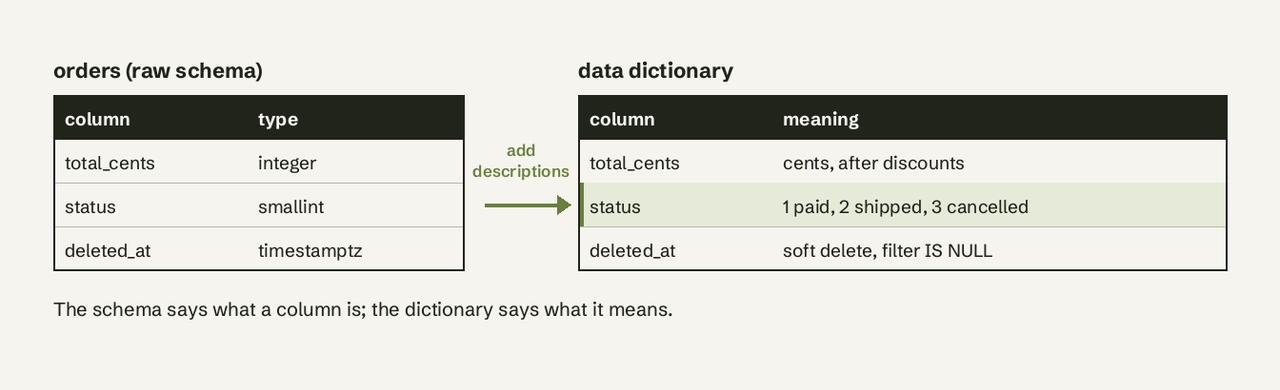
You don't have to fill it by hand. This PostgreSQL query exports the template straight from the catalog, comments included, so you can paste it into a sheet:
-- PostgreSQL: data dictionary from the live schema
SELECT c.table_name,
       c.column_name,
       c.data_type,
       c.is_nullable,
       col_description(format('%I.%I', c.table_schema, c.table_name)::regclass,
                       c.ordinal_position) AS description
FROM information_schema.columns c
WHERE c.table_schema = 'public'
ORDER BY c.table_name, c.ordinal_position;
-- MySQL: same output, comments come from COLUMN_COMMENT
SELECT table_name, column_name, column_type, is_nullable, column_comment
FROM information_schema.columns
WHERE table_schema = DATABASE()
ORDER BY table_name, ordinal_position;Empty description cells are your to-do list. For more on the concept itself, see our data dictionary definition, and if you need to find every database on a server first, list all databases in Postgres.
What does good sample database documentation look like?
Model these real, public examples rather than a blank page:
- GitLab Database Dictionary: one YAML file per table in db/docs (1,149 files when we checked in November 2026), each with
table_name,description,feature_categories,introduced_by_url,milestoneandgitlab_schema. Worth it for: the best public example of ownership-first documentation reviewed in code. - SchemaSpy sample for Chinook: the full generated HTML site for a small music-store database. Worth it for: seeing what a generator produces before you install one.
- tbls sample output: generated Markdown docs for PostgreSQL, MySQL, SQL Server, BigQuery, Snowflake, MongoDB and more. Worth it for: seeing how docs render inside GitHub next to the code.
What the good ones share: every table has a one-line purpose, descriptions carry units and enum meanings, and the docs live in the repo so a schema change without a doc change gets noticed in review.
How do you keep database docs up to date?
Make the documentation a by-product of shipping, not a separate project:
- Write
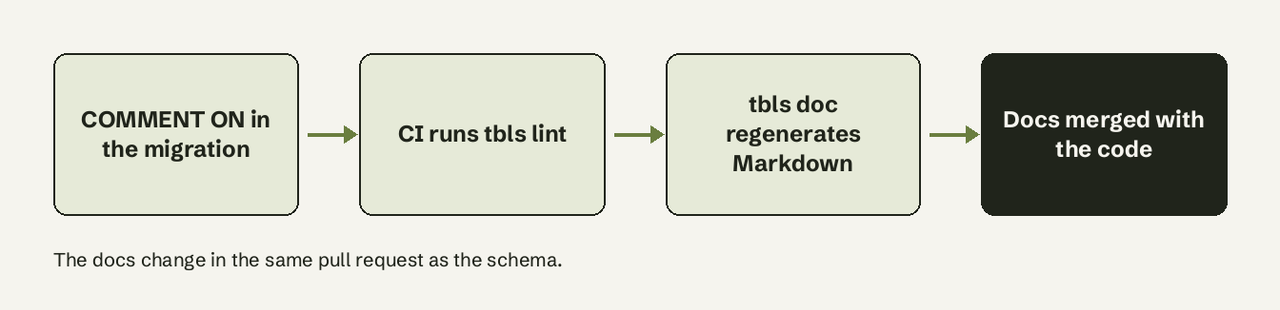
COMMENT ON(orCOMMENT, orsp_addextendedproperty) in the same migration that adds the column. - Add a
.tbls.ymlwith yourdsn:anddocPath:, and turn onrequireColumnCommentandrequireTableCommentunderlint:. - Run
tbls lintandtbls diffin CI so a pull request with an undocumented column fails. - Regenerate the docs on merge to main (the
k1low/setup-tbls@v1GitHub Action does this) and commit or publish the output. - Check
tbls coveragemonthly and fix the tables at 0% first.
# .tbls.yml
dsn: postgres://dbuser:dbpass@localhost:5432/app
docPath: doc/schema
lint:
  requireTableComment:
    enabled: true
  requireColumnComment:
    enabled: true
    exclude:
      - id
      - created_at
      - updated_at
Start here: the path by team size
| Team | Start with | Then add | Cost |
|---|---|---|---|
| Solo developer | Native comments + SchemaSpy in Docker | Data dictionary query into a sheet | Free |
| Small product team | Native comments + tbls in CI | Azimutt for big schemas | Free |
| Agency sharing with clients | dbdocs from db2dbml | Personal Pro for private links | Free to $8/mo |
| Analytics team on dbt | dbt Docs v2 or Catalog | tbls for source databases | Free with dbt |
| Many sources, governance owner | Dataedo | Lineage and data quality tiers | From $18,000/yr |
Documentation tells a teammate what total_cents means; it still doesn't answer "what was revenue by country last month?" for someone who can't write SQL. That is the gap AI for Database fills: connect your database read-only, ask in plain English, and get the answer with its SQL shown, then pin it to a self-refreshing dashboard. Try AI for Database free at aifordatabase.com; sample data is included. See how it works on PostgreSQL.
Frequently Asked Questions
What is database documentation?
Database documentation is a description of a database's tables, columns, relationships and business rules, usually a data dictionary plus an ER diagram. It lets someone who did not build the database understand and query it correctly.
What is the best free database documentation tool?
For most teams it is tbls if you use CI, because it can fail a build when a column has no description, and SchemaSpy if you want a full HTML site with diagrams in minutes. dbdocs is the easiest to share with people outside your team.
Is a data dictionary the same as database documentation?
A data dictionary is the core part of database documentation: the per-column list of names, types and meanings. Full documentation also covers relationships, ownership and business rules.
Where should database documentation be stored?
Store descriptions as comments inside the database and generated output in the same repository as the application code. That way schema changes and doc changes are reviewed together and never drift apart.
Can documentation be generated from an existing database?
Yes. tbls, SchemaSpy, SchemaCrawler and dbdocs (through db2dbml) all connect to a live database and generate documentation from its catalog, including any comments already stored on tables and columns.
How detailed should column descriptions be?
One sentence that says what the schema can't: units, allowed values and their meaning, the source system, and gotchas like soft deletes. Skip descriptions that only repeat the column name.