
7 Best PostgreSQL GUI Clients for Mac (Compared)
TL;DR: For developers, Postico 2 and TablePlus are the native Mac picks, DBeaver Community and pgAdmin 4 are the free ones, and Beekeeper Studio sits in between. For teammates who don't write SQL, AI for Database answers Postgres questions in plain English in the browser and shows the SQL it ran.
Try AI for Database free at aifordatabase.com (sign up, sample data included).
The best PostgreSQL GUI for Mac is Postico 2 if you want a native Mac app built only for Postgres, TablePlus if you want a native app that also handles MySQL, SQLite and others on a $99 one-time license, and DBeaver Community if it has to be free. pgAdmin 4 is free, official and runs on Apple Silicon, but its cross-platform UI does not feel like a Mac app. If the person who needs the data is an ops lead or founder rather than a developer, a GUI client still expects them to write SQL; AI for Database is the option built for them.
How we judged
We checked each client against its own site and download page on 2026-11-16:
- Native or not: a true Mac app (AppKit) versus Electron, Java or a web UI in a shell.
- Apple Silicon: a native build for M-series Macs.
- License: one-time, subscription, or free.
- Who can use it: does it need SQL, or can a non-developer get an answer?
Summary table
| Client | Type | Price | Postgres only? | Needs SQL? | Best for |
|---|---|---|---|---|---|
| AI for Database | Web app, any browser | Free start; Pro $20/user/mo | No | No (shows it) | Non-developers, dashboards, alerts |
| Postico 2 | Native Mac app | Paid license, free trial | Yes | For queries | Mac users who live in Postgres |
| TablePlus | Native Mac app | $99 one-time | No | For queries | Developers with several databases |
| DBeaver Community | Java (Eclipse) | Free, open source | No | Yes | Free all-rounder |
| pgAdmin 4 | Web UI in desktop runtime | Free, open source | Yes | Yes | Postgres admin tasks |
| Beekeeper Studio | Electron | Free Community; Indie $9/mo yearly | No | Yes | Clean cross-platform UI |
| psql (Postgres.app) | Command line | Free | Yes | Yes | Scripting and quick checks |
1. AI for Database
What it is: A browser-based AI data platform. You connect your PostgreSQL database (or Supabase, MySQL, SQL Server, BigQuery and others), ask "Show me revenue by country last 30 days", and it writes the SQL, runs it read-only and returns a table or chart with the SQL shown.
Why it is first for this list: Most people searching for a Postgres GUI on a Mac want to see data without a terminal. For developers the native clients below are better at editing rows and tables. For the founder, ops manager or PM on the team, every one of those still means writing SQL; AI for Database does not. It also does what desktop clients don't: dashboards that refresh on a schedule and workflows that send a Slack alert, email or webhook when a number changes.
Pricing: Free start with sample data. Pro $20 per user per month, paid as credits that never expire; Team $50 per user per month with unlimited AI usage and shared dashboards (pricing, 2026-11-16).
Limits: It is not a database admin tool: no table structure editor, no row editing, answers are read-only. Keep a client below for that. See chat with your Postgres database.
2. Postico 2 by Egger Apps
What it is: A native Mac app for PostgreSQL from Egger Apps, built for "people who use databases": researchers, analysts, app developers and students (eggerapps.at).
Best for: Mac users who work only in Postgres. Postico 2 has a multi-file SQL query editor with folders and autosave, pgFormatter built in (press Ctrl-F to format), a graphical table structure editor that shows columns, indexes and constraints together, a foreign key picker for data entry, and a function editor.
Pricing: Paid license with a free trial; check the current price on the Postico site.
Limits: PostgreSQL only, Mac only. The Postgres.app team calls it "a very modern Mac app" (postgresapp.com).
3. TablePlus: buy once, use forever
What it is: A native database client for Mac (also Windows, Linux and iOS) that covers PostgreSQL, MySQL, SQLite, Redis and more.
Best for: Developers who switch between databases and want a fast native UI.
Pricing: One-time purchase, no subscription: Basic $99 for 1 device with 1 year of updates, Standard $129 for 2 devices, Team $79 per seat from 3 seats. After 1 year you keep using the app; renewing only buys more updates (TablePlus pricing, 2026-11-16).
Limits: The free version has limits on open tabs and connections; the full feature set needs a license.
4. DBeaver Community
What it is: A free, open-source universal SQL client built on Eclipse (Java). Version 26.2.5 shipped on November 15, 2026, with separate Apple Silicon and Intel DMGs (download).
Best for: A free client that handles PostgreSQL plus MySQL, SQL Server, SQLite and more, with ER diagrams. Install with Homebrew:
brew install --cask dbeaver-communityPricing: Free. DBeaver PRO adds NoSQL databases like MongoDB and Redis, cloud databases, and a Visual Query Builder (dbeaver.io).
Limits: It looks and behaves like a Java IDE, not a Mac app. We cover options for non-technical teams in DBeaver alternatives.
5. pgAdmin 4: is it good on macOS?
pgAdmin 4 is good on macOS for Postgres administration and it is free, but it is the least Mac-like option here. It ships as a macOS app bundle for both Intel and Apple Silicon, signed and notarized by Apple. Support starts at pgAdmin 7.8 for macOS 14 Sonoma, 8.13 for macOS 15 Sequoia and 9.9 for macOS 26 Tahoe; the current release is v9.19 from October 29, 2026 (pgAdmin macOS download). The Postgres.app site puts it plainly: "the cross-plattform UI really doesn't live up to the expectations of a native Mac app" (postgresapp.com).
What it is: The official open-source PostgreSQL administration tool, a web application wrapped in a desktop runtime.
Best for: Admin tasks: roles, backups with pg_dump, server settings, and the graphical EXPLAIN view. If you read plans often, see our guide to PostgreSQL EXPLAIN.
Pricing: Free.
Limits: Heavier than native apps and slower to browse data.
6. Beekeeper Studio
What it is: A cross-platform SQL editor and database manager built with Electron, with a free Community edition.
Best for: A clean, modern interface on Mac, Windows and Linux.
Pricing: Community is free with unlimited connections and no tab limits. Indie is $9 per user per month billed yearly ($18 monthly), Professional $14 ($28 monthly), Business $18 ($35 monthly). Pay for 12 months and you keep the paid features forever; there is a 30-day money-back guarantee (Beekeeper pricing, 2026-11-16).
Limits: Electron, so it uses more memory than Postico or TablePlus.
7. psql command line, bundled in Postgres.app
What it is: Postgres.app is a full PostgreSQL installation packaged as a Mac app, and it includes psql, the official command-line client (postgresapp.com).
Best for: Local development and quick checks. Add the tools to your path:
echo /Applications/Postgres.app/Contents/Versions/latest/bin | sudo tee /etc/paths.d/postgresappPricing: Free.
Limits: No GUI. Pair it with one of the clients above.
Which Postgres clients are native Mac apps?
Postico 2 and TablePlus are the native Mac apps on this list. DBeaver runs on Java, pgAdmin 4 is a web app in a desktop runtime, and Beekeeper Studio uses Electron. All of them have Apple Silicon builds, so the difference you feel is startup time, memory use and Mac conventions like keyboard shortcuts, not raw compatibility.
Which Postgres GUI works for non-developers?
AI for Database.

Every desktop client here expects SQL for anything beyond browsing a table. With AI for Database a non-developer types a question, gets the answer as a table or chart, and can pin it to a dashboard that refreshes on its own, while a developer can still check the SQL.
How to choose
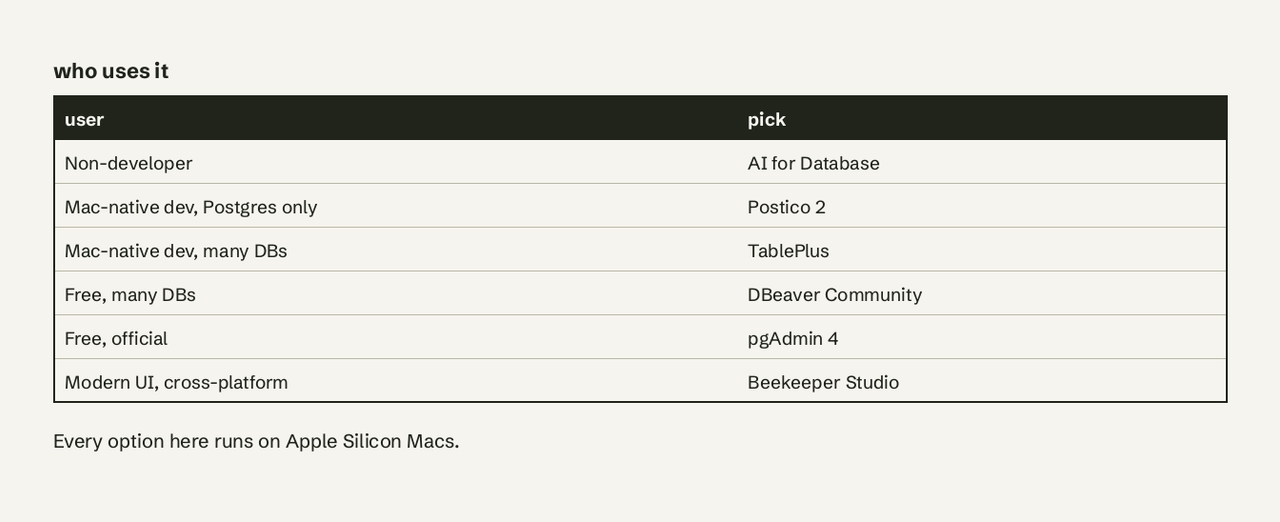
- A teammate who doesn't write SQL needs Postgres numbers: AI for Database.
- You use only Postgres and want the best Mac app: Postico 2.
- You use several databases and hate subscriptions: TablePlus, $99 once.
- It must be free and handle every database: DBeaver Community.
- You administer servers, roles and backups: pgAdmin 4.
- You want a modern UI on Mac and Linux: Beekeeper Studio.
Get started free
Try AI for Database free at aifordatabase.com. Connect your Postgres database and ask your first question: sign up.
Frequently Asked Questions
What is the best free PostgreSQL GUI for Mac?
DBeaver Community is the best free PostgreSQL GUI for Mac for most people: open source, native Apple Silicon build, and it handles other databases too. pgAdmin 4 is the free choice for admin work, and Beekeeper Studio Community is free with unlimited connections.
Is pgAdmin good on macOS?
It works well and is free, with signed Apple Silicon builds supporting macOS up to 26 Tahoe, but its web-based UI feels slower and less Mac-like than Postico 2 or TablePlus.
Is TablePlus a one-time purchase?
Yes. TablePlus Basic is $99 once for 1 device, with 1 year of updates included; the app keeps working after that year.
Does Postico work with Supabase or other hosted Postgres?
Postico connects to any PostgreSQL server you can reach with a host, port, user and password, which includes hosted services such as Supabase that expose a standard Postgres connection string.
Can I query PostgreSQL on a Mac without writing SQL?
Yes. AI for Database turns a plain-English question into SQL, runs it read-only on your Postgres database and shows the result and the query.