
Basedash vs Draxlr: Pricing, AI and Dashboards Compared
TL;DR: Basedash vs Draxlr comes down to budget and scope. Basedash is a full AI BI platform (warehouse, 750+ sources, semantic layer) priced at $1,000/month for up to 25 users; Draxlr is a no-code dashboard and embedding tool for SQL databases starting at $25/month. If you want plain-English answers, self-refreshing dashboards and database alerts without either price jump, AI for Database starts free and costs $10 per user per month.
Try AI for Database free at aifordatabase.com
The short answer: pick Basedash if you are a funded team that wants one governed BI stack with ETL, a managed warehouse and many SaaS connectors, and $12,000+ a year is fine. Pick Draxlr if you mainly need dashboards on a SQL database, want to embed them in your own product with row-level security, and want to start small. Pick AI for Database if your team has no data person, the data lives in your production database, and the job is asking questions, keeping a dashboard current and getting alerted when a number moves. All prices below were read on the vendors' own pricing pages on 2026-11-15.
Basedash vs Draxlr vs AI for Database at a glance
| Criteria | AI for Database | Basedash | Draxlr |
|---|---|---|---|
| Starting price | Free start; Pro $10/user/month | $1,000/month + AI usage (Startup) | $25/month (Lite) |
| Users on entry plan | Per user | Up to 25 | 1 (10 on Premium, $75) |
| Free trial | Free with sample data, 100 free queries on your own DBs | 14 days, no card | 7 days on Power plan, no card |
| Data sources | PostgreSQL, MySQL, SQL Server, Oracle, SQLite, MongoDB, BigQuery, Supabase, Google Sheets, HubSpot, Salesforce and more | 750+ data sources, managed warehouse | 14 SQL databases (Postgres, MySQL, Snowflake, BigQuery, ClickHouse...) + Airtable |
| Plain-English questions | Yes, shows the SQL for every answer | Yes, shows the SQL, governed metrics | Yes, AI assistant writes read-only SQL; 50 to 300 AI credits/month by plan |
| Dashboards | Self-refreshing on a schedule | Yes, AI-generated | Yes, drag-and-drop, live refresh |
| Alerts and actions | Condition-based workflows: Slack, email, webhook | Automations and anomaly insights to Slack/email | Slack and email alerts; 12h minimum on Lite, 15 min on Power |
| Embedding in your product | No | Yes (Enterprise lists embedding) | Yes, Premium and up; white-label |
| Self-hosting | Enterprise | Enterprise | Enterprise ($500+) |
| Best for | Teams without a data team | Funded teams wanting a full BI stack | Product teams embedding dashboards |
What AI for Database does for this choice
AI for Database sits between the two. Like Basedash it answers questions asked in plain English, and like Draxlr it connects straight to the database you already run, without a warehouse project first. Three things it does for teams comparing these tools:
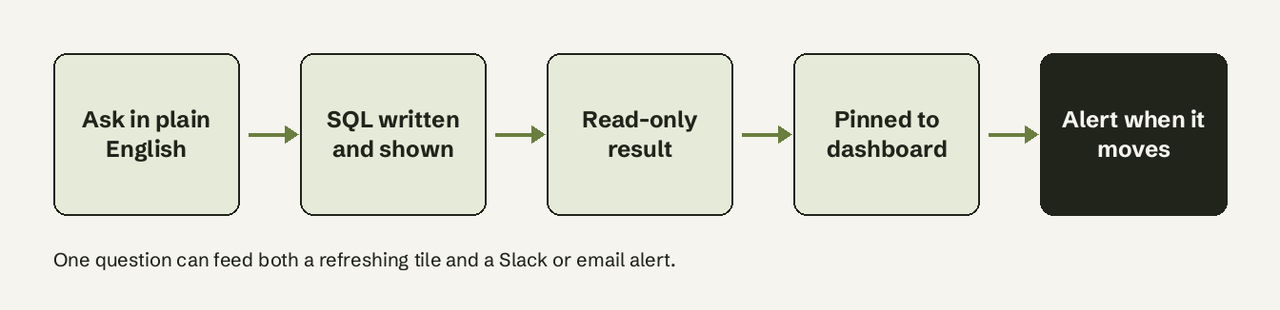
- Natural language queries. Ask "Show me revenue by country last 30 days" and it writes the SQL, runs it read-only and returns a table or chart, with the SQL shown.
- Self-refreshing dashboards. Pin answers to a dashboard that refreshes on a schedule, so nobody re-runs queries on Monday morning.
- Action workflows. Define a condition ("when daily signups drop below 50") and an action (Slack alert, email or webhook). It watches the database and fires on its own, with no stored procedures or DBA access.
What it does not do: it has no white-label embedding for your customers. If embedding analytics in your own app is the main job, Draxlr or Basedash fits that better. Pricing is on the AI for Database pricing page.
What is the difference between Basedash and Draxlr?
Basedash is an AI-native BI platform; Draxlr is a dashboard and embedding tool for SQL databases with AI on top. Basedash describes itself as "Self-serve BI, embedded analytics, ETL, managed warehouse, and a semantic layer" (basedash.com). It pulls data from 750+ sources into the Basedash Warehouse, lets you define governed metrics (for example a fixed MRR definition) and answers questions against them.
Draxlr starts from your SQL database. You build queries with a visual query builder or raw SQL, pin them to dashboards, and embed those dashboards in your product with HTML, React or Vue (draxlr.com). Its AI assistant reads your schema, writes read-only SQL and shows the query, but the core product is the builder and the dashboards.
In practice: Basedash is a replacement for a BI stack. Draxlr is a lighter tool for teams that need dashboards on one to five databases, often inside their own app.
What do Basedash and Draxlr cost?
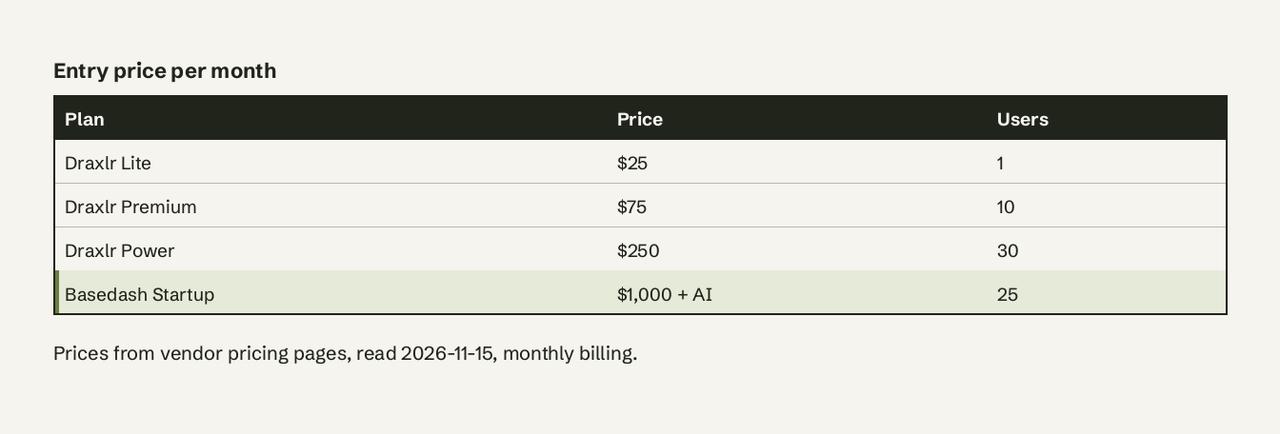
Basedash publishes two plans (basedash.com/pricing, read 2026-11-15):
- Startup: $1,000/month plus AI usage, up to 25 users, $1,000/month of AI credits, 750+ data sources, Basedash Warehouse, MCP server, Slack app, automations and insights.
- Enterprise: custom, adds self-hosting, embedding, SSO, SCIM, audit logs and custom AI models.
Basedash does not charge per seat inside the Startup plan, which is good value if 20 people will use it. For a 3-person team it is $12,000 a year.
Draxlr publishes four plans (draxlr.com/pricing, read 2026-11-15, monthly billing):
| Plan | Price | Databases | Users | AI credits/month |
|---|---|---|---|---|
| Lite | $25/month | 1 | 1 | 50 |
| Premium | $75/month | 2 | 10 | 100 |
| Power | $250/month | 5 | 30 | 300 |
| Enterprise | $500/month | Custom | Custom | Custom |
Annual billing is at least 33% cheaper, and external viewers are unlimited on every plan. One Draxlr AI credit is one message to the assistant, so 50 credits means about 50 questions a month on Lite.
AI for Database: free to start with sample data and 100 free queries on your own databases, then Pro at $10 per user per month and Team at $30 per user per month (pricing, checked 2026-10-23).
Which one lets non-technical people query a database in plain English?
All three do, with different limits. Basedash's chat is the deepest of the two competitors: it answers against governed definitions you set up, and shows the SQL. That governance is its strength, and it also means someone has to define the models first.
Draxlr's AI chat works on Lite, but 50 credits a month runs out fast if several people ask questions, and Lite has one user. Non-technical users will likely spend more time in the visual query builder, which reviewers on G2 call easy to learn.
AI for Database is built for this case: plain English is the main interface, every answer shows its SQL, and there is no semantic-layer setup before the first answer. See how it compares with Draxlr and with Basedash.
How do dashboards and alerts compare?
Basedash generates dashboards from a prompt and runs "insights": agents that watch metrics, flag anomalies and post to Slack or email, plus scheduled and change-triggered reports.
Draxlr has a drag-and-drop dashboard canvas with filters, drill-downs, PDF and Excel export, and scheduled email reports. Alerts go to Slack and email, but the check frequency depends on the plan: every 12 to 24 hours on Lite, 1 hour on Premium, 15 minutes on Power.
AI for Database keeps dashboards fresh on a schedule and turns any condition into an action: Slack, email or a webhook to another system. For a walkthrough see PostgreSQL Slack alerts and the alerts and monitoring page.
Data sources and setup
Basedash connects databases, warehouses and 750+ SaaS tools, and can load them into its managed warehouse. That breadth matters when your metrics span Stripe, HubSpot and a product database.
Draxlr connects to 14 SQL databases (PostgreSQL, MySQL, Supabase, MariaDB, SQL Server, PlanetScale, CockroachDB, YugabyteDB, Redshift, BigQuery, Snowflake, ClickHouse, Databricks, Neon) plus Airtable, with read-only access. The number of databases is capped by plan: 1, 2 or 5.
AI for Database connects to PostgreSQL, MySQL, SQL Server, Oracle, SQLite, MongoDB, Redis, Firebase, Supabase and BigQuery, plus apps like Google Sheets, Salesforce, HubSpot, Notion and Airtable. Answers are read-only.
Embedding and MCP
Embedding is where Draxlr is strongest. Embed Dashboard comes on Premium ($75), Full App Embedding (dashboards, query builder, SQL editor and AI assistant inside your app) on Power ($250), and row-level security per customer on Power and up. Embeds are white-labeled.
Basedash also embeds dashboards and AI chat with a React SDK and JWT SSO; its pricing page lists embedding on Enterprise. Both offer an MCP server so Claude, Cursor or ChatGPT can query your data; Draxlr limits MCP to 50 requests a month on Lite.
When is AI for Database the better choice than both?
Choose AI for Database when:
- You have no data team and nobody to build a semantic layer or a query library.
- Your data lives in a production database and you want answers this week, not after a warehouse project.
- You want alerts that fire on a condition and call a webhook, not only a scheduled email.
- You are a team of 1 to 10 and $1,000/month (Basedash) or per-database caps (Draxlr) do not fit.
Choose Basedash if / choose Draxlr if
Choose Basedash if you have 10 to 25 people who need BI, data spread across many SaaS tools, and you want governed metrics, a managed warehouse and anomaly insights in one platform.
Choose Draxlr if you want dashboards on one to five SQL databases, you plan to embed analytics in your own product with row-level security, and you want to start at $25 to $75 a month.
Choose AI for Database if you want to ask your database questions in plain English, keep a dashboard current and get alerted when a number moves, starting free. Browse more comparisons.
Frequently Asked Questions
Is Basedash or Draxlr cheaper?
Draxlr is cheaper to start: $25/month for one user and one database, versus $1,000/month plus AI usage for Basedash Startup. At 25 users Basedash's flat price can work out lower per head than per-seat BI tools, but Draxlr's Power plan covers 30 users for $250/month.
Does Draxlr have a free plan?
No. Draxlr offers a 7-day free trial on the Power plan with no credit card, then a paid plan from $25/month.
Does Basedash have a free trial?
Yes. Basedash offers a 14-day free trial with no credit card and full feature access.
Can I self-host Basedash or Draxlr?
Both offer self-hosting on their Enterprise plans: Basedash on a custom plan, Draxlr as "Dedicated Server / Self-host" on Enterprise from $500/month.
Which is better for embedding analytics in a SaaS product?
Draxlr, for most small teams: white-label embedding from $75/month and row-level security from $250/month. Basedash supports embedding with a React SDK but lists it on Enterprise.
Is there a cheaper alternative with plain-English queries and alerts?
AI for Database starts free with sample data and 100 free queries on your own databases, then $10 per user per month, and includes self-refreshing dashboards and condition-based alerts. Ready to skip the trade-off? [Try AI for Database free at aifordatabase.com](https://app.aifordatabase.com/signup)