
What Is an AI Database? Definition, Types and Examples
TL;DR: An AI database is a database that you can query, search or extend with artificial intelligence. The term covers three different things: tools like AI for Database that let you ask your existing database questions in plain English, vector databases that store embeddings for semantic search, and database engines with AI functions built in. Most business teams searching the term want the first kind.
Want to see the first kind on your own data? Try AI for Database free at aifordatabase.com (start here, sample data included).
An AI database is any database setup where AI does part of the work that SQL or a developer used to do. In practice that means one of three things: (1) an AI layer on top of the database you already have, which turns a question like "revenue by country last 30 days" into SQL, runs it and shows the result; (2) a vector database, such as pgvector on Postgres or MongoDB Vector Search, which stores numeric embeddings so applications can search by meaning; (3) an AI-native engine, such as Oracle AI Database 26ai or Google AlloyDB AI, which ships vector search, model calls and natural-language-to-SQL inside the database itself. They solve different problems for different people, so the right answer depends on whether you want to ask your data questions or build AI applications on it.
How AI for Database answers questions on your own data
AI for Database is the first kind: an AI layer that sits on the databases a company already runs. It does not replace PostgreSQL or MySQL; it connects to them. Here is what it does, specifically:
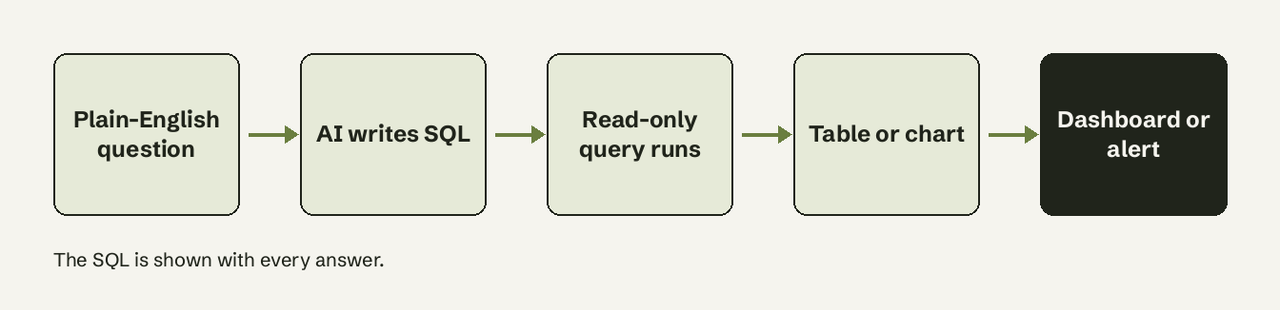
- Natural language queries. Ask "Show me revenue by country last 30 days" and get an answer. The AI translates the question to SQL, runs it, and returns a table or chart. Every answer shows its SQL, and answers are read-only.
- Self-refreshing dashboards. Pin answers to a dashboard that refreshes automatically on a schedule, with no manual re-running.
- Action workflows. Define a condition ("when daily signups drop below 50") and an action (Slack alert, email or webhook). The system watches the database and fires automatically.
- Sources. PostgreSQL, MySQL, SQL Server, Oracle, SQLite, MongoDB, Redis, Firebase, Supabase, BigQuery and more, plus apps like Google Sheets, Salesforce and HubSpot.
- Price. You can create an account and try it on sample data; Pro is $20 per user per month (including $20 of non-expiring credits) and Team is $50 per user per month with unlimited AI usage (pricing, read 2026-11-16).
What it does not do: it is not a vector store, and it does not host your data. If you are building a chatbot that searches documents by meaning, you need the second kind below. Our AI database overview covers the product side in more depth.
What are the three kinds of AI database?
The three kinds share a name but not a job. This table is the quickest way to tell them apart.
| AI layer on your database | Vector database | AI-native database engine | |
|---|---|---|---|
| Example | AI for Database | pgvector, MongoDB Vector Search | Oracle AI Database 26ai, AlloyDB AI |
| Who uses it | Founders, ops, analysts, PMs | Developers building AI apps | DBAs and platform teams |
| What goes in | Your existing tables | Embeddings (arrays of numbers) | Your tables plus embeddings |
| Main job | Answer business questions, dashboards, alerts | Similarity search, RAG retrieval | Run vectors and model calls inside SQL |
| Migration needed | No, connects to current DB | Usually adds an extension or service | Adopt or upgrade that engine |
| SQL knowledge needed | No | Yes | Yes |
How does asking a database in plain English work?
Asking in plain English works by giving a large language model the database schema (table and column names, types, relationships) along with your question, so it can write a SQL query that fits. The tool runs that query against the live database and returns rows, which it formats as a table or chart. This process is called text-to-SQL, and we explain the mechanics in text-to-SQL explained.
A worked example with real numbers. Say a SaaS company has an orders table and a customers table. A manager asks: "Which country brought in the most revenue in October?"
SELECT c.country, SUM(o.amount) AS revenue
FROM orders o
JOIN customers c ON c.id = o.customer_id
WHERE o.created_at >= '2026-10-01' AND o.created_at < '2026-11-01'
GROUP BY c.country
ORDER BY revenue DESC
LIMIT 3;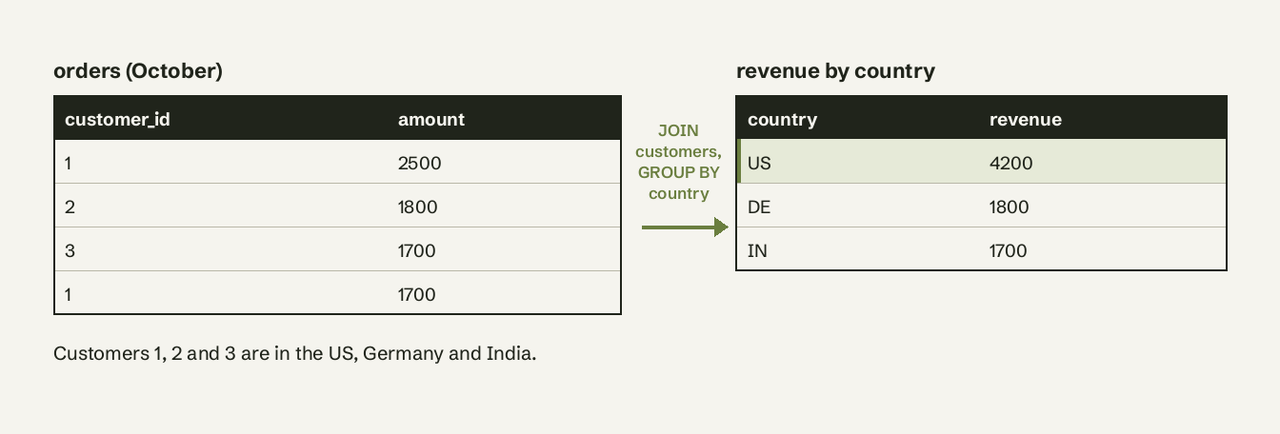
Four October orders (2,500, 1,800, 1,700 and 1,700) add up to 7,700. Customer 1 in the US placed two of them, so the US total is 2,500 + 1,700 = 4,200, about 55% of the month. The manager never wrote the JOIN; they read the answer and the SQL that produced it. Pin that answer to a dashboard and it refreshes on schedule; add a workflow and you get a Slack message if October-style revenue in a country drops below a threshold.
What is the difference between an AI database and a vector database?
A vector database is one kind of AI database, built for a narrower job: storing embeddings and finding the ones closest to a query. An embedding is an array of numbers produced by a model, often with hundreds or thousands of dimensions, where similar items sit close together. A vector search for "red fruit" can return apples and strawberries even if those words never appear, as MongoDB's vector search docs put it.
In pgvector, the whole idea fits in three statements (from its README; vector(3) is the column type, <-> is L2 distance):
CREATE EXTENSION vector;
CREATE TABLE items (id bigserial PRIMARY KEY, embedding vector(3));
SELECT * FROM items ORDER BY embedding <-> '[3,1,2]' LIMIT 5;
Concrete facts from the vendors' own docs:
- pgvector is "Open-source vector similarity search for Postgres", supports Postgres 13+, exact and approximate nearest neighbor search, and L2, inner product, cosine, L1, Hamming and Jaccard distance (GitHub).
- MongoDB Vector Search runs approximate search on Atlas clusters on v6.0.11, v7.0.2 or later, and can generate embeddings for you with Automated Embedding.
- Approximate indexes like HNSW (Hierarchical Navigable Small World graphs) and IVF (Inverted File Index clusters) trade a little accuracy for a lot of speed, which is why vector search stays fast across millions of rows.
So: if your question is "how much revenue did we make", you need an AI layer that writes SQL. If your question is "find support tickets that mean the same thing as this one", you need vector search. See our glossary entries on vector databases and embeddings.
What is an AI-native database engine?
An AI-native engine puts vector search and model calls inside the database itself, so developers use them from SQL.
- Oracle AI Database 26ai was announced on October 16, 2025 as a long-term support release that replaces Oracle Database 23ai. Customers move from 23ai by applying the October 2025 release update, and AI Vector Search is included at no additional charge. It also supports Model Context Protocol and ONNX embedding models (Oracle).
- AlloyDB AI on Google Cloud adds a customized pgvector, a ScaNN index (
alloydb_scann, PostgreSQL 14 to 18),google_ml_integrationfor calling Gemini, OpenAI and Anthropic models from SQL, andalloydb_ai_nlfor natural-language questions (Google Cloud docs).
These are strong choices if you are already on that engine and have engineers to build on it. They are developer platforms, though: a sales lead still needs someone to build the app before they can ask a question.
Which kind of AI database does your team need?
A team needs one when the people asking questions are not the people who write SQL. Signs you are there:
- Ops, sales or product people queue behind an engineer for every one-off number.
- The real figures live in Postgres, MySQL or Supabase, not in the CRM.
- You have no data team, so nobody will pre-build the reports a BI tool needs.
Pick a vector database instead when you are building search or RAG into your own product. Pick an AI-native engine when your platform team is standardizing on Oracle or AlloyDB and wants AI functions in SQL. Many companies run two: a vector store inside the product and a plain-English layer for the business team.
Pitfalls to watch
- Write access. Plain-English tools should run read-only. AI for Database answers are read-only by design.
- Unchecked answers. Always be able to see the SQL. A wrong JOIN looks like a confident number. Our piece on text-to-SQL accuracy covers where models slip.
- Buying the wrong kind. A vector database will not answer "MRR by plan"; a text-to-SQL tool will not do semantic document search.
Frequently Asked Questions
What is an AI database in simple terms?
It is a database you can work with through AI: either by asking it questions in plain English, by searching it by meaning with embeddings, or by calling AI models from inside SQL.
Is ChatGPT an AI database?
No. ChatGPT can write SQL for you, but you still have to run it, manage credentials and check results. An AI layer like AI for Database connects to the database and does the full loop.
Is a vector database the same as an AI database?
A vector database is one kind of AI database. It stores embeddings for similarity search and powers RAG; it does not answer business questions about your tables on its own.
Do I need to migrate my data to use an AI database?
Not for an AI layer: AI for Database connects to PostgreSQL, MySQL, SQL Server, MongoDB, Supabase, BigQuery and others where they are. Vector search usually means adding an extension or service; an AI-native engine means running that engine.
What are examples of AI databases?
AI for Database (plain-English questions, dashboards, alerts on your own database), pgvector and MongoDB Vector Search (vector databases), and Oracle AI Database 26ai and Google AlloyDB AI (AI-native engines). Ready to ask your own database a question? Try AI for Database free at aifordatabase.com: [create an account](https://app.aifordatabase.com/signup), connect a database or use the sample data, and ask your first question in plain English.
- POSTGRESQL CAST: CONVERT TYPES WITH CAST AND :: →
- WHAT IS A PARAMETERIZED REPORT? DEFINITION AND EXAMPLES →
- 8 BEST SQL NOTEBOOKS: FREE TIERS AND DATABASES COMPARED →
- SQL PARTITION BY: EXAMPLES, VS GROUP BY, PITFALLS →
- POSTGRESQL GETDATE() EQUIVALENT: NOW() AND SYSDATE →
- POSTGRESQL DATEADD: ADD DAYS, MONTHS, HOURS →