
Disk Space Alert in SQL Server: T-SQL and Database Mail
TL;DR: A reliable disk space alert in SQL Server is one T-SQL query on sys.dm_os_volume_stats, a percentage threshold, msdb.dbo.sp_send_dbmail for the email and a SQL Server Agent job that runs it every 15 to 60 minutes. Unlike the older xp_fixeddrives scripts, the DMV reports total size and mount points, so the alert works on any volume layout. AI for Database does the same "check a number, alert when it crosses a line" loop for your business data, such as signups or failed payments, and sends it to Slack, email or a webhook without a stored procedure.
Try AI for Database free at aifordatabase.com
To get a SQL Server low disk space alert, query sys.master_files with CROSS APPLY sys.dm_os_volume_stats(database_id, file_id) to get total_bytes and available_bytes for every volume that holds a data or log file, compute the free percentage, and call sp_send_dbmail when any volume drops below your threshold (10% is a common starting point). Schedule it with SQL Server Agent. The login running it needs VIEW SERVER STATE (SQL Server 2019 and earlier) or VIEW SERVER PERFORMANCE STATE (SQL Server 2022 and later), according to Microsoft's sys.dm_os_volume_stats docs.
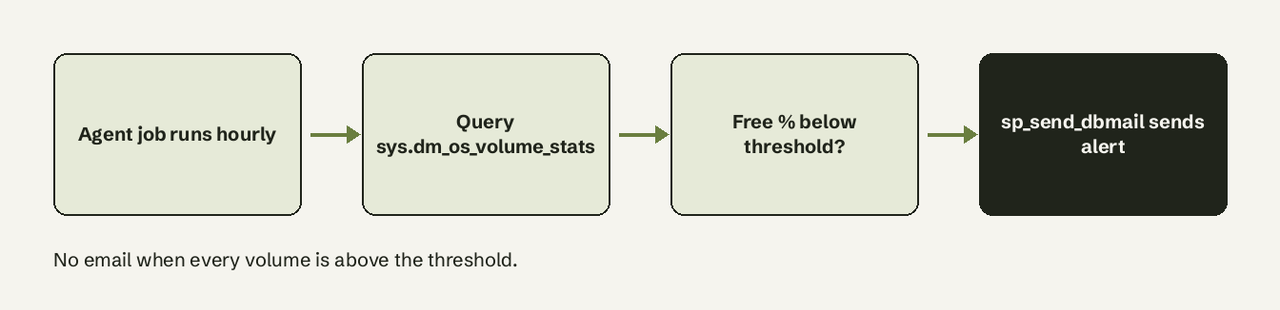
What you need
- SQL Server 2008 R2 SP1 or later on Windows (the DMV exists on Linux too, but mount point columns return NULL there).
- SQL Server Agent. It is not included in Express edition; on Express use Windows Task Scheduler with
sqlcmdinstead (editions and features). - Database Mail configured with at least one profile (configure Database Mail).
VIEW SERVER STATEor, on 2022+,VIEW SERVER PERFORMANCE STATEfor the job owner.
How do I check free disk space from SQL Server?
Use sys.dm_os_volume_stats. It returns one row per database file, so group by volume to get one row per disk:
SELECT DISTINCT
    vs.volume_mount_point,
    vs.logical_volume_name,
    CAST(vs.total_bytes     / 1073741824.0 AS DECIMAL(10,1)) AS total_gb,
    CAST(vs.available_bytes / 1073741824.0 AS DECIMAL(10,1)) AS free_gb,
    CAST(100.0 * vs.available_bytes / vs.total_bytes AS DECIMAL(5,1)) AS free_pct
FROM sys.master_files AS f
CROSS APPLY sys.dm_os_volume_stats(f.database_id, f.file_id) AS vs
ORDER BY free_pct;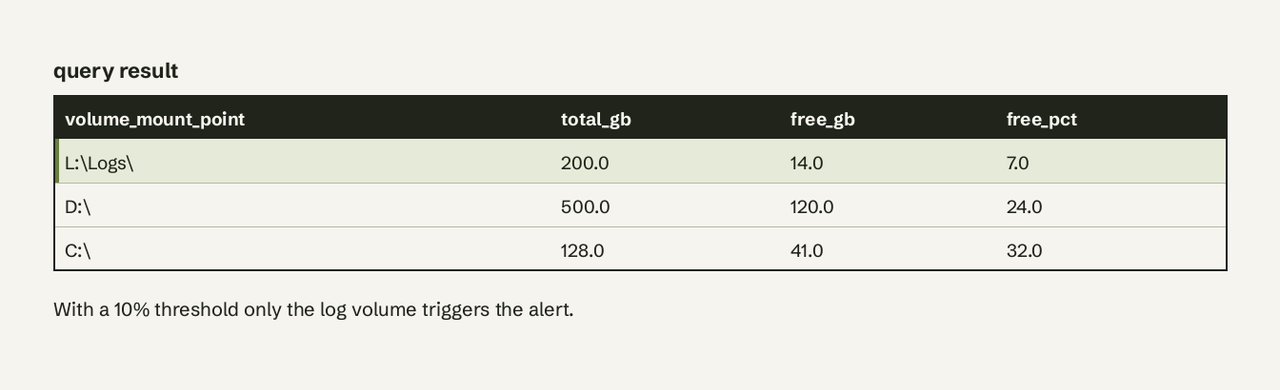
Two limits to know. The DMV only sees volumes that hold at least one database file, so a backup drive with no data files will not show up. And xp_fixeddrives, which most older scripts use (for example the SQLServerCentral script), returns free MB per drive letter only: no total size, so no percentage, and no mount points.
Step-by-step: low disk space email alert
Step 1: Enable Database Mail
EXEC sp_configure 'show advanced options', 1;
RECONFIGURE;
EXEC sp_configure 'Database Mail XPs', 1;
RECONFIGURE;
Then create an account and profile in SSMS under Management > Database Mail. The rest of this guide assumes a profile named DBA Alerts.
Step 2: Create the alert procedure
USE master;
GO
CREATE OR ALTER PROCEDURE dbo.usp_DiskSpaceAlert
    @MinFreePct  DECIMAL(5,1) = 10.0,
    @Recipients  VARCHAR(MAX) = 'dba@example.com'
AS
BEGIN
    SET NOCOUNT ON;

    DECLARE @body NVARCHAR(MAX) = N'';

    SELECT @body = @body
        + v.volume_mount_point + N': '
        + CAST(v.free_pct AS NVARCHAR(10)) + N'% free ('
        + CAST(v.free_gb  AS NVARCHAR(20)) + N' GB of '
        + CAST(v.total_gb AS NVARCHAR(20)) + N' GB)' + CHAR(13) + CHAR(10)
    FROM (
        SELECT DISTINCT
            vs.volume_mount_point,
            CAST(vs.total_bytes     / 1073741824.0 AS DECIMAL(10,1)) AS total_gb,
            CAST(vs.available_bytes / 1073741824.0 AS DECIMAL(10,1)) AS free_gb,
            CAST(100.0 * vs.available_bytes / vs.total_bytes AS DECIMAL(5,1)) AS free_pct
        FROM sys.master_files AS f
        CROSS APPLY sys.dm_os_volume_stats(f.database_id, f.file_id) AS vs
    ) AS v
    WHERE v.free_pct < @MinFreePct;

    IF @body <> N''
    BEGIN
        DECLARE @subject NVARCHAR(255) =
            N'Low disk space on ' + @@SERVERNAME;

        EXEC msdb.dbo.sp_send_dbmail
            @profile_name = 'DBA Alerts',
            @recipients   = @Recipients,
            @subject      = @subject,
            @body         = @body,
            @importance   = 'High';
    END
END
GO
sp_send_dbmail needs at least one of @recipients, @copy_recipients or @blind_copy_recipients and returns a mailitem_id once the message is queued (sp_send_dbmail reference).
Step 3: Schedule it with SQL Server Agent
USE msdb;
GO
EXEC dbo.sp_add_job      @job_name = N'Disk space alert';
EXEC dbo.sp_add_jobstep  @job_name = N'Disk space alert',
                         @step_name = N'Check volumes',
                         @subsystem = N'TSQL',
                         @database_name = N'master',
                         @command = N'EXEC dbo.usp_DiskSpaceAlert @MinFreePct = 10.0;';
EXEC dbo.sp_add_schedule @schedule_name = N'Every 60 minutes',
                         @freq_type = 4, @freq_interval = 1,
                         @freq_subday_type = 8, @freq_subday_interval = 1;
EXEC dbo.sp_attach_schedule @job_name = N'Disk space alert',
                            @schedule_name = N'Every 60 minutes';
EXEC dbo.sp_add_jobserver @job_name = N'Disk space alert';
GO
@freq_subday_type = 8 means hours; use 4 with @freq_subday_interval = 15 for every 15 minutes (sp_add_schedule).
Step 4: Test it by raising the threshold
Run the procedure with a threshold above your real free space so it must fire:
EXEC master.dbo.usp_DiskSpaceAlert @MinFreePct = 99.0;How to verify the alert worked
Check the Database Mail queue. sent_status should read sent, not failed or unsent:
SELECT TOP 5 mailitem_id, recipients, subject, sent_status, sent_date
FROM msdb.dbo.sysmail_allitems
ORDER BY mailitem_id DESC;

SELECT TOP 5 log_date, description
FROM msdb.dbo.sysmail_event_log
ORDER BY log_id DESC;
Does the alert cover mount points?
Yes. volume_mount_point holds the mount path (for example L:\Logs\), so a log volume mounted under a folder is checked on its own size, not the size of the parent drive. That is the main gap in xp_fixeddrives-based scripts and in the drive-letter parsing used by the MSSQLTips PowerShell approach. On Linux the mount point column is NULL, so add vs.total_bytes to the message to tell volumes apart.
How often should the disk space check run?
Hourly suits most servers. Go to every 15 minutes for volumes with fast-growing logs or tempdb, and daily is enough for a data volume that grows a few GB a month. Pair a percentage threshold with an absolute floor (for example under 10% or under 20 GB) because 10% of a 4 TB volume is still 400 GB.
Common errors and fixes
Msg 300, ... VIEW SERVER STATE permission was denied: grantVIEW SERVER STATE(orVIEW SERVER PERFORMANCE STATEon 2022+) to the job owner.profile name is not valid: the@profile_namedoes not match a Database Mail profile; checkmsdb.dbo.sysmail_profile.sent_status = failed: readsysmail_event_logfor the SMTP error (wrong port, auth, or TLS).- Job never runs: SQL Server Agent service is stopped, or you are on Express edition.
Alerts beyond disk space: business data
A disk alert keeps the server alive; most teams also need alerts on what is in the database. With AI for Database you connect SQL Server, ask a question like "how many signups did we get in the last hour?", and turn it into an action workflow: when the number crosses a line, it sends a Slack message, an email or calls a webhook. Answers are read-only and show their SQL, and there is no stored procedure or DBA access involved. It is not a server or OS monitoring tool, so keep the Agent job above for disk space. See alerts and monitoring, SQL Server connection, alerting on long-running queries in SQL Server and free database monitoring tools.
Frequently Asked Questions
How do I send an email alert when disk space is low in SQL Server?
Configure Database Mail, wrap a sys.dm_os_volume_stats query in a procedure that calls msdb.dbo.sp_send_dbmail when free space is below your threshold, and schedule it with a SQL Server Agent job.
What is a good low disk space threshold?
10% free is a common default, combined with an absolute floor such as 20 GB for large volumes. Set it so you have time to add space before autogrowth fails.
Can I use xp_fixeddrives instead?
It works for a quick look, but it returns only free MB per drive letter: no total size, no percentage and no mount points. sys.dm_os_volume_stats covers all three.
Does this work on Azure SQL Database?
No. Azure SQL Database manages storage for you and has no Database Mail or Agent; use Azure Monitor alerts on storage percent there. Azure SQL Managed Instance supports Database Mail. Want the same kind of alert on your business numbers? [Try AI for Database free at aifordatabase.com](https://app.aifordatabase.com/signup).