
Snowflake TRUNC Date: DATE_TRUNC and TRUNC Reference
TL;DR: To truncate a date in Snowflake, use DATE_TRUNC('month', order_date) or the same function with the arguments flipped, TRUNC(order_date, 'month'). Both round the value down to the start of the year, quarter, month, week, day, hour, minute or second and return the same data type you passed in. Week truncation depends on the WEEK_START session parameter, which is the one setting most guides skip. If you would rather ask "revenue by week starting Monday" in plain English, AI for Database writes the Snowflake SQL for you, runs it and shows the query.
The snowflake trunc date answer in one line: SELECT DATE_TRUNC('month', '2024-05-09'::DATE); returns 2024-05-01, and SELECT TRUNC('2024-05-09'::DATE, 'month'); returns the same. Snowflake's docs describe TRUNC as "an alternative syntax for DATE_TRUNC by reversing the two arguments" (Snowflake docs, TRUNCATE, TRUNC). A DATE goes in and a DATE comes out; a TIMESTAMP goes in and a TIMESTAMP comes out (Snowflake docs, DATE_TRUNC).
Try AI for Database free at aifordatabase.com (https://app.aifordatabase.com/signup, sample data included).
Snowflake date truncation lookup table
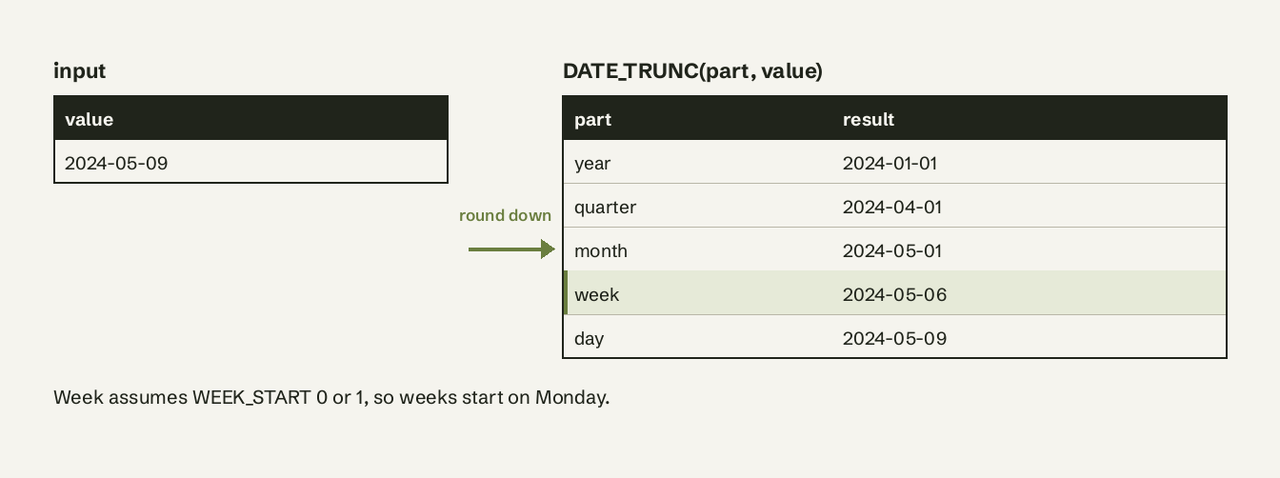
Input: the date 2024-05-09 (a Thursday) and the timestamp 2024-05-09 08:50:57.891. Values match the examples in Snowflake's documentation.
| Part (aliases) | DATE_TRUNC form | TRUNC form | Result |
|---|---|---|---|
year (y, yy, yyyy, yr) | DATE_TRUNC('year', d) | TRUNC(d, 'year') | 2024-01-01 |
quarter (q, qtr) | DATE_TRUNC('quarter', d) | TRUNC(d, 'quarter') | 2024-04-01 |
month (mm, mon) | DATE_TRUNC('month', d) | TRUNC(d, 'month') | 2024-05-01 |
week (w, wk), WEEK_START = 0 or 1 | DATE_TRUNC('week', d) | TRUNC(d, 'week') | 2024-05-06 (Monday) |
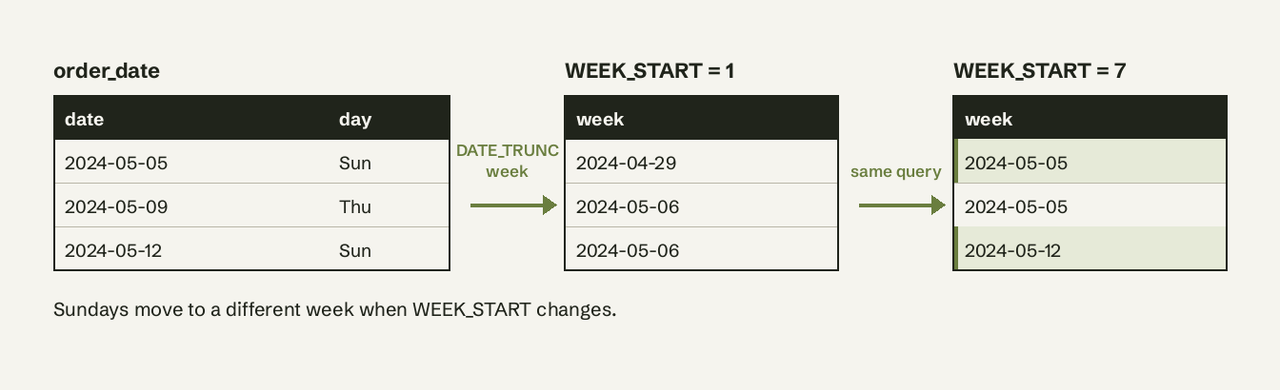
| week, WEEK_START = 7 | DATE_TRUNC('week', d) | TRUNC(d, 'week') | 2024-05-05 (Sunday) |
day (d, dd) | DATE_TRUNC('day', d) | TRUNC(d, 'day') | 2024-05-09 |
hour (h, hh, hr) | DATE_TRUNC('hour', ts) | TRUNC(ts, 'hour') | 2024-05-09 08:00:00.000 |
minute (m, mi, min) | DATE_TRUNC('minute', ts) | TRUNC(ts, 'minute') | 2024-05-09 08:50:00.000 |
second (s, sec) | DATE_TRUNC('second', ts) | TRUNC(ts, 'second') | 2024-05-09 08:50:57.000 |
Parts are case-insensitive, so 'MONTH', 'month' and 'mon' all work (Snowflake docs, Supported date and time parts). DATE_TRUNC also accepts millisecond, microsecond and nanosecond.
Using AI for Database on Snowflake data
AI for Database lists Snowflake on its integrations page, next to PostgreSQL, MySQL, SQL Server and BigQuery. For date bucketing that means:
- You type "weekly signups for the last 12 weeks, weeks starting Monday" and it writes the
DATE_TRUNC('week', ...)query, runs it read-only and shows the SQL so you can check the truncation part. - The answer can be pinned to a dashboard that refreshes on a schedule, so the weekly chart stays current without anyone re-running the query.
- An action workflow can watch the same number, for example "when daily signups drop below 50", and send a Slack message, email or webhook.
It does not change your session parameters. If your account default for WEEK_START is not what you want, say the week start in the question or set it yourself (see below). See how to query Snowflake without SQL for the setup.
What is the difference between TRUNC and DATE_TRUNC in Snowflake?
TRUNC and DATE_TRUNC are the same date function with the arguments in opposite order: DATE_TRUNC(part, expr) versus TRUNC(expr, part). TRUNCATE is a synonym for TRUNC. Results, return types and week rules are identical.
The one real difference: TRUNC is overloaded. With a number it removes digits instead, and the numeric form has one required and one optional argument (Snowflake docs, TRUNC):
SELECT TRUNC(123.456, 1);               -- 123.4  (numeric TRUNC)
SELECT TRUNC('2024-05-09'::DATE, 'mm'); -- 2024-05-01 (date TRUNC)
SELECT DATE_TRUNC('mm', '2024-05-09'::DATE); -- 2024-05-01
Prefer DATE_TRUNC in shared code. It reads the same as PostgreSQL, Redshift and BigQuery's DATE_TRUNC, and nobody mistakes it for the numeric function. If you work across engines, compare it with the PostgreSQL date functions.
Syntax and arguments
DATE_TRUNC( <date_or_time_part>, <date_or_time_expr> )
TRUNC( <date_or_time_expr>, <date_or_time_part> )date_or_time_part: a string from the supported parts list (year, quarter, month, week, day, hour, minute, second and finer).date_or_time_expr: anything that evaluates to a DATE, TIME or TIMESTAMP. A string literal needs a cast ('2024-05-09'::DATE), otherwise Snowflake cannot tell which overload you mean.
Does DATE_TRUNC return a date or timestamp?
DATE_TRUNC returns the same type as its input. Snowflake's docs: "The returned value is the same type as the input value." So a DATE column stays a DATE, and a TIMESTAMP_NTZ, TIMESTAMP_LTZ or TIMESTAMP_TZ value stays that timestamp type with the truncated parts set to zero.
SELECT DATE_TRUNC('month', CURRENT_DATE());       -- DATE, e.g. 2026-11-01
SELECT DATE_TRUNC('month', CURRENT_TIMESTAMP());  -- TIMESTAMP_LTZ, 2026-11-01 00:00:00.000
SELECT DATE_TRUNC('month', CURRENT_TIMESTAMP())::DATE; -- cast if you want a DATE
This matters when you join a truncated timestamp to a calendar table of DATEs: cast first, or the join compares a timestamp with a date.
How do I truncate to week starting Monday in Snowflake?
Set WEEK_START = 1, then truncate to week:
ALTER SESSION SET WEEK_START = 1;  -- 1 = Monday ... 7 = Sunday
SELECT DATE_TRUNC('week', order_date) AS week_start,
       COUNT(*) AS orders
FROM orders
GROUP BY 1
ORDER BY 1;
The default, WEEK_START = 0, is the legacy behavior and also truncates to Monday, so many accounts already get Monday weeks. Snowflake still recommends setting the parameter explicitly, "the most common scenario is to set the parameter to 1" (Snowflake docs, Calendar weeks and weekdays). The trap: an admin can set WEEK_START = 7 at the account or user level, and the same query then returns Sunday weeks with no change in your SQL.
For weeks that never depend on parameters, use ISO parts such as week_iso and yearofweekiso in DATE_PART, which the docs say "disregard the session parameters".
For Sunday weeks without touching the session:
SELECT DATEADD('day', -DAYOFWEEKISO(order_date) % 7, order_date) AS sunday_week
FROM orders;
DAYOFWEEKISO returns 1 for Monday through 7 for Sunday, so % 7 gives 0 on Sunday and steps back the right number of days.
Usage notes and errors
- TIME values only truncate to time parts.
DATE_TRUNC('day', '08:50:48'::TIME)errors, because a TIME has no day. - Truncation is not extraction.
DATE_TRUNC('quarter', ts)gives2024-04-01 00:00:00.000;EXTRACT('quarter', ts)gives2. - Last day instead of first day: use
LAST_DAY(d, 'month'), which returns2024-05-31for the example date. - Group by the truncated value, not by the raw column, or every row is its own group.
When to use TIME_SLICE instead
DATE_TRUNC only rounds to one unit. For buckets like 15 minutes or 2 weeks, use TIME_SLICE(expr, slice_length, part [, 'START' | 'END']) (Snowflake docs, TIME_SLICE):
SELECT TIME_SLICE(event_ts::TIMESTAMP_NTZ, 15, 'MINUTE') AS bucket,
       COUNT(*) AS events
FROM events
GROUP BY 1;
TIME_SLICE accepts only DATE or TIMESTAMP_NTZ, so cast LTZ values first. Its slices are aligned to midnight on 1970-01-01, and week slices to the week containing that Thursday.
Examples you can copy
Monthly revenue:
SELECT DATE_TRUNC('month', paid_at)::DATE AS month,
       SUM(amount) AS revenue
FROM payments
WHERE paid_at >= DATEADD('month', -12, DATE_TRUNC('month', CURRENT_DATE()))
GROUP BY 1
ORDER BY 1;
Signups per quarter, as a compact TRUNC form:
SELECT TRUNC(created_at, 'quarter') AS quarter, COUNT(*) AS signups
FROM users
GROUP BY 1
ORDER BY 1;
The same monthly grouping powers cohort analysis from your database and automated weekly reports.
Frequently Asked Questions
What is the difference between TRUNC and DATE_TRUNC in Snowflake?
Only the argument order. DATE_TRUNC('month', d) and TRUNC(d, 'month') return the same value and type. TRUNC also has a numeric form, so DATE_TRUNC is clearer in shared code.
How do I truncate to week starting Monday?
Run ALTER SESSION SET WEEK_START = 1; and use DATE_TRUNC('week', d). The default value 0 also gives Monday, but setting it explicitly protects you from account-level overrides.
Does DATE_TRUNC return a date or timestamp?
The same type as the input. Truncating a TIMESTAMP gives a TIMESTAMP at midnight; add ::DATE if you need a DATE.
How do I get the first day of the month in Snowflake?
DATE_TRUNC('month', CURRENT_DATE()) returns the first day of the current month as a DATE.
Can I truncate to 15 minutes in Snowflake?
Not with DATE_TRUNC. Use TIME_SLICE(ts, 15, 'MINUTE') on a TIMESTAMP_NTZ value. Want weekly and monthly numbers from Snowflake without writing the SQL? Try AI for Database free at aifordatabase.com (https://app.aifordatabase.com/signup, sample data included).