
9 Best Query Builders for SQL: Visual, Code, AI (Compared)
TL;DR: For a free visual SQL query builder, start with DbSchema Community or FlySpeed SQL Query Free. For heavy SQL Server or MySQL work, dbForge Query Builder (from $139.95) is the most complete paid desktop option. Developers who want a query builder in code should use Knex.js; teams who want questions answered without building queries at all should look at Metabase or a natural-language tool.
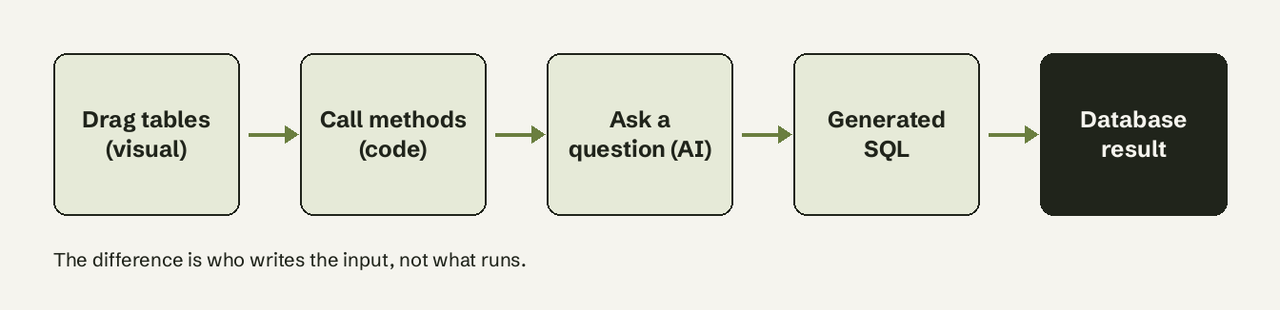
A query builder is a tool that writes SQL for you from clicks, method calls or a question, so you don't type the SELECT ... JOIN ... WHERE yourself. There are three kinds, and they suit different people: visual query builders (drag tables, tick columns, the tool writes the SQL), code query builders (libraries like Knex that build SQL from function calls inside an app) and natural-language builders (you ask a question, the tool generates and runs the SQL). The best query builder is the one that matches who is asking and where the result goes. Below are nine options, with prices from each vendor's site checked on 2026-10-30, and the SQL each kind produces.
How we judged
- Who it's for: analyst, developer, or someone who doesn't write SQL.
- Databases: which engines it connects to.
- SQL transparency: can you see and edit the generated SQL?
- Price: free tier and the first paid tier, from the vendor's page.
- Limits: what it won't do, from the docs.
Query builders at a glance
| # | Tool | Type | Best for | Free option | Paid from |
|---|---|---|---|---|---|
| 1 | DbSchema | Visual (desktop) | Learning joins, multi-database teams | Community edition | Pro (paid licence) |
| 2 | FlySpeed SQL Query | Visual (desktop, Windows) | Free ad-hoc querying | Free version | $49 |
| 3 | dbForge Query Builder | Visual (desktop, Windows) | SQL Server power users | 30-day trial | $139.95 |
| 4 | DBeaver Visual Query Builder | Visual inside a SQL IDE | Developers already on DBeaver | No (Lite and up) | Lite subscription |
| 5 | SSMS Query Designer | Visual inside SSMS | SQL Server shops | Free | Free |
| 6 | Metabase query builder | Visual BI questions | Business users with dashboards | Open source | $100/month Starter |
| 7 | Knex.js | Code library (Node.js) | App developers | MIT, free | Free |
| 8 | Active Query Builder | Embeddable component | Software vendors | Trial | Commercial licence |
| 9 | AI for Database | Natural language | Non-SQL teams on live databases | Sample data + 100 queries | $10/user/month |
1. DbSchema
DbSchema is a cross-database design tool with a visual query builder: you click tables and columns, it joins them along their foreign keys and writes the SQL as you go. It suits people learning SQL and teams that work across several engines. Pricing: every download starts with a 15-day trial of all features, then you keep the free Community edition (connect, reverse-engineer, draw diagrams, run SQL) or buy Pro, which adds offline models, documentation and schema sync (DbSchema pricing). Limit: the builder relies on declared foreign keys; schemas without them need manual joins.
2. FlySpeed SQL Query
FlySpeed SQL Query is a Windows desktop tool built on Active Query Builder. It reads your database structure and lets you tick columns to build a query, then runs it and shows the result grid. Pricing: Free, or $49 for the full version; the free version is fully functional except printing, export and import (ActiveDBSoft). Best for: the best free visual SQL query builder if you only need to look at results, not ship them.
3. dbForge Query Builder
dbForge Query Builder from Devart is the most complete paid visual builder for SQL Server: diagram canvas, a condition expression builder, subqueries and a results grid. Pricing: from $139.95, Professional $469.95, with a 30-day free trial (Devart). Limit: Windows only, and SQL Server only; Devart sells separate MySQL and PostgreSQL products.
4. DBeaver Visual Query Builder
DBeaver's Visual Query Builder sits inside its SQL Editor: click Builder, drag tables onto the canvas and set columns, conditions, joins and sorting. What you build appears in the SQL editor and valid SQL you type shows up in the builder, so it doubles as a learning aid. Pricing: the docs state it is available in the Lite, Enterprise and Ultimate editions only, not the free Community edition (DBeaver docs); PRO editions offer a 14-day trial.
5. SSMS Query Designer
SQL Server Management Studio includes a Query and View Designer with a diagram pane, a criteria pane for filters and sorting, and the generated SQL pane (Microsoft Learn). Pricing: free with SSMS. Limit: SQL Server and Azure SQL only, Windows only, and the designer has not changed much in years.
6. Metabase query builder
Metabase's query builder (its "question" editor) lets business users pick a table, filter, summarize and group without SQL, then save the result to a dashboard. It suits teams who want charts more than raw queries. Pricing: Open Source is free with unlimited users; Starter is $100/month ($90 on annual billing) including users, then $6 per extra user; Pro is $575/month; 14-day trial (Metabase pricing). Limit: someone still has to model the data and handle anything the builder can't express, which falls back to SQL. We compare it with a natural-language approach in Metabase vs AI for Database.
7. Knex.js
Knex is a SQL query builder library for Node.js. You chain methods and it emits SQL for PostgreSQL, CockroachDB, Redshift, MySQL, MariaDB, SQLite, Oracle and SQL Server through their drivers (Knex docs). Pricing: free and open source. Limit: it's for developers inside an app. Knex's own docs warn against composing queries in the browser for server execution because of security risk.
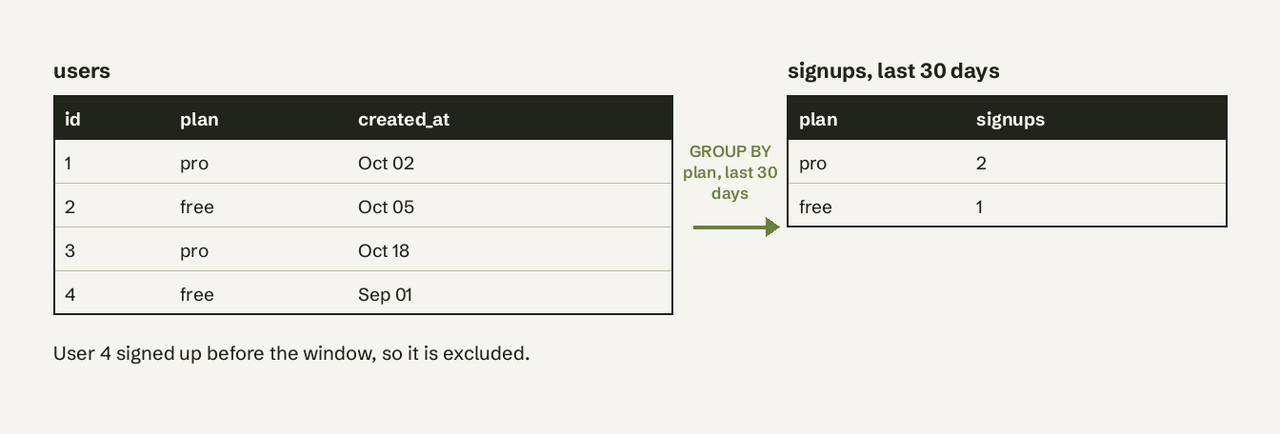
// Knex: signups per plan in the last 30 days
const rows = await knex('users')
  .select('plan')
  .count('* as signups')
  .where('created_at', '>=', knex.raw("now() - interval '30 days'"))
  .groupBy('plan')
  .orderBy('signups', 'desc');
That chain produces:
-- SQL generated by the Knex chain above (PostgreSQL)
SELECT "plan", count(*) AS "signups"
FROM "users"
WHERE "created_at" >= now() - interval '30 days'
GROUP BY "plan"
ORDER BY "signups" DESC;
8. Active Query Builder
Active Query Builder is not an app you use; it's a component software vendors embed so their own customers can build queries visually inside their product. It can add hidden conditions to user queries and analyze them to prevent data leaks (Active Query Builder). Pricing: commercial licence, quoted by the vendor. Best for: a SaaS that needs an ad-hoc reporting screen without building one.
9. AI for Database
AI for Database is a natural-language query builder: connect PostgreSQL, MySQL, Supabase, BigQuery or another database, ask "signups per plan in the last 30 days", and it writes and runs the SQL, shows the query, and can pin it to a dashboard or alert. Pricing: start free on sample data, 100 free queries on your own database, then $10 per user per month (aifordatabase.com/pricing, 2026-10-23). Limit: generated SQL should be reviewed for business-critical numbers, which is why the query is always shown.
Query builder vs ORM: which should I use?
Use a query builder when you want control over the SQL and think in tables; use an ORM when you want to think in objects and let the library handle relations. Knex builds SQL but returns plain rows; ORMs such as Prisma, TypeORM or Sequelize map rows to models, manage relations and often run migrations. Many teams use both: the ORM for app CRUD, a query builder or raw SQL for reports, where ORMs produce awkward queries.
| Query builder (Knex) | ORM (Prisma, TypeORM) | |
|---|---|---|
| You write | Method chains close to SQL | Model operations |
| Returns | Plain rows | Typed objects with relations |
| Reporting queries | Natural fit | Often drops to raw SQL |
| Learning curve | Need SQL concepts | Need the ORM's API |
How to choose
- You don't write SQL and need answers from a live database: Metabase if you'll invest in setup, a natural-language tool if you want answers today. Our list of SQL alternatives for non-technical teams goes deeper.
- You're learning SQL: DbSchema Community or DBeaver's builder, because both show the SQL beside the diagram. Keep our SQL cheat sheet open.
- You live in SQL Server: SSMS for free, dbForge if you want more.
- You're writing an app: Knex, or an ORM for CRUD.
- You're building a product with self-serve reporting: Active Query Builder.
Can AI replace drag-and-drop tools?
For most ad-hoc questions, yes: typing "revenue by month for Pro customers" is faster than dragging three tables and setting a filter. Visual builders still win when you need to see the join structure, when the schema has no clear names for the AI to map, or when you're teaching SQL. The safe middle ground is an AI tool that shows the generated SQL so it can be checked, as covered in our text-to-SQL tools comparison.
If your team keeps asking a developer to build the same queries, AI for Database connects to your database, answers in plain English with the SQL shown, and keeps the answers on a self-refreshing dashboard. Try it free on sample data.
Frequently Asked Questions
What is the best free visual SQL query builder?
DbSchema Community and FlySpeed SQL Query Free are the strongest free visual builders. FlySpeed's free version does everything except print, export and import; DbSchema Community keeps the builder after its 15-day full trial. SSMS's Query Designer is free if you only use SQL Server.
Does DBeaver Community have a visual query builder?
No. DBeaver's docs list the Visual Query Builder in the Lite, Enterprise and Ultimate editions only.
Is a query builder safer than raw SQL?
Code query builders such as Knex bind parameters, which protects against SQL injection when you'd otherwise concatenate strings. They don't make it safe to build queries in the browser and send them to the server, which Knex's docs warn against.
Are query builders slower than hand-written SQL?
The database runs the generated SQL like any other query, so speed depends on the SQL produced. Visual builders sometimes add unnecessary joins or columns; check the generated query for large tables.
What is Metabase's query builder?
It's Metabase's no-SQL question editor: choose data, filter, summarize and group, then visualize. It's included in the free open-source edition.