
SQL Divide Two Columns: Fix 0 Results and Divide by Zero
TL;DR: To divide two columns in SQL, write a / b. If both columns are integers, PostgreSQL, SQL Server and SQLite throw away the decimals (7 / 2 = 3, and 1 / 4 = 0), so cast one side first: a * 1.0 / b or CAST(a AS numeric) / b. Wrap the divisor in NULLIF(b, 0) so a zero gives NULL instead of an error, then ROUND(..., 2). If you would rather ask "conversion rate by plan" in plain English, AI for Database writes this query for you, runs it and shows the SQL.
The short answer to "how do I divide two columns in SQL": SELECT ROUND(CAST(paid AS numeric) / NULLIF(signups, 0), 2) AS conversion_rate FROM funnel;. That one line handles the three things that go wrong with SQL division: integer division returning 0, the divide by zero error, and too many decimal places. It works as written in PostgreSQL, SQL Server (use decimal(10,4) instead of numeric if you prefer), MySQL and Oracle. BigQuery has a shorter form, SAFE_DIVIDE(paid, signups).
Try AI for Database free at aifordatabase.com (https://app.aifordatabase.com/signup, sample data included).
What you need
- A table with two numeric columns. The examples use
funnel(plan text, signups int, paid int). - Any of: PostgreSQL 12+, MySQL 8.x, SQL Server 2016+, SQLite 3, BigQuery or Oracle 19c+.
- Read access. Every query here is a
SELECT; nothing changes your data.
What are the steps for a safe division query?
- Write the plain division. Use the
/operator with the dividend first:
   SELECT plan, paid / signups AS conversion_rate
   FROM funnel;
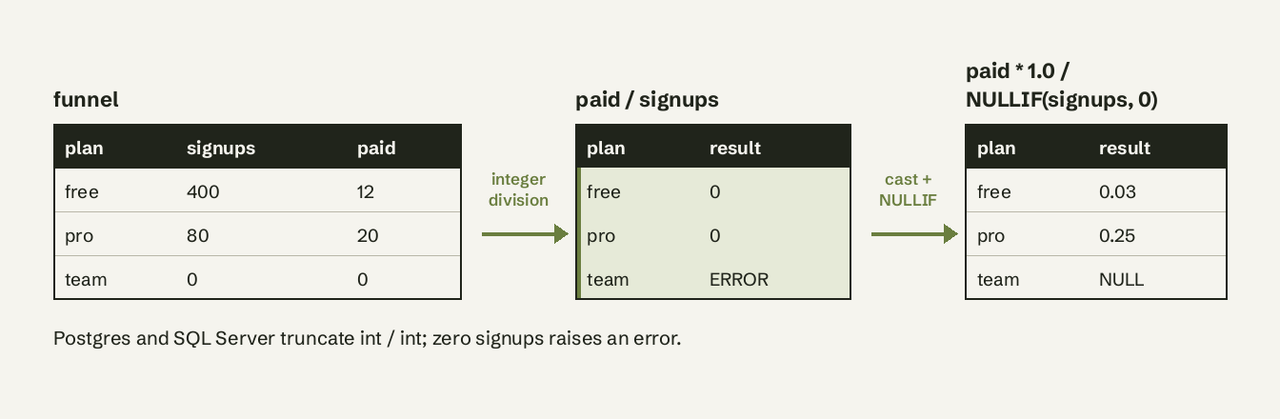
On integer columns in PostgreSQL this returns 0 for the free plan (12 / 400) and 0 for pro (20 / 80).
- Force decimal division. Cast either column, or multiply by
1.0:
   SELECT plan, CAST(paid AS numeric) / signups AS conversion_rate
   FROM funnel;
   -- or: paid * 1.0 / signups
Now pro returns 0.25000000000000000000.
- Guard against zero.
NULLIF(signups, 0)returns NULL whensignupsis 0, and anything divided by NULL is NULL, so the row survives without an error:
   SELECT plan, CAST(paid AS numeric) / NULLIF(signups, 0) AS conversion_rate
FROM funnel;- Round the result. Round after dividing, not before:
   SELECT plan,
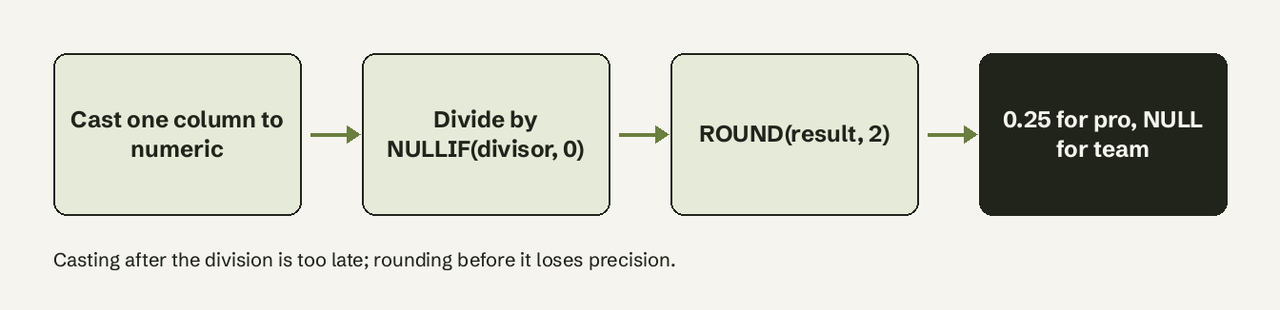
          ROUND(CAST(paid AS numeric) / NULLIF(signups, 0), 2) AS conversion_rate
FROM funnel;- Optional: show it as a percentage or replace NULL. Multiply by 100 and use
COALESCEif your report needs a number instead of NULL:
   SELECT plan,
          COALESCE(ROUND(100.0 * paid / NULLIF(signups, 0), 1), 0) AS conversion_pct
   FROM funnel;
Verify it worked: run the query on a row you can check by hand. For pro, 20 / 80 must give 0.25 (or 25.0 as a percentage). If you still see 0, the cast is in the wrong place (see the next section).
Why does dividing two columns return 0?
Dividing two integer columns returns 0 because PostgreSQL, SQL Server and SQLite do integer division when both operands are integers: the fractional part is truncated, so any result below 1 becomes 0. Microsoft's docs say it directly: "If an integer dividend is divided by an integer divisor, the result is an integer that has any fractional part of the result truncated" (Microsoft Learn, / (Division)). PostgreSQL documents the same rule, "Division of integral types truncates the result towards zero", with 5 / 2 returning 2 (PostgreSQL docs, Mathematical Functions).
Where the cast goes matters:
SELECT CAST(20 / 80 AS numeric);   -- 0     (division already happened as integers)
SELECT CAST(20 AS numeric) / 80;   -- 0.25  (cast first, then divide)
MySQL, Oracle and BigQuery do not have this trap: their / returns a decimal or float even for integers. MySQL has a separate DIV operator for integer division (7 DIV 2 = 3) (MySQL 8.4 Arithmetic Operators).
How does division behave in each database?
| Database | 7 / 2 on integers | Divide by zero | Safe division | Integer division |
|---|---|---|---|---|
| PostgreSQL | 3 | ERROR: division by zero (SQLSTATE 22012) | a / NULLIF(b, 0) | / on ints, or div(a, b) |
| SQL Server | 3 | Msg 8134, Divide by zero error encountered. | a / NULLIF(b, 0) | / on ints |
| MySQL 8 | 3.5000 | NULL with a warning | NULL by default | a DIV b |
| SQLite | 3 | NULL | NULL by default | / on ints |
| BigQuery | 3.5 (FLOAT64) | error: division by zero | SAFE_DIVIDE(a, b) | DIV(a, b) |
| Oracle | 3.5 | ORA-01476: divisor is equal to zero | a / NULLIF(b, 0) | TRUNC(a / b) |
| Snowflake | 3.500000 | error | DIV0(a, b) returns 0, DIV0NULL | TRUNC(a / b) |
Two details the other guides skip:
- MySQL adds 4 decimals by default. The scale of a
/result grows bydiv_precision_increment, which defaults to 4, which is why7 / 2prints3.5000(MySQL server variables). - BigQuery's `/` never truncates. It returns FLOAT64 for integer inputs, and
SAFE_DIVIDEreturns NULL instead of an error when the divisor is 0 (BigQuery mathematical functions).
How do I avoid divide by zero errors?
Wrap the divisor in NULLIF(divisor, 0). NULLIF returns NULL when its two arguments are equal, and division by NULL returns NULL, so the query keeps running and the row shows NULL (PostgreSQL conditional expressions). This is standard SQL and works in every database in the table above.
-- PostgreSQL, SQL Server, MySQL, Oracle, SQLite
SELECT plan, paid * 1.0 / NULLIF(signups, 0) AS rate FROM funnel;

-- BigQuery
SELECT plan, SAFE_DIVIDE(paid, signups) AS rate FROM funnel;

-- Snowflake: 0 instead of NULL
SELECT plan, DIV0(paid, signups) AS rate FROM funnel;
A CASE expression does the same job and is easier to read when you want a different fallback:
SELECT plan,
       CASE WHEN signups = 0 THEN NULL
            ELSE paid * 1.0 / signups END AS rate
FROM funnel;
Decide on purpose whether zero signups should show NULL ("no data") or 0 ("0% converted"). For a conversion rate, NULL is usually more honest; averages computed later with AVG() skip NULLs but count zeros.
How do I round the result to 2 decimals?
Use ROUND(expression, 2) around the whole division. In PostgreSQL the two-argument ROUND only accepts numeric, so this fails:
SELECT ROUND(paid::float / signups, 2) FROM funnel;
-- ERROR: function round(double precision, integer) does not exist
Cast to numeric instead of float, or cast the result: ROUND((paid::float / signups)::numeric, 2). In SQL Server, ROUND keeps the trailing zeros of the type (0.250000); cast the result to decimal(10,2) for clean output. In MySQL and BigQuery, ROUND(x, 2) works on any numeric type.
How do I get a ratio across two joined tables?
Join the tables first, then divide in the SELECT. When the tables are at different grains (one row per day vs one row per order), aggregate each side before joining, or the join multiplies rows and inflates the dividend.
-- revenue per visitor per day: aggregate each side, then join and divide
WITH rev AS (
  SELECT order_date AS day, SUM(amount) AS revenue
  FROM orders GROUP BY order_date
),
traffic AS (
  SELECT day, SUM(visitors) AS visitors
  FROM web_sessions GROUP BY day
)
SELECT t.day,
       ROUND(r.revenue * 1.0 / NULLIF(t.visitors, 0), 2) AS revenue_per_visitor
FROM traffic t
LEFT JOIN rev r ON r.day = t.day
ORDER BY t.day;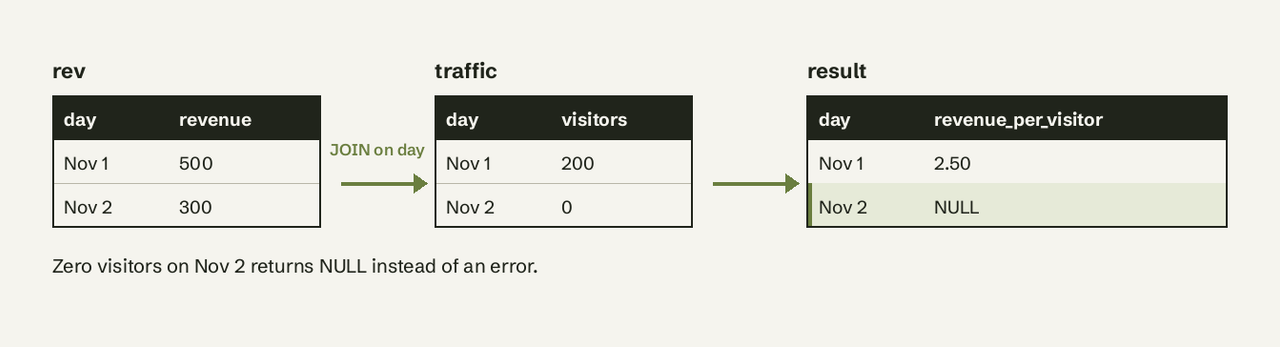
How do I divide aggregates, like a ratio per group?
Divide the aggregates, not the rows. SUM(paid) / SUM(signups) gives the true overall rate; AVG(paid / signups) gives an average of per-row rates, which weights a plan with 5 signups the same as one with 5,000.
SELECT plan,
       ROUND(SUM(paid) * 1.0 / NULLIF(SUM(signups), 0), 4) AS conversion_rate
FROM funnel_daily
GROUP BY plan;
For a share of the total, use a window function: amount * 1.0 / SUM(amount) OVER () returns each row's fraction of the grand total.
Where AI for Database fits
Most people searching for this are building a report: conversion rate, revenue per user, churn rate. All of them are a division with the same three traps. AI for Database connects to PostgreSQL, MySQL, SQL Server, BigQuery, Supabase and more, and you ask the question in plain English ("paid conversion rate by plan last 30 days"). It writes the SQL, runs it read-only, returns the table or chart and shows the SQL it used, so you can check the cast and the NULLIF yourself. You can pin the answer to a dashboard that refreshes on a schedule, or set a workflow such as "when conversion drops below 2%, send a Slack alert". It starts free with sample data; Pro is $10 per user per month (pricing).
It does not replace knowing what the query does: for a one-off calculation in your own SQL client, the patterns above are all you need.
Related guides: SQL COUNTIF patterns, NVL in Postgres (COALESCE), UNION vs UNION ALL and Postgres date BETWEEN.
Common errors and fixes
ERROR: division by zero(PostgreSQL) orMsg 8134, Divide by zero error encountered.(SQL Server): wrap the divisor inNULLIF(col, 0).ORA-01476: divisor is equal to zero(Oracle): same fix,NULLIF(col, 0).function round(double precision, integer) does not exist(PostgreSQL): cast tonumericbeforeROUND.- Result is always 0 or a whole number: integer division; cast one operand before dividing.
- Percentages above 100% after a join: the join duplicated rows; aggregate each table first.
Frequently Asked Questions
Why does SQL division return 0?
Both columns are integers, so PostgreSQL, SQL Server and SQLite truncate the result: 12 / 400 becomes 0. Cast one column with CAST(col AS numeric) or multiply by 1.0 before dividing.
How do I avoid divide by zero errors in SQL?
Use a / NULLIF(b, 0). When b is 0 the divisor becomes NULL and the result is NULL instead of an error. In BigQuery use SAFE_DIVIDE(a, b); in Snowflake DIV0(a, b) returns 0.
How do I round a division result to 2 decimal places?
Wrap it: ROUND(CAST(a AS numeric) / NULLIF(b, 0), 2). In PostgreSQL the value must be numeric, not float, for two-argument ROUND.
How do I divide columns from two different tables?
Join them on a shared key and divide in the SELECT. If the tables have different grains, aggregate each one in a CTE first so the join does not duplicate rows.
How do I calculate a percentage between two columns?
ROUND(100.0 part / NULLIF(total, 0), 1). Starting with 100.0 makes the whole expression decimal, so no separate cast is needed.
Does MySQL do integer division?
Not with /: 7 / 2 returns 3.5000. Use 7 DIV 2 for integer division, which returns 3. > Try AI for Database free at aifordatabase.com (https://app.aifordatabase.com/signup, sample data included). Ask "conversion rate by plan" and check the SQL it writes.