
SQL Snippets: Where to Save Them and Libraries to Use
TL;DR: SQL snippets are saved pieces of SQL you insert with a short trigger word instead of retyping them. SSMS stores them as .snippet XML files, VS Code as JSON .code-snippets files, DBeaver as Templates and DataGrip as Live Templates. If the snippet you keep reusing is really a business question ("revenue by month", "active users this week"), AI for Database lets you ask it in plain English, shows the SQL, and pins the answer to a dashboard that refreshes itself.
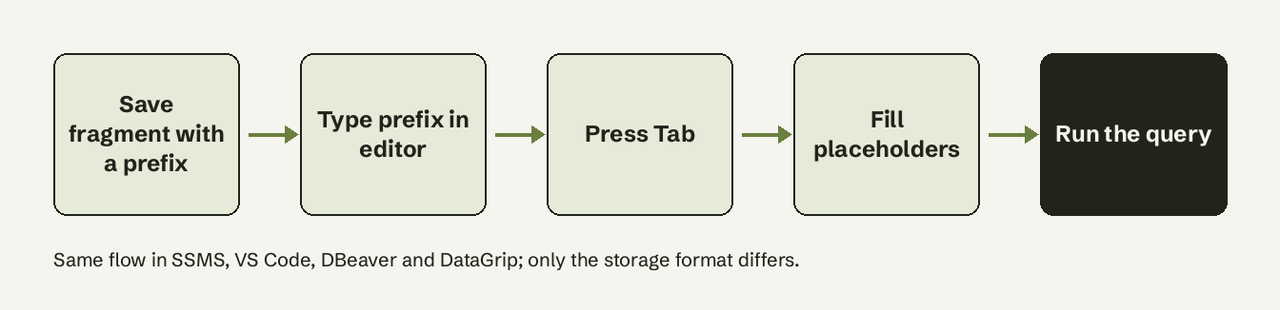
SQL snippets (also called SQL templates or live templates) are reusable fragments of SQL, such as a standard join, a date filter or a TRY...CATCH block, that your editor inserts when you type a prefix and press Tab. Every major SQL editor supports them, but each stores them in a different place and format: SSMS uses XML .snippet files registered in Tools > Code Snippets Manager, VS Code uses JSON with ${1:placeholder} tab stops, DBeaver and DataGrip use template settings pages. Below are the exact paths, a sample snippet for each, and the snippet libraries worth importing.
Try AI for Database free at aifordatabase.com (https://app.aifordatabase.com/signup, sample data included).
What AI for Database does for the queries you keep saving
Most snippet collections end up as a pile of report queries: monthly revenue, signups by source, churned accounts. AI for Database handles that job differently for teams without a data team:
- Ask instead of paste. Connect PostgreSQL, MySQL, SQL Server, BigQuery, Supabase and more, type "revenue by country last 30 days", and get a table or chart. Every answer shows its SQL, so it doubles as a snippet you can copy into your editor.
- Read-only. Answers run read-only, so a reused query cannot change data.
- Dashboards that refresh themselves. Pin the question once and it re-runs on a schedule, so nobody pastes the same snippet every Monday.
- Workflows. "When daily signups drop below 50, send a Slack alert" replaces the snippet someone runs by hand to check.
It does not manage editor snippets for you. Keep using the editor tools below for DDL, admin scripts and code you write yourself.
How do I add custom snippets in SSMS?
SSMS snippets are XML files with a .snippet extension that follow the Visual Studio Code Snippets Schema with the language set to SQL (Microsoft Learn).
- Save the file, for example
TopN.snippet. - Open SSMS, go to Tools > Code Snippets Manager.
- Choose Add to register a whole folder, or Import to add one file to My Code Snippets.
- In a query window press Ctrl+K, Ctrl+X to insert it.
<?xml version="1.0" encoding="utf-8" ?>
<CodeSnippets xmlns="http://schemas.microsoft.com/VisualStudio/2005/CodeSnippet">
  <CodeSnippet Format="1.0.0">
    <Header>
      <Title>Top N rows</Title>
      <SnippetTypes><SnippetType>Expansion</SnippetType></SnippetTypes>
    </Header>
    <Snippet>
      <Declarations>
        <Literal><ID>n</ID><Default>100</Default></Literal>
        <Literal><ID>table</ID><Default>dbo.Orders</Default></Literal>
      </Declarations>
      <Code Language="SQL"><![CDATA[SELECT TOP ($n$) * FROM $table$ ORDER BY 1 DESC;]]></Code>
    </Snippet>
  </CodeSnippet>
</CodeSnippets>
To see where the built-in T-SQL snippets live on your machine, pick SQL in the Language box of Code Snippets Manager; the path appears under Location.
Do VS Code and DBeaver support SQL snippets?
Yes, both do, in different formats.
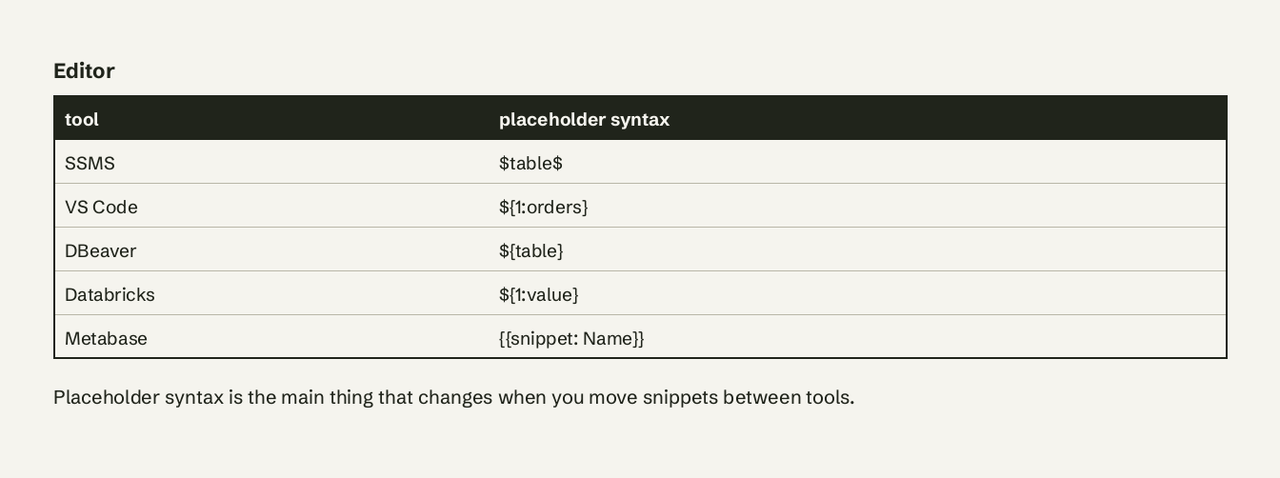
VS Code (and the mssql extension) uses JSON snippets. Open File > Preferences > Configure Snippets, pick sql or create a global .code-snippets file. A project file in .vscode/ is shared with everyone who opens the repo (VS Code docs). ${1:default} is a tab stop and $0 is where the cursor ends. Tab expansion needs "editor.tabCompletion": "on".
{
  "Rows in the last N days": {
    "prefix": "lastn",
    "scope": "sql",
    "body": [
      "SELECT *",
      "FROM ${1:orders}",
      "WHERE ${2:created_at} >= CURRENT_DATE - INTERVAL '${3:7} days';$0"
    ],
    "description": "Filter a table to the last N days (PostgreSQL)"
  }
}
Azure Data Studio used the same format, but Microsoft retired it on February 28, 2026 and points users to VS Code (Microsoft Learn). Copy your old sql.json snippets into VS Code as they are.
DBeaver calls them SQL Templates. Press Ctrl+Alt+Space to list them, or type the template name and press Tab. Add or edit them under Preferences > SQL Editor > Templates (DBeaver docs).
-- DBeaver template "dup": find duplicate values
SELECT ${column}, COUNT(*) AS n
FROM ${table}
GROUP BY ${column}
HAVING COUNT(*) > 1;
DataGrip uses Live Templates: Ctrl+J inserts, Tab expands, and Settings > Editor > Live Templates manages them. Built-ins include sel, selw, selc, ins and upd (JetBrains docs).
| Editor | Name for snippets | Format | Where to manage | Insert |
|---|---|---|---|---|
| SSMS | Code snippets | .snippet XML | Tools > Code Snippets Manager | Ctrl+K, Ctrl+X |
| VS Code | Snippets | .code-snippets / sql.json | File > Preferences > Configure Snippets | prefix + Tab |
| DBeaver | SQL Templates | settings page | Preferences > SQL Editor > Templates | name + Tab, Ctrl+Alt+Space |
| DataGrip | Live Templates | settings page | Settings > Editor > Live Templates | abbreviation + Tab, Ctrl+J |
| Databricks SQL | Query snippets | ${1:value} in UI | View > Query snippets | autocomplete, Ctrl+Space |
| Metabase | Snippets | {{snippet: Name}} | SQL editor sidebar | {{snippet: autocomplete |
Where can I find ready-made SQL snippet libraries?
Start with these, grouped by kind. All are free unless noted.
Snippet collections
- count/sql-snippets: curated analytics snippets (cohorts, medians, outliers, time series) with folders for BigQuery, MSSQL, MySQL, Postgres and Snowflake. Best single library for analysts.
- Databricks query snippets: docs with ready examples of snippets with insertion points, useful as a pattern even outside Databricks.
- Metabase snippets: shows how a team stores shared KPI definitions ("what counts as an active user") as snippets.
Editor documentation
- SSMS: Add Transact-SQL snippets: the official schema and a full TRY...CATCH example file.
- VS Code user-defined snippets: every placeholder, choice and variable the JSON format supports.
- DBeaver SQL templates: template variables and DBeaver-specific ones such as table and column pickers.
- DataGrip live templates: simple, parameterized and surround templates, plus postfix completion.
Reference queries to turn into snippets
- PostgreSQL date/time functions: the source for every date filter snippet on Postgres.
- MySQL date and time functions: same for MySQL.
- SQL Server system catalog views: the base for "find a column", "table sizes" and other admin snippets.
Our free pages
- SQL glossary entry and scheduled query: for when a snippet should run on its own.
- Dashboard and query templates: report questions ready to run on sample data.
What makes a SQL snippet worth saving?
A snippet is worth saving when you type the same structure at least weekly and only the names change. Good candidates:
- Boilerplate with fixed syntax:
TRY...CATCH,MERGE,CREATE TABLEwith your audit columns. - Easy-to-get-wrong filters: half-open date ranges (
>= start AND < end), timezone conversion. - Admin lookups: find a column across tables, table sizes, blocking sessions.
- Team definitions: "active user" or "net revenue", shared in a project
.code-snippetsfile or a Metabase snippet so everyone uses one definition.
Skip it when the query is a one-off report someone else will ask for again next month: that is a dashboard, not a snippet. For PostgreSQL work, see our PostgreSQL page.
Start here
- Pick your editor's row in the table above and create one snippet for the query you typed most this week.
- Import three analytics snippets from count/sql-snippets for your database.
- Put team definitions in a shared project snippet file.
- Move recurring report queries out of snippets and into a scheduled dashboard.
Frequently Asked Questions
What is a SQL snippet?
A SQL snippet is a saved, reusable fragment of SQL that an editor inserts when you type a short prefix, often with placeholders you fill in with Tab.
How do I add custom snippets in SSMS?
Write an XML .snippet file with language SQL, then register it in Tools > Code Snippets Manager with Add (folder) or Import (file).
Do VS Code and DBeaver support SQL snippets?
Yes. VS Code uses JSON snippet files (sql.json or .code-snippets); DBeaver uses SQL Templates under Preferences > SQL Editor > Templates.
Can I move Azure Data Studio snippets to VS Code?
Yes. Azure Data Studio used the VS Code snippet format, so the same JSON works in VS Code, which Microsoft recommends after the February 28, 2026 retirement.
Where can I find ready-made SQL snippet libraries?
count/sql-snippets on GitHub is the broadest free collection, with versions for BigQuery, MSSQL, MySQL, Postgres and Snowflake. > Stop pasting the same report query every week. Try AI for Database free at aifordatabase.com (https://app.aifordatabase.com/signup, sample data included).