
AI Hallucinating SQL: Why It Happens and How to Catch It
TL;DR: AI hallucinating SQL is when a language model writes a query that references tables or columns that do not exist, or that runs cleanly but answers a different question than the one asked. The first kind fails loudly; the second returns a believable wrong number. AI for Database reduces both by generating SQL against the schema of the database you actually connected, running it read-only, and showing the SQL next to every answer so you can check it.
Try AI for Database free at aifordatabase.com (sample data included, no setup needed to see the SQL behind each answer).
An AI hallucinates SQL because it predicts likely-looking code from patterns it saw in training, not from your database. If it has never seen your schema, it guesses names like total_revenue or created_date. If it has seen your schema but not your business rules, it guesses what "active customer" or "revenue" means. The research numbers show the size of the gap: on the BIRD benchmark (12,751 questions over 95 real databases), ChatGPT reached 40.08% execution accuracy against a human score of 92.96% (Li et al., BIRD). On Spider 2.0, built from 632 enterprise workflows on databases that often have over 1,000 columns, an o1-preview based agent solved 21.3% of tasks (Lei et al., Spider 2.0). The fix is not a smarter prompt. It is grounding the model in your real schema, checking the SQL before and after it runs, and keeping a human in the loop for numbers that matter.
What does it mean when AI hallucinates SQL?
A SQL hallucination is a generated query that is syntactically plausible but not faithful to your database or to the question. It comes in two shapes:
- Loud hallucinations: the query references something that does not exist. Postgres stops it with
ERROR: column "total_revenue" does not existorrelation "customer_segments" does not exist. Annoying, but safe. - Silent hallucinations: every table and column is real, the query runs, and it returns a number. The join path, filter, time window or metric definition is wrong. Nothing warns you.
The silent kind is the one that costs money, because the result gets pasted into a Slack thread, a dashboard or a board deck. For a broader definition see our glossary entry on [SQL hallucination](/glossary/sql-hallucination/) and the general [AI hallucination](/glossary/hallucination/) page.
Why does AI invent tables and columns in SQL?
A model invents tables and columns when it has not been given your schema, or has been given too much of it to reason over. Four causes cover most cases:
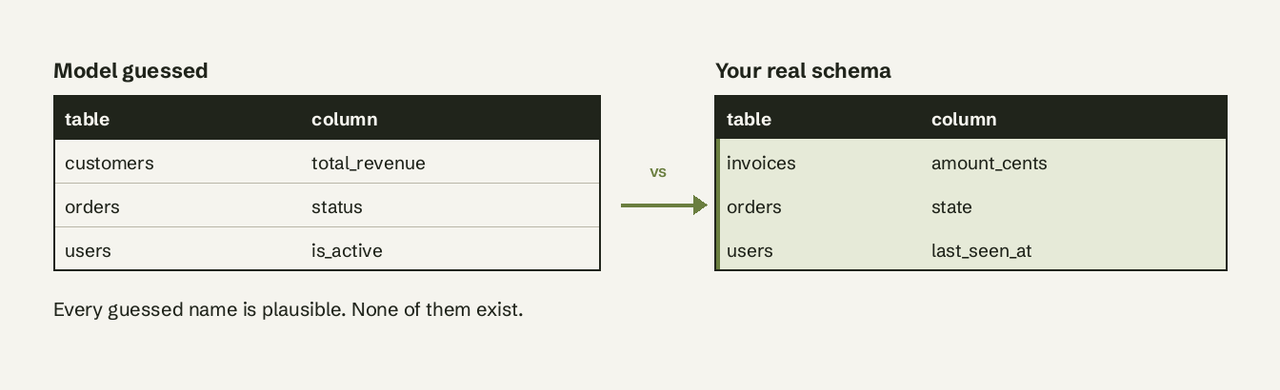
- No schema grounding. A chat assistant that has never seen your DDL falls back on the most common names from tutorials:
users.is_active,orders.total,customers.signup_date. - Training-data priors. Even with the schema in context, the model leans towards textbook names. Your column is
created_at; it writescreated_date. - Vague questions. "Show me active users" has no column called active. The model makes one up or picks one of several candidates without telling you.
- Large, messy schemas. Spider 2.0 databases often exceed 1,000 columns. When
amount,amount_centsandnet_amountappear in five tables, the model can pick the wrong one even though every option is real.
A stronger model narrows this gap but does not close it. The same Spider 2.0 agent that solved 91.2% of Spider 1.0 and 73.0% of BIRD solved 21.3% of real enterprise workflows (Spider 2.0). The difference was not the model; it was schema size, dialects and missing context. For a comparison of models on this task see our guide to the [best LLM for SQL generation](/blog/best-llm-for-sql-generation/), and for the underlying technique see [text-to-SQL](/glossary/text-to-sql/).
How does a hallucinated query look? A worked example with numbers
Take a small SaaS database with two tables. customers(id, plan, created_at) and invoices(id, customer_id, amount_cents, status, issued_at) where status is paid, open or void.
The question: "What was our revenue in October?"
A model without schema context writes:
-- Hallucinated: neither column exists
SELECT SUM(total_revenue)
FROM customers
WHERE signup_date >= '2026-10-01';
That fails loudly. Now give the model the schema but not the business rule. It writes:
-- Runs fine, answers the wrong question
SELECT SUM(amount_cents) / 100.0 AS revenue
FROM invoices
WHERE issued_at >= '2026-10-01'
  AND issued_at <  '2026-11-01';
Say October has 6 invoices: 4 paid for $500 each, 1 open for $1,200 and 1 void for $800. This query returns $4,000. The correct answer, counting only paid invoices, is $2,000. The query doubled revenue and nothing errored.
-- Correct: only paid invoices count as revenue
SELECT SUM(amount_cents) / 100.0 AS revenue
FROM invoices
WHERE status = 'paid'
  AND issued_at >= '2026-10-01'
  AND issued_at <  '2026-11-01';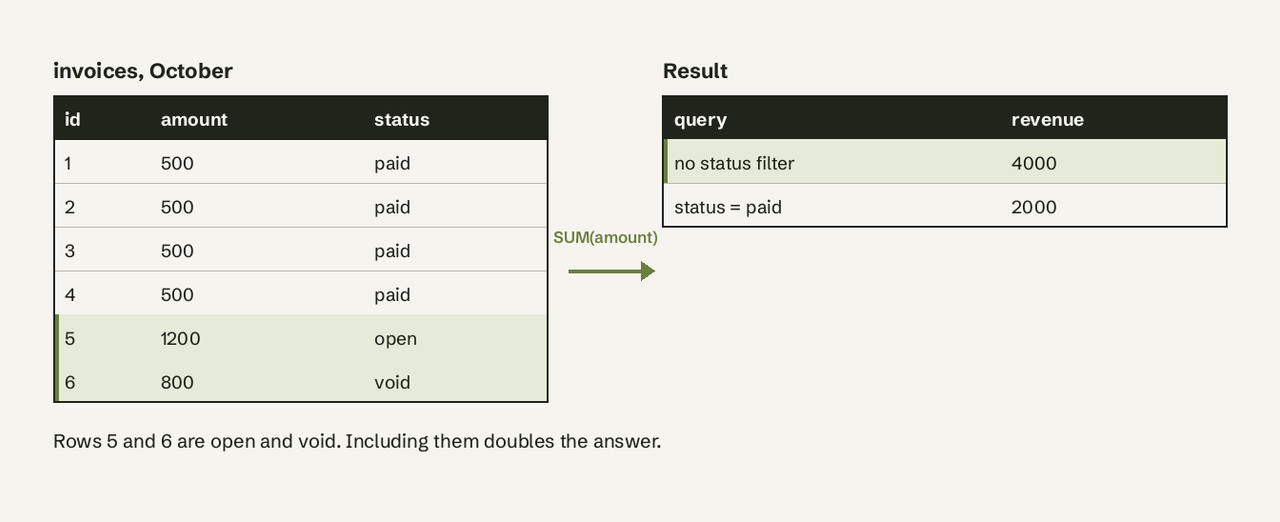
The seven failure modes to watch for
The top guides on this topic agree on roughly the same list. Here it is with the first check for each:
| Failure mode | What goes wrong | First check |
|---|---|---|
| Invented schema | Table or column does not exist | Match identifiers against information_schema.columns |
| Wrong join | Real tables, wrong key, rows duplicated or dropped | Compare COUNT(*) before and after the join |
| Wrong metric definition | "Revenue" includes void invoices | Written metric definitions fed to the model |
| Dialect drift | Postgres syntax sent to BigQuery or SQL Server | EXPLAIN or a dry run on the target engine |
| Wrong filter or time grain | created_at used where paid_at was meant | Read the WHERE clause against the question |
| Bad aggregation | Average of averages, COUNT instead of COUNT(DISTINCT) | Recompute one value by hand |
| Model priors over your data | The answer follows a textbook pattern, not your rules | Ground in schema plus business notes |
Does giving the model the schema stop hallucinations?
Giving the model the schema stops most loud hallucinations, not silent ones. With the real DDL in context, the model rarely invents a column. It can still pick the wrong one of two real columns, join on the wrong key, or leave out a filter, as in the revenue example above.
In Postgres you can pull the schema to feed a model with one query. The information_schema.columns view lists every column the current user is allowed to see (PostgreSQL docs):
SELECT table_name, column_name, data_type, is_nullable
FROM information_schema.columns
WHERE table_schema = 'public'
ORDER BY table_name, ordinal_position;
Two additions close much of the remaining gap:
- Column comments for anything ambiguous:
COMMENT ON COLUMN invoices.amount_cents IS 'Invoice total in cents, divide by 100';A model reads these if your tool passes them in. - Business definitions in plain words: "Revenue = sum of paid invoices. Active customer = at least one paid invoice in the last 30 days." This is the job a semantic layer does at larger companies.
- A few worked examples, known as [few-shot SQL prompting](/glossary/few-shot-sql-prompting/): two or three correct question and query pairs from your own database teach the model your naming and your rules.
How AI for Database handles hallucinated SQL
AI for Database is built for teams without a data team, so it cannot assume someone will review every query. Here is what it does for this exact problem, using only what the product does today:
- It connects to your database first. You connect PostgreSQL, MySQL, SQL Server, Oracle, SQLite, MongoDB, Supabase, BigQuery and more. Queries are generated for that connection's schema, not from a guessed one, which takes out most invented-table errors.
- Every answer shows its SQL. The table or chart comes with the query that produced it, so anyone on the team can see whether the
WHEREclause includesstatus = 'paid'. - Answers are read-only. A wrong query can return a wrong number, but it cannot change or delete data.
- Answers you trust become dashboards and alerts. Once a query is checked, you pin it to a self-refreshing dashboard or an action workflow ("when daily signups drop below 50, send a Slack alert"), so the checked query runs again instead of a new one being generated every time.
What it does not do: it does not know your business definitions unless your schema or your question carries them. Ask "revenue from paid invoices in October", not "revenue in October", until the definition is clear. Pricing (from our pricing page, read 2026-11-20): start free with sample data, 100 free queries on your own databases, then Pro at $10 per user per month.
How do you catch SQL that runs but returns the wrong number?
You catch silent hallucinations by checking the query's logic and its result against something you already trust. Five checks, cheapest first:
- Read the SQL, not just the answer. Check three things: which table, which filter, which time column. Most silent errors live there.
- Sanity-check the size. If last month's revenue was $2,100 and the tool says $4,000, look at the filters before celebrating.
- Count rows around joins. Run
SELECT COUNT(*)on the base table and on the joined result. If an order table of 1,000 rows becomes 1,400 after a join, the join duplicated rows. - Plan it before running it.
EXPLAINshows the execution plan without running the statement;EXPLAIN ANALYZEactually executes it (PostgreSQL docs), so use plainEXPLAINon anything that writes. - Keep a golden set. Querio suggests 50 to 100 known question, query and result cases as a regression test (Querio). For a small team, ten questions whose answers you know (last month's revenue, signups, churned accounts) is a good start.
-- Join check: did the join change the row count?
SELECT
  (SELECT COUNT(*) FROM orders) AS orders_rows,
  (SELECT COUNT(*) FROM orders o JOIN customers c ON c.id = o.customer_id) AS joined_rows;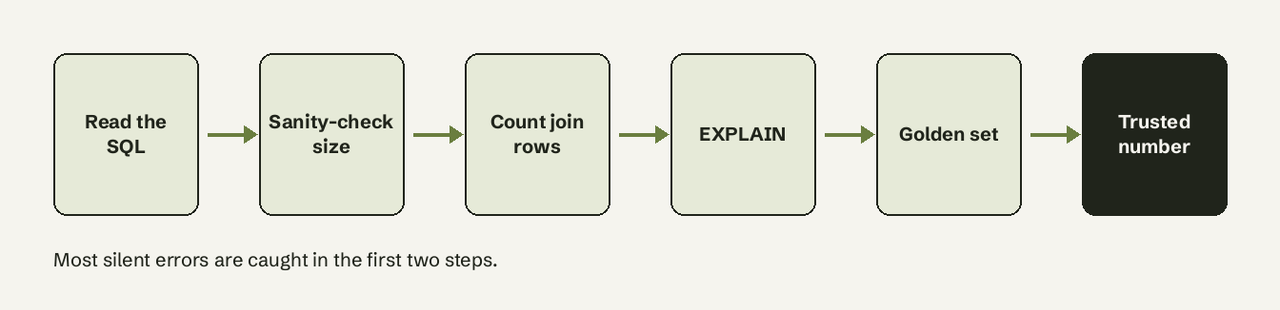
Loud vs silent hallucinations: which matters more?
Silent hallucinations matter more. A loud one costs a retry; a silent one costs a decision.
| Loud hallucination | Silent hallucination | |
|---|---|---|
| Example | column "total_revenue" does not exist | Revenue includes void invoices |
| Database reaction | Error, nothing returned | Runs, returns a number |
| Main cause | No or partial schema | Missing business rule, wrong join or filter |
| Fix | Ground in the real schema | Definitions, visible SQL, result checks |
| Risk | Wasted minute | Wrong number in a report |
How should non-technical teams verify AI-generated queries?
Non-technical teams verify AI-generated queries by checking the result against a number they already know, and by reading the plain parts of the SQL. You do not need to write SQL to read WHERE status = 'paid' or issued_at >= '2026-10-01'. A practical routine:
- Ask with the definition in the question. "Paid invoices", "customers who signed up in October", "orders excluding refunds".
- Ask the same thing two ways. "Revenue in October" and "sum of paid invoice amounts in October" should match. If they don't, one of them is wrong.
- Compare with a known number from Stripe, your CRM or last month's report.
- Review before you share. Ad-hoc questions are fine to explore. Anything that goes into a dashboard, alert or board slide gets a second pair of eyes, a point Basedash also makes in its guide (Basedash).
- Use a read-only connection. In Postgres, a role with only
SELECTgrants, ordefault_transaction_read_only = on, means even a bad query cannot change data (PostgreSQL docs).
Ask your database, and see the SQL
AI for Database connects to your database, answers questions in plain English, shows the SQL behind every answer and turns checked queries into self-refreshing dashboards and alerts. Try AI for Database free at aifordatabase.com. Sample data is included, so you can see how it writes and shows queries before connecting your own database. If you work in Postgres, start with our [PostgreSQL page](/databases/postgresql/).
Frequently Asked Questions
Why does ChatGPT make up column names in SQL?
ChatGPT makes up column names when it has not seen your schema. It predicts the most common name from its training data, such as total_revenue or created_date. Paste your table definitions first, or use a tool that connects to your database and reads the schema for you.
Is AI-generated SQL safe to run on production?
AI-generated SQL is safe to run on production only through a read-only connection. Read-only access means a wrong query can return a wrong number but cannot update or delete rows. Run EXPLAIN without ANALYZE first if you are unsure what a statement does.
How accurate is text-to-SQL today?
Text-to-SQL accuracy depends on the database. On BIRD, ChatGPT scored 40.08% execution accuracy versus 92.96% for humans in the original paper; on Spider 2.0 enterprise workflows an o1-preview agent solved 21.3%. Accuracy on your own small, well-named schema is usually higher, and visible SQL plus checks covers the rest.
What is the difference between a SQL hallucination and a SQL error?
A SQL error is any query that fails or misbehaves. A SQL hallucination is an error caused by the model inventing something: a table, a column, a relationship or a definition. Hallucinations that reference real objects run without errors, which makes them harder to catch.
Can a semantic layer prevent SQL hallucinations?
A semantic layer prevents most metric-definition hallucinations, because "revenue" or "active user" is defined once and the model uses that definition instead of guessing. It does not prevent a wrong filter on a question the layer does not cover, so visible SQL and result checks still matter.