
Database MCP Server: Connect Claude to Your Data (2026)
TL;DR: A database MCP server is a small program that lets Claude list your tables and run SQL against your live database. To connect Claude to your database with MCP, create a read-only database user, pick a maintained server for your engine, and register it in claude_desktop_config.json or with claude mcp add. Keep it read-only: the old Anthropic reference Postgres server was archived in May 2025 with no security guarantees.
How do I connect Claude to my database with MCP? You run a database MCP server locally (or point Claude at a remote one), give it a connection string for a read-only user, and add it to Claude's MCP config. Claude then calls the server's tools (list tables, describe schema, run query) whenever you ask a question about your data, and answers from live rows instead of guessing. The whole setup takes about 10 minutes for PostgreSQL, MySQL, SQLite or SQL Server.
This guide covers how a database MCP server works, the step-by-step setup for Claude Desktop and Claude Code, how to give Claude access to internal databases without handing it your admin password, the errors you will hit, and where MCP falls short for teams.
What Is a Database MCP Server?
A database MCP server is a process that speaks the Model Context Protocol on one side and your database driver on the other. MCP is an open protocol introduced by Anthropic that gives AI assistants one standard way to call external tools and data sources.
There are three parts, as IBM Technology's explainer below lays out:
- Host: the app you talk to (Claude Desktop, Claude Code, an IDE).
- Client: the MCP connection inside the host.
- Server: the program that exposes tools such as
list_tablesorexecute_sqland actually talks to the database.
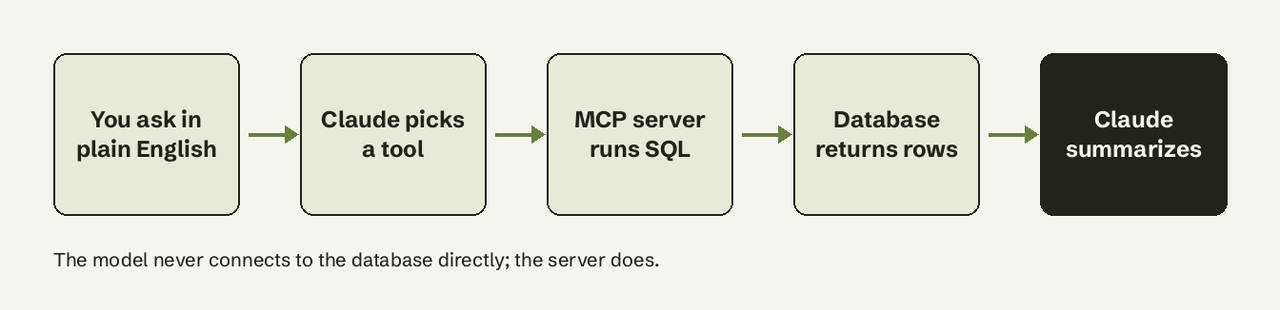
When you ask a question, Claude asks the server what tools exist, decides which to call, writes the SQL, runs it through the server and summarizes the result. The data stays in your database, results are always current, and there's no CSV upload limit.
What You Can Do Once It's Connected
A connected database turns Claude into a capable, if basic, data analyst. Typical uses:
- Ad-hoc questions: "How many users signed up last week, split by plan?" answered from live rows, not stale exports.
- Schema exploration: "What tables reference the orders table?" Useful when you inherit an unfamiliar database.
- Debugging: "Show me the last 20 failed payment records and group them by error code."
- Quick reports: "Summarize revenue by month for 2026 so far."
- Lookups: Anthropic's own Claude Code docs use the example "Find emails of 10 random users who used feature ENG-4521, based on our PostgreSQL database."
How Do I Connect Claude to My Database? (Step by Step)
The package differs per database, but the pattern is the same. Here is PostgreSQL with Claude Desktop and Claude Code.
Step 1: Create a read-only database user
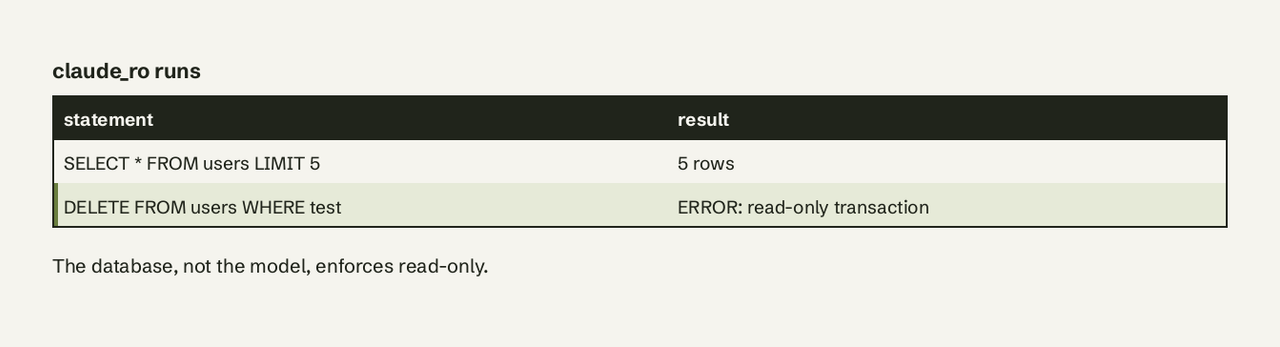
Do this first, not last. If the AI ever writes a destructive query, the database refuses it.
-- PostgreSQL: a login that can only read
CREATE ROLE claude_ro LOGIN PASSWORD 'change-me';
GRANT CONNECT ON DATABASE app TO claude_ro;
GRANT USAGE ON SCHEMA public TO claude_ro;
GRANT SELECT ON ALL TABLES IN SCHEMA public TO claude_ro;
ALTER DEFAULT PRIVILEGES IN SCHEMA public GRANT SELECT ON TABLES TO claude_ro;
-- belt and braces: every transaction starts read-only
ALTER ROLE claude_ro SET default_transaction_read_only = on;
For MySQL the equivalent is CREATE USER 'claude_ro'@'%' IDENTIFIED BY '...'; GRANT SELECT ON app.* TO 'claude_ro'@'%';.
Step 2: Install an MCP server for your database
Pick a server that is still maintained. Many older tutorials point at @modelcontextprotocol/server-postgres, but that reference server now lives in the servers-archived repository, archived on May 29, 2025, with "no security guarantees".
A maintained option for Postgres is Postgres MCP Pro (crystaldba/postgres-mcp), which has a restricted mode that limits it to read-only transactions and caps execution time:
pipx install postgres-mcpMySQL, SQLite, SQL Server and MongoDB have their own community servers; check the repo's last commit date and whether it supports a read-only mode before trusting it.
Step 3: Add the server to your Claude config
Claude Desktop. Open the config file; the paths below come from the official MCP guide to local servers:
- macOS:
~/Library/Application Support/Claude/claude_desktop_config.json - Windows:
%APPDATA%\Claude\claude_desktop_config.json - Linux:
~/.config/Claude/claude_desktop_config.json
{
  "mcpServers": {
    "postgres": {
      "command": "postgres-mcp",
      "args": ["--access-mode=restricted"],
      "env": {
        "DATABASE_URI": "postgresql://claude_ro:change-me@localhost:5432/app"
      }
    }
  }
}
Fully quit and restart Claude Desktop. The database tools appear under the tools icon in a new chat.
Claude Code. One command, no JSON editing. The -- separates Claude's options from the server command:
claude mcp add --env DATABASE_URI=postgresql://claude_ro:change-me@localhost:5432/app \
  postgres -- postgres-mcp --access-mode=restricted
It is saved to local scope by default, per the Claude Code MCP docs. Add --scope project to write it to .mcp.json so teammates get the same server (keep the password out of that file), or --scope user for all your projects. Our [guide to connecting Claude Code to a database](/blog/connect-claude-code-to-database-2026/) goes deeper on that workflow.
Step 4: Test with a scoped question
Start with something you can verify: "How many rows are in the users table?" Check the number against a query you run yourself. Then try "Delete the test rows in users" and confirm it fails with a read-only error. Once both checks pass, move on to real questions.
How Do I Give Claude Access to Internal Databases Securely?
Give Claude access to internal databases the same way you would give it to a new contractor: least privilege, a separate login, and nothing it does can't be undone.
- Always use a read-only user. Never put your admin connection string in an MCP config.
- Scope the schema. If the database holds payroll or PII tables, grant SELECT only on the tables Claude needs, or on views that hide sensitive columns.
- Point it at a replica. For production, connect to a read replica so a heavy AI-written query can't slow the primary.
- Watch the config file.
claude_desktop_config.jsonstores your connection string in plain text. Anyone with access to the laptop has the credentials. - Reach private networks safely. For a database inside a VPC, use an SSH tunnel or bastion rather than opening the port to the internet. If you use Supabase, never give the server the [service role key](/blog/supabase-service-role-key/).
- Never expose a write path through chat. Automations and writes belong in a system with audit logs and permissions.
Common Errors and Fixes
| Symptom | Likely cause | Fix |
|---|---|---|
| Tools never appear in Claude Desktop | Invalid JSON or app not fully restarted | Validate the JSON, quit from the menu bar and reopen |
spawn ... ENOENT in the logs | Command not on Claude's PATH | Use the absolute path to the binary |
password authentication failed | Wrong user or URL-encoded characters in the password | Test the same URI with psql first |
permission denied for table | Grants missing on that table or schema | Add GRANT SELECT or the default privileges line |
cannot execute ... in a read-only transaction | Working as intended | Leave it; that's your guardrail |
Logs live in ~/Library/Logs/Claude on macOS (mcp*.log) and %APPDATA%\Claude\logs on Windows.
Where MCP Falls Short for Teams
MCP is excellent for individual technical users. It gets awkward fast when a whole team needs data access:
- Per-machine setup: every person edits a config and manages credentials on their own laptop. For a CS lead or ops manager, that's a hard stop.
- No persistence: every answer dies in the chat. No saved dashboards, no scheduled reports.
- No shared layer: five people asking the same revenue question get five separately generated SQL queries, with no guarantee they match.
- No automation: MCP answers questions; it can't watch your database and send a Slack alert when trial signups drop.
The No-Code Alternative: AI for Database
If the goal is "my team asks the database questions in plain English," you can skip the config files. AI for Database connects to PostgreSQL, MySQL, SQLite, MongoDB, Supabase, BigQuery and SQL Server from the browser, shows the generated SQL for every answer, and adds what MCP lacks: dashboards that refresh themselves and workflows that send emails, Slack messages or webhooks when your data changes. A developer sets up the read-only connection once; everyone else just asks. Start with sample data and ask your first question in under two minutes.
MCP or No-Code: Which Should You Pick?
Pick a database MCP server if you're a developer who lives in Claude, works solo, and wants ad-hoc query access inside your existing chat workflow. Pick a hosted tool if non-technical teammates need answers, if you want dashboards and alerts and not just one-off chats, or if you don't want credentials spread across laptops. Plenty of teams do both. For the ChatGPT side of the same question, see [how to connect a database to ChatGPT](/blog/connect-database-to-chatgpt/), and for a wider field, our [comparison of AI database query tools](/blog/best-ai-database-query-tools-2026/).
Frequently Asked Questions
How do I connect Claude Code to production databases securely through MCP?
Treat production as off-limits for writes: a replica, a SELECT-only role, and a server flag that refuses anything else. Secrets go in your shell environment, never in a committed file.
Is there an official Anthropic MCP server for PostgreSQL?
There was a reference server, but it was moved to the modelcontextprotocol/servers-archived repository on May 29, 2025 and is no longer maintained. Use an actively maintained community server instead.
Can Claude change or delete data through MCP?
Only if the database user allows it. With SELECT-only grants and read-only transactions, write statements fail at the database, whatever SQL the model writes.
Does my data get sent to Anthropic?
Query results that Claude reads are sent to the model as part of the conversation, the same as anything you paste. Limit what it can see with scoped grants or views over non-sensitive columns.
Does a database MCP server work with MySQL, SQLite and MongoDB?
Yes. Only the package and connection string change. If you're on Railway, see [querying Railway Postgres without SQL](/blog/query-railway-postgres-without-sql-2026/).